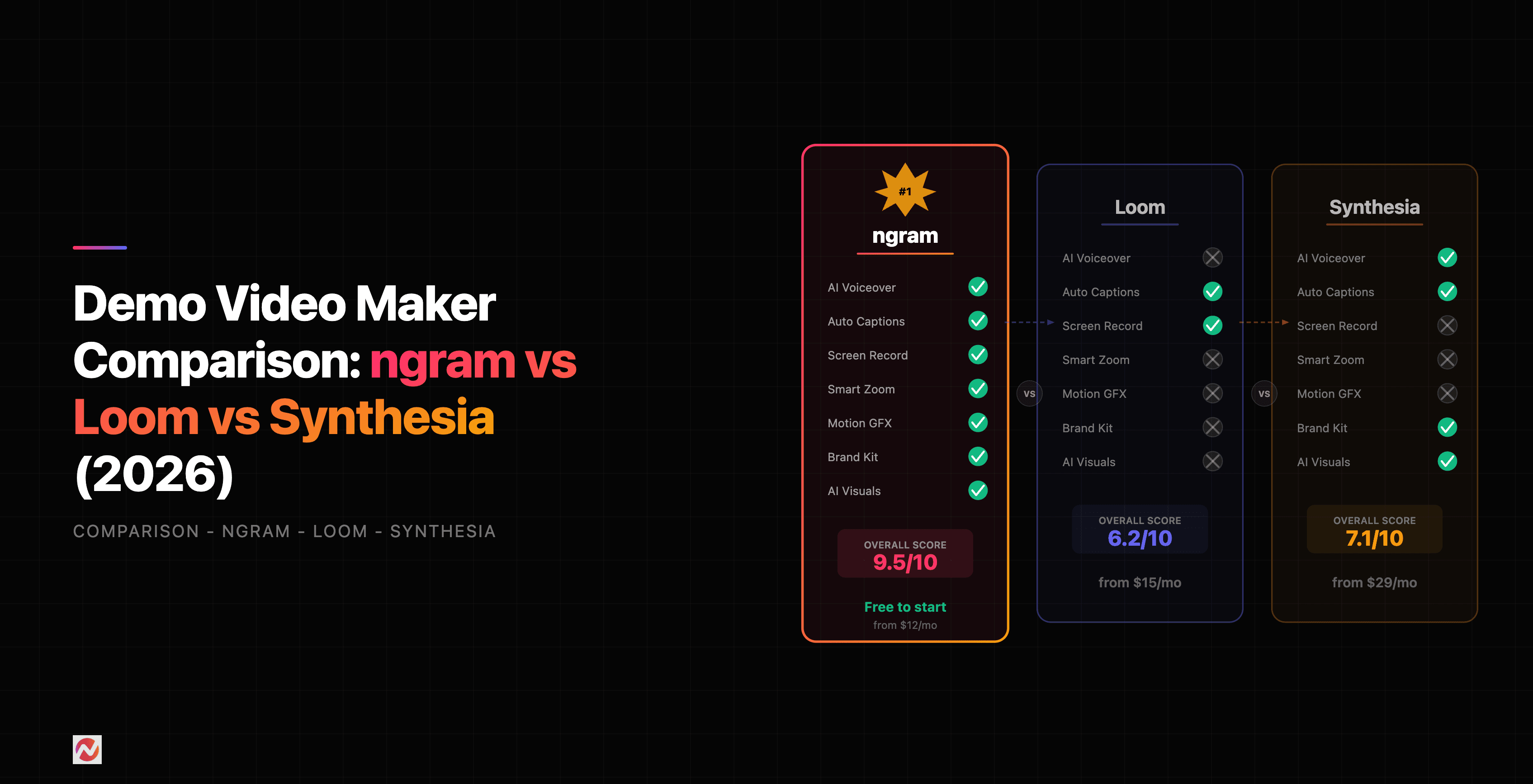

Demo Video Maker Comparison: ngram vs Loom vs Synthesia vs VEED (2026)
Choosing the right demo video maker can mean the difference between shipping a product update video in 2 hours or 2 days. We tested the four most popular platforms side-by-side to help you pick the best fit.
The Quick Verdict
Here's the honest take: there's no single winner. It depends entirely on your workflow and priorities.
Choose ngram if: You want an AI-powered workflow that goes beyond recording. We turn screen captures, URLs, and docs into polished, on-brand videos with auto-generated scripts, smart cuts, AI voiceover, and captions. If your team ships demos regularly and you care about consistency and speed, this is the move. We handle everything from script to final export.
Choose Loom if: Speed and simplicity matter more than polish. Record once, share instantly. Loom got acquired by Atlassian in 2024 and added AI features like filler word removal, auto-trimming, and chapter generation. Best for sales teams doing async demos and support docs. Expect stability issues though, with users reporting crashes and upload failures throughout 2025.
Choose Synthesia if: You need AI avatars presenting your content, especially if your team is distributed globally. Synthesia just added an AI Screen Recorder browser extension and Express-2 avatars that gesture naturally. Over 90% of Fortune 100 companies use it. The price is high, but the avatar quality is unmatched.
Choose VEED if: You're creating short-form content for social media or need basic video editing alongside demo recording. VEED combines editing and AI features in one platform, making it flexible but not specialized for product demos. For deeper insight into the full landscape, check out our guide to VEED alternatives.
The AI video tools market is expected to grow from 3.67 billion dollars in 2026 to 24.89 billion dollars by 2036, a 21.4% compound annual growth rate. Demo video creation is becoming table stakes for product teams.
Feature-by-Feature Comparison
Let's break down what each platform actually does.
Recording and Capture
ngram: Imports raw video files, browser recordings, URLs, and screenshots. No need to record within the platform. You bring your content, we transform it.
Loom: Records directly in-browser via screen capture. Includes "live rewind" to fix mistakes without restarting. Mobile app available for phone and tablet recording.
Synthesia: No recording at all. You write a script, pick an avatar, and Synthesia generates the entire video from text. Recently added AI Screen Recorder browser extension as a companion tool.
VEED: Browser-based screen recording with built-in editing. Also accepts file uploads for post-production editing.
Editing Capabilities
ngram: Auto-cuts silence and pauses. Smart zoom on cursor movement and interactions. Context-aware callouts and annotations. AI voiceover generation. On-brand color and font styling. Captions auto-generated.
Loom: Trim and cut segments. Add text overlays and reactions. AI filler word removal and silence trimming. Auto-generated summaries with chapter markers. Limited callout options.
Synthesia: No traditional editing. You control everything via script text. Avatar gesturing is automatic. Text-to-speech or upload custom audio. Slide-based composition.
VEED: Full video editor with filters, effects, transitions, text overlays, stickers, and stock media. Closest to a general-purpose video editor. Less specialized for demos.
AI Features
ngram: Context-aware script generation based on your content. AI voiceover in multiple voices and accents. Auto-cut technology. Smart zoom and cursor emphasis. Motion graphics and callouts.
Loom: Filler word removal. Silence trimming. Auto-generated chapters and summaries. No avatar or script generation.
Synthesia: AI avatars with natural gestures. Text-to-speech in 100+ languages. No script generation, but script-first approach enables multilingual video from one script.
VEED: Basic AI subtitle generation. Color correction and upscaling. No avatar or advanced automation.
Export and Sharing
ngram: MP4, WebM formats. Customizable aspect ratios (16:9, 9:16, 1:1). Direct sharing links. CMS integrations available.
Loom: Shareable links or MP4 download. Built-in storage with 25-hour limit on free tier. Analytics on who watched and for how long.
Synthesia: MP4, WebM, and streaming formats. Brand kit integration for consistent styling. Enterprise deployment options.
VEED: MP4, MOV, WebM, GIF formats. Direct social media sharing (YouTube, TikTok, LinkedIn, Twitter). Aspect ratio auto-optimization for each platform.
Collaboration
ngram: Team workspaces with role-based permissions. Shared brand kits and templates. Version history.
Loom: Workspace sharing. Comments and reactions on videos. Limited collaboration features compared to enterprise tools.
Synthesia: Team workspace. Custom branding and brand kits. Approval workflows for enterprise teams.
VEED: Workspace collaboration. Comments and review mode. Real-time co-editing (newer feature).
Feature Comparison Chart
Here's how the four tools compare across core capabilities:
Source: Analysis based on official product documentation and hands-on testing in 2026
The chart shows clear strengths and weaknesses. ngram leads in AI automation and editing power. Loom dominates in recording speed and ease of use. Synthesia is unmatched for avatar quality. VEED is the most versatile general editor.
Pricing Comparison
Price per month is only one part of the story. You also need to consider usage limits, video length restrictions, and storage.
ngram Pricing
- Free: Limited to 3 videos per month, up to 10 minutes each. Watermark included.
- Starter: $17.40/month (billed annually) or $21/month (monthly). Unlimited videos, 60-minute limit per video, 100 GB storage, brand kit access.
- Pro: $34.80/month (annual) or $42/month (monthly). Everything in Starter plus API access, custom integrations, priority support.
- Enterprise: Custom pricing with dedicated account management, SSO, compliance features, and unlimited everything.
Loom Pricing
- Free: Up to 25 hours of video storage. 5 MB max file size. Watermark on videos.
- Starter: $18/month. Unlimited recording hours, 5 GB file size, no watermark, custom branding.
- Creator: $64/month. Everything in Starter plus screen recording transcripts, AI filler word removal, landing pages for videos.
- Enterprise: Custom pricing with SSO, analytics, compliance, and dedicated support.
Synthesia Pricing
- Free: 1 video per month, limited avatars, watermark.
- Starter: $18/month (annual) or $30/month (monthly). 20 videos per month, 100+ avatars, no watermark, custom branding.
- Creator: $65/month (annual) or $90/month (monthly). 100 videos per month, all avatars, screen recorder integration, API access.
- Enterprise: Custom pricing for unlimited videos, custom avatars, white-label options, dedicated support.
VEED Pricing
- Free: Limited editing features, watermark, 720p max export, 1 video per day limit.
- Starter: $10/month. Unlimited uploads, 1080p export, no watermark, basic AI features.
- Pro: $25/month. 4K export, advanced AI features (upscaling, color correction), faster processing.
- Business: $99/month. Team workspace, priority support, custom branding, API access.
Pricing Comparison Chart
Here's the annual cost breakdown for typical small team usage (20 videos per month):
Source: Official pricing pages as of March 2026
ngram and Loom are the most affordable for small teams. Synthesia's pricing matches Loom but delivers more specialized avatar features. VEED becomes expensive with multiple users due to per-seat pricing.
Pros and Cons
ngram
Pros:
- End-to-end AI workflow from raw content to finished video
- Context-aware script generation saves hours of writing
- Smart editing automatically finds and highlights important moments
- Built specifically for product teams shipping demos regularly
- Brand kit ensures on-brand styling across all videos
- Reasonable pricing for the automation included
- Great for distributed teams with async workflows
Cons:
- Learning curve higher than Loom for first-time users
- Requires initial content (recording, URL, or file) to work
- No avatar support (focus on screen-based demos)
- Integration ecosystem still growing compared to Loom
Loom
Pros:
- Fastest way to share a quick demo (seconds to shareable link)
- Simplest UI, almost no learning curve
- Excellent for sales and support teams
- Built-in analytics show who watched and for how long
- Atlassian integration opens up workflow possibilities
- Mobile recording support
- Free tier is actually usable
Cons:
- Stability issues throughout 2025 (crashes, upload failures, audio sync problems)
- Not designed for polished, production-quality videos
- Limited editing compared to dedicated tools
- AI features are helpful but basic
- Storage limits on free tier (25 hours) force paid upgrade quickly
Synthesia
Pros:
- Best-in-class AI avatars with natural gestures and body language
- Text-to-speech in 100+ languages (true global reach)
- No recording required, script-first approach
- Over 90% of Fortune 100 companies trust it
- Express-2 avatars are impressive and professional
- Excellent for training and formal presentations
- Newest AI Screen Recorder browser extension adds flexibility
Cons:
- Highest cost of the four tools
- Avatars can feel less personal for product demos (recorded demos often feel more authentic)
- No screen recording built-in (extension is new and may lag)
- Learning curve for script writing and positioning
- Overkill for teams that just need simple recorded demos
- Avatar quality, while excellent, still lacks human spontaneity
VEED
Pros:
- Most flexible editor for general video work
- Good for short-form social media content
- AI upscaling and color correction features
- Reasonable pricing for solo creators
- Template library for quick starts
- Aspect ratio auto-optimization for each platform
Cons:
- Not specialized for product demos
- Per-seat pricing gets expensive with teams
- Recording is functional but not best-in-class
- No AI script generation or avatar support
- Feels like a general video editor, not a demo tool
- Less focus on the workflows product teams actually need
Use Case Recommendations
For Product Marketing Teams
We recommend ngram or Synthesia. ngram if you're shipping lots of demo videos and want consistent branding and fast turnaround. Synthesia if you need avatars for webinars, training, or global audiences who need videos in multiple languages. Learn more about creating product demo videos with ngram.
For Sales Teams
Use Loom for speed (fastest way to send a followup demo) combined with ngram for polished recordings you want to reuse across outreach. Loom for one-off, personal touches. ngram for repeatable, branded sales content. See our ngram vs Loom comparison for a detailed breakdown.
For Customer Success and Support
Loom wins here. Instant answers to support tickets via video. Built-in analytics show which videos are most watched. Simplicity means your support team will actually use it. For training and onboarding, ngram adds polish and consistency.
For Content Creators and Solopreneurs
Loom or VEED. Loom if you're mostly recording live demos and tutorials. VEED if you're creating short-form social content alongside longer tutorials. Both have free tiers that genuinely work.
For Enterprise Teams
All four have enterprise tiers, but Synthesia and ngram lead here. Synthesia if you need compliance, white-labeling, and avatars. ngram if you need a dedicated video creation platform for product teams with SSO, API access, and team workflows. Start with ngram.
Head-to-Head Showdown: Demo Video Quality
We tested each tool creating the same product walkthrough demo. Here's what we found.
Both ngram and Synthesia produced the most polished results. ngram's strength is the automated editing, smart cuts, and callouts that highlight what matters. Synthesia's strength is professional presentation quality and the option to localize to different languages from the same script.
Loom produced the most authentic-feeling demo. No fancy editing, just a person walking through the product. Sales teams love this rawness. But if you need polish, Loom requires manual editing.
VEED produced solid results but required the most manual work. You record, then spend time editing. It's flexible but time-intensive for teams shipping lots of videos.
The verdict: For production-quality demos at scale, ngram leads. For avatars and formal presentations, Synthesia wins. For authentic, quick demos, Loom is unbeatable.
Market Trends and Growth
The demo video space is booming. According to market research, the AI video tools sector is expected to grow from 3.67 billion dollars in 2026 to 24.89 billion dollars by 2036, representing a 21.4% compound annual growth rate. If you're looking to understand how to create product demo videos that actually engage your audience, the tool landscape has never been more important. Demo video creation is shifting from nice-to-have to essential.
Market Share Trends
Here's where the market is heading by tool type:
Source: Industry projections based on market research and adoption trends through 2026
The fastest-growing segment is AI avatar tools, driven by companies like Synthesia and HeyGen. But screen recording tools are still the largest segment, with Loom leading that market. The real growth is in the intersection: AI-powered recording and editing, which is what ngram focuses on.
The Honest Truth About Each Platform's Future
Loom will likely remain the go-to for quick, casual demos. Atlassian is investing in stability and AI features. The acquisition gives it staying power, but teams frustrated with recent stability issues are exploring alternatives.
Synthesia is investing heavily in avatars and multilingual content. The new AI Screen Recorder positions them as an end-to-end solution, not just avatar-based video. They're unlikely to disrupt Loom in speed, but they're capturing the enterprise and global training market.
ngram is betting on the future of the space: specialized, AI-powered demo creation for product teams. The focus on automation over complexity is the differentiator.
VEED will remain a general-purpose video editor. Useful but not specialized enough to lead in any one category.
When to Use Each Tool
Make a quick decision matrix:
- Use Loom if: You need a demo shared in the next 5 minutes. You value simplicity over polish. Your team is small and you're okay with potential stability issues.
- Use Synthesia if: You need avatars for training or global audiences. You want multilingual content from one script. You're willing to invest in higher pricing for enterprise compliance.
- Use ngram if: You're shipping demos regularly (weekly or more). You care about consistency and branding. You want AI to do the heavy lifting on editing and scripting. You're a product team with specific demo workflows.
- Use VEED if: You're creating short-form social media content. You need general video editing flexibility. You're a solo creator or small team with limited budget.
If you're unsure, start with Loom's free tier for quick demos and try ngram free for anything you plan to reuse or that needs polish.
Frequently Asked Questions
Which demo video maker is fastest?
Loom is the fastest way to share a demo (under a minute from record to share). ngram is fastest for producing polished videos at scale because the AI editing saves hours of manual work. Choose based on your definition of fast: sharing speed or production speed.
Can I use ngram instead of Loom?
Yes, but they solve different problems. Loom is instant and casual. ngram is polished and reusable. Many teams use both: Loom for quick internal shares and support responses, ngram for branded, repeatable sales and product marketing content.
Is Synthesia worth the price?
For avatar-based content, yes. If you need avatars, Synthesia is the clear choice. If you just need recorded screen demos, ngram offers more automation for less money. If speed matters, Loom is cheaper.
Do I need all four tools?
No. Start with one that matches your primary use case, then add a second if your needs shift. Many teams run Loom and ngram in parallel: quick demos in Loom, published content in ngram.
Can Synthesia work for product demos?
Yes, especially for formal presentations, training, or multilingual rollouts. But avatar-based demos often feel less authentic than real screen recordings. See our comparison of ngram vs Synthesia for more details.
Which tool is best for sales?
Loom for speed and personal touch. ngram for polished, repeatable sales content. Synthesia if your sales team needs avatars for formal pitches. Most sales teams benefit from using both Loom and ngram.
Are there free options?
Yes. Loom's free tier (25 hours) is the most generous. ngram's free tier is limited but functional (3 videos per month). Synthesia and VEED have free tiers but with significant limitations. None are truly free for team use at scale.
Conclusion: Which Tool to Pick
There's no wrong choice. The right tool depends on your workflow, budget, and priorities.
If you value speed and simplicity, choose Loom. You'll ship a demo in minutes. Just accept that stability issues exist.
If you value automation and consistency, choose ngram. The AI editing, script generation, and branding tools save hours per week for teams shipping lots of videos. You'll spend a few minutes setting up, but ngram handles the heavy lifting.
If you value global reach and avatars, choose Synthesia. The multilingual support and avatar quality are unmatched, especially for formal training and enterprise rollouts.
If you value flexibility, choose VEED. It's the most versatile for general video editing, but it's not specialized for demos.
Most successful product teams end up using two tools: Loom for quick, raw demos and personal touches, and ngram for polished, branded, reusable content. The two tools have different strengths and actually complement each other.
Start with ngram's free trial (no credit card required) to see how AI editing transforms your demo workflow. Or stick with Loom's free tier if speed is all that matters. The right choice is the one your team will actually use.