
Quick comparison
| Tool | Best For | Starting Price | Key Differentiator |
|---|---|---|---|
| ngram | Professional video from any asset | Free / $17.40/mo | AI-powered, context-aware generation with no export caps |
| Guidde | High-volume team documentation | Free / $18/creator/mo | Unlimited video creation, 200+ AI voices |
| Scribe | Automated step-by-step guides | Free / $17/seat/mo | Auto-captures browser workflows into written guides |
| Tango | In-app workflow walkthroughs | Free / $22/user/mo | Real-time in-app guidance overlays |
| Descript | Transcript-based video editing | Free / $24/mo | Edit video by editing text |
| Loom | Quick async screen recordings | Free / $15/mo | Fastest record-to-share workflow |
| Camtasia | Desktop tutorial editing | $179.88/yr | Deep desktop editing control |
If you're evaluating Clueso alternatives because your team keeps bumping into export caps, you're not alone. We tested 7 tools across features, AI capabilities, pricing, and real user sentiment from G2, Product Hunt, and Reddit. Here's what held up.
Clueso does one thing genuinely well: it turns raw screen recordings into polished product videos with AI voiceovers, auto-zoom, and captions. Backed by Y Combinator with $1.9M in funding and used by 1,000+ companies, it's a real product solving a real problem.
But the AI video generator market hit $717 million in 2025 and is growing at 18.8% CAGR, per Fortune Business Insights. Competition has exploded, and Clueso's pricing model hasn't kept pace with what teams now expect from their video documentation tools.
1. ngram
If Clueso's export limits have you rationing which videos actually get made, ngram removes that friction entirely.
Where Clueso starts with a screen recording and polishes it, ngram starts with whatever you have - a screen recording, a document, screenshots, a URL, or even just a text prompt - and builds a complete, professional video from it. Tell ngram who the audience is, what the video needs to accomplish, and where it's going. It handles the script, storyboard, visuals, pacing, captions, and brand styling.
What makes ngram stand out
No export caps or per-minute billing. This is the simplest differentiator and the one that matters most if you're coming from Clueso. ngram doesn't meter your output - you create what you need, when you need it.
Context-aware generation adapts everything automatically. Tell ngram your audience (developers vs. executives), your goal (educate vs. convert), and your channel (LinkedIn vs. help center). A customer onboarding video gets a different structure than a sales demo, without you rebuilding the project from scratch.
Plan first, generate second. You review the script and storyboard before anything renders. With Clueso, you record first and edit after. With ngram, you fix direction at the cheapest possible moment - before any video exists.
AI-powered screen recording editing turns rough captures into polished walkthroughs with automatic filler word removal, smart zoom on interactions, cursor emphasis, and callout labels driven by your prompts. This matches Clueso's core capability but wraps it in a broader creation workflow.
Key features
- Context-aware generation - Adapts structure, pacing, and tone to your audience and channel
- Plan first, generate second - Script and storyboard review before rendering
- Any asset in - Text, images, docs, URLs, screen recordings as input
- AI editing - Auto-cut, filler removal, smart zoom, cursor emphasis
- Multi-format export - 16:9, 9:16, 1:1 with captions included
- Brand kits - Logo, colors, fonts applied to every video automatically
Pros
- ✅ No export caps or per-minute metering
- ✅ Works with any input (not just screen recordings)
- ✅ Script + storyboard review before rendering saves revision time
- ✅ Brand kits keep every video on-brand without manual styling
Cons
- ❌ Web-based only - no native desktop app yet
- ❌ Newer platform, smaller community than established tools
Who is ngram best for?
Product Marketing, Growth, Sales Enablement, Customer Success, and Agencies who need professional videos regularly without production timelines. If your videos go to customers, prospects, or public audiences - and you've been frustrated by Clueso's output limits - ngram is the pick.
ngram has a generous free plan with paid plans starting at $17.40 per month. For a detailed head-to-head, see our ngram vs Clueso comparison.
Ready to try ngram? Create your first video in under 5 minutes. Start free
See ngram in action:
2. Guidde
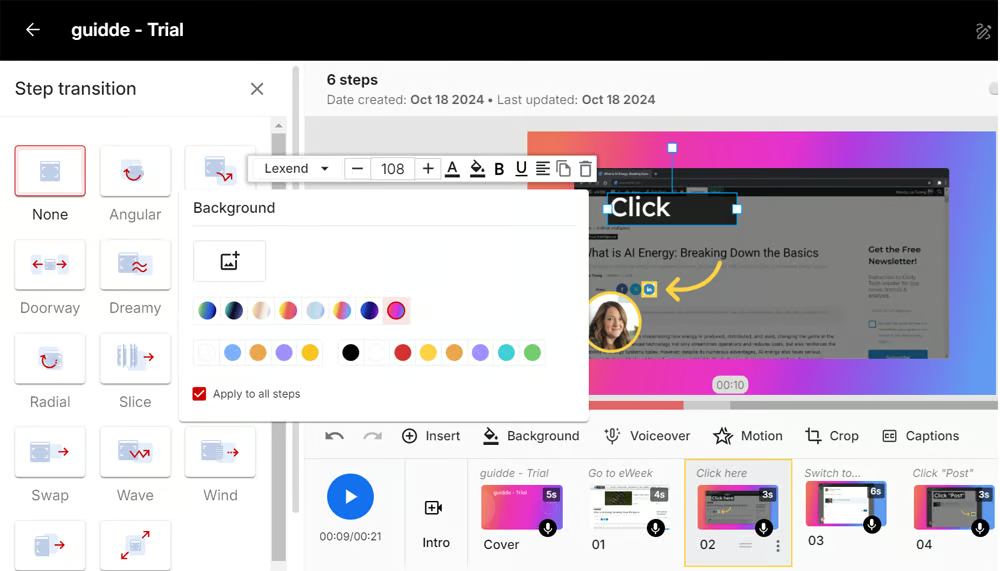
Guidde is the closest direct competitor to Clueso in approach - both transform screen recordings into video documentation with AI voiceovers. The difference is the business model.
Where Clueso caps your output at 6-12 hours annually, Guidde offers unlimited video creation on every paid plan. The Pro plan runs $18/creator/month (annually) and includes 200+ AI voices across 100+ languages, Brand Kit customization, and full export options.
Guidde claims teams create documentation "11x faster" than traditional methods. In practice, you record your workflow through the Chrome extension, and Guidde's Magic Capture auto-generates a structured guide with steps, annotations, and an AI-generated script.
Key features
- Unlimited video creation - No export caps on any paid plan
- 200+ AI voices - Multilingual voiceovers across 100+ languages
- Magic Capture - Auto-generates structured guides from recordings
- Deep integrations - Zendesk, Salesforce, Slack, Confluence, ServiceNow
- Brand Kit - Custom logos, fonts, colors on all content
Pros
- ✅ Unlimited creation removes the output bottleneck that frustrates Clueso users
- ✅ Deep business tool integrations (Zendesk, Salesforce, Confluence)
- ✅ Affordable per-creator pricing ($18/mo annual)
Cons
- ❌ Less manual editing control than Clueso's editor
- ❌ Desktop recording requires Business plan ($39/creator/mo)
- ❌ Some AI voiceovers still sound robotic per G2 reviewers
What users say
G2 reviewers praise Guidde's speed and ease of use for high-volume documentation. Teams producing lots of how-to content appreciate the unlimited model. The main criticism is limited fine-tuning options - if you want frame-by-frame control, Guidde isn't built for that.
Best for
Documentation teams producing high volumes of customer education content who need deep help desk integrations. If Clueso's export caps are your main frustration, Guidde is the most direct swap.
3. Scribe
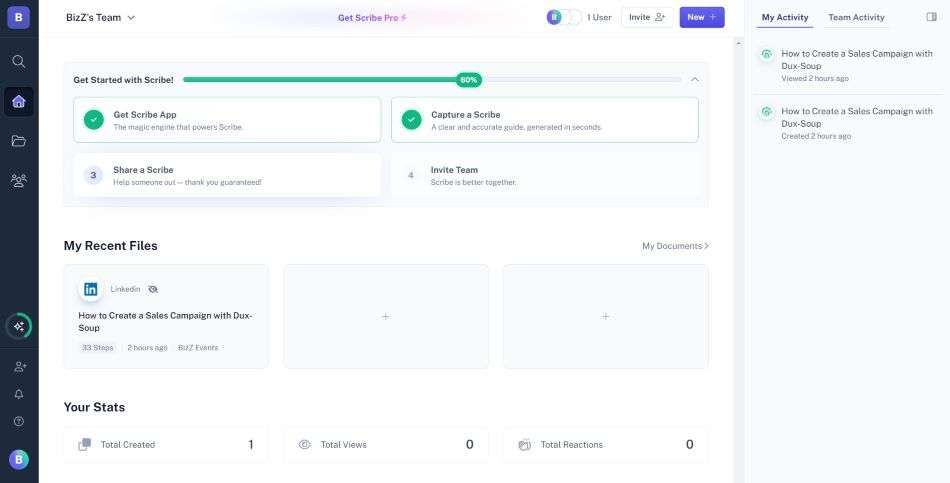
Scribe takes a fundamentally different approach from Clueso. Instead of producing video, Scribe auto-generates written step-by-step guides from your browser actions. Install the Chrome extension, click record, complete your workflow, and Scribe produces a guide with annotated screenshots, arrows, text boxes, and click indicators.
Over 3 million people use Scribe, and it's particularly popular for internal process documentation where video may be overkill.
Key features
- Auto-capture - Records browser clicks and generates step-by-step guides
- Guide Me - Interactive in-browser walkthroughs
- AI workflow analysis - Identifies process improvements
- Instant translation - Guides in multiple languages
- Sidekick - Discover guides for any website contextually
Pros
- ✅ Zero editing required - guides generate automatically
- ✅ Perfect for internal SOPs where video is unnecessary
- ✅ 3M+ users, battle-tested for process documentation
Cons
- ❌ No video output - text and screenshots only
- ❌ Team plan requires minimum 5 users ($75/mo minimum)
- ❌ Enterprise pricing can surprise (users on Reddit report annual quotes around $18,000)
What users say
Users consistently praise Scribe's speed for internal documentation. The main complaints center on AI-generated descriptions that lack context without manual editing, and the high minimum seat count for team pricing.
Best for
Teams that need process documentation, SOPs, and internal guides where video isn't required. Not a fit if your primary use case is customer-facing polished video.
Looking for professional video without export limits? ngram turns your screen recordings, docs, and images into polished videos in minutes. Try ngram free
4. Tango
Tango captures step-by-step guides automatically as you work - but exclusively through screenshots, not video. The standout feature is Nuggets: in-app guided walkthroughs that overlay directly onto web applications, coaching users through processes in the live interface.
Founded in 2021, Tango's in-app guidance capability separates it from pure documentation tools like Clueso and Scribe.
Key features
- Auto-capture - Screenshots taken at each click during browser workflows
- Nuggets - In-app guided walkthroughs overlaid on live web apps
- Smart annotations - Auto-generated callouts and highlights
- Export flexibility - PDF, HTML, Markdown, and embed options
- Team management - Shared libraries with permissions
What users say
G2 reviewers highlight Tango's strength for software rollouts and change management. The in-app guidance is "genuinely powerful" for training at scale. The limitation users flag most: zero video capability. If you need voiceovers, motion, or multimedia output, Tango can't deliver.
Best for
IT and operations teams rolling out software changes who need in-app guidance overlays. Not ideal if you need video documentation.
Pricing starts at $22/user/month (annual), with key features like in-app walkthroughs and PII blurring gated behind Enterprise.
5. Descript
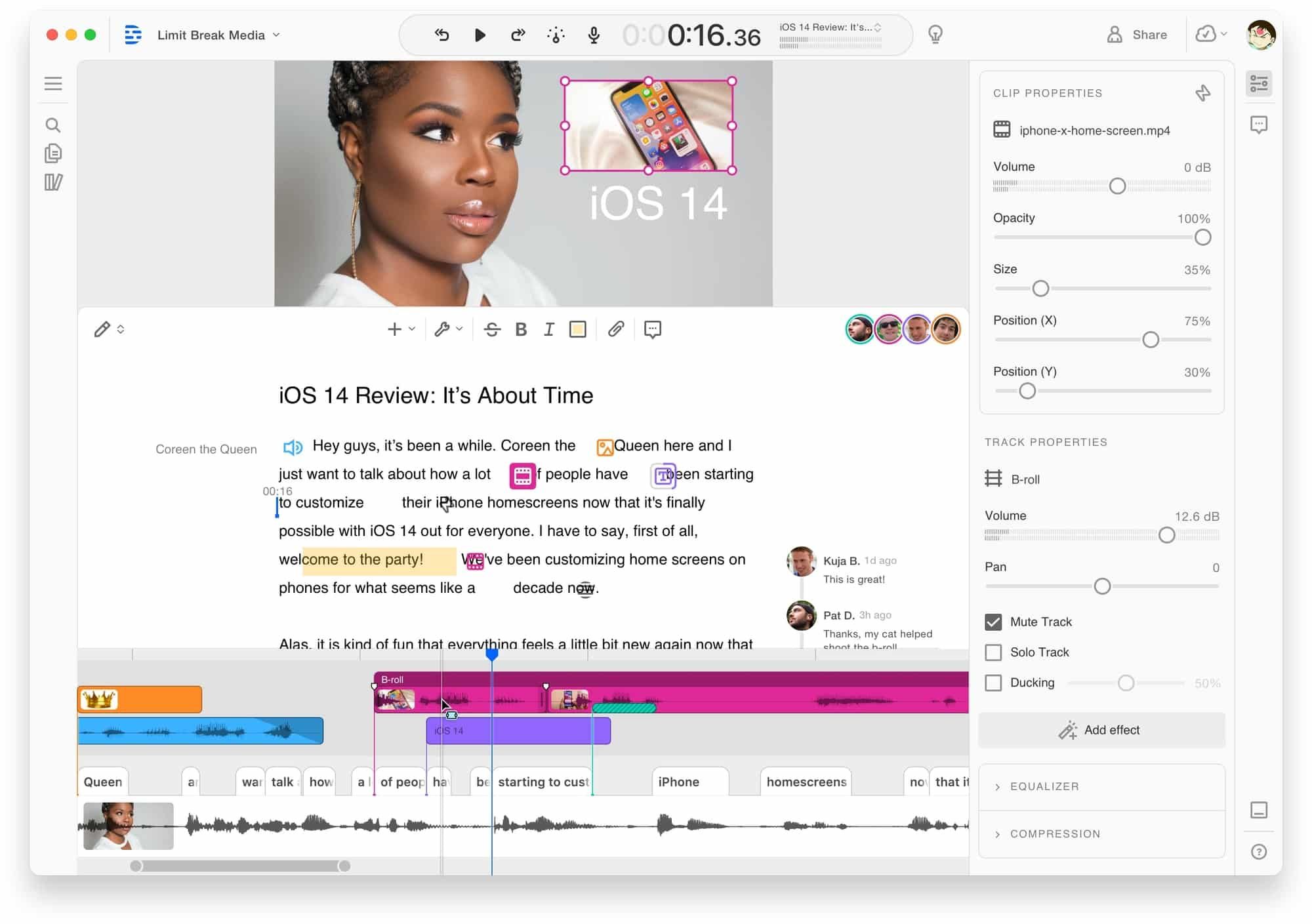
Descript is a full video and audio editor built around a core insight: editing video should feel like editing a text document. Record a screen capture, and Descript transcribes it. Delete a word from the transcript, and the corresponding video cuts automatically.
Founded in 2017 and backed by over $100M in funding, Descript has built a large user base among content creators and podcasters.
Key features
- Text-based editing - Edit video by editing the transcript
- AI voice cloning - Fix mistakes without re-recording
- Filler word removal - Automatic um/ah detection and removal
- Screen recording - Built-in recorder with webcam overlay
- AI features - Green screen, eye contact correction, studio sound
What users say
Reddit users call the transcript-based editing "mind-blowing for long-form content." G2 reviewers note the editing power is unmatched for podcast and video production. Complaints center on rendering speed and occasional audio-video sync issues. The learning curve for advanced features is steeper than Clueso's focused workflow. For a detailed comparison, see our ngram vs Descript comparison.
Best for
Content creators and teams who work with long-form video and want deep transcript-level control. Less ideal for quick documentation-style videos where Clueso's automation shines.
Pricing starts at $24/month with a limited free tier.
6. Loom
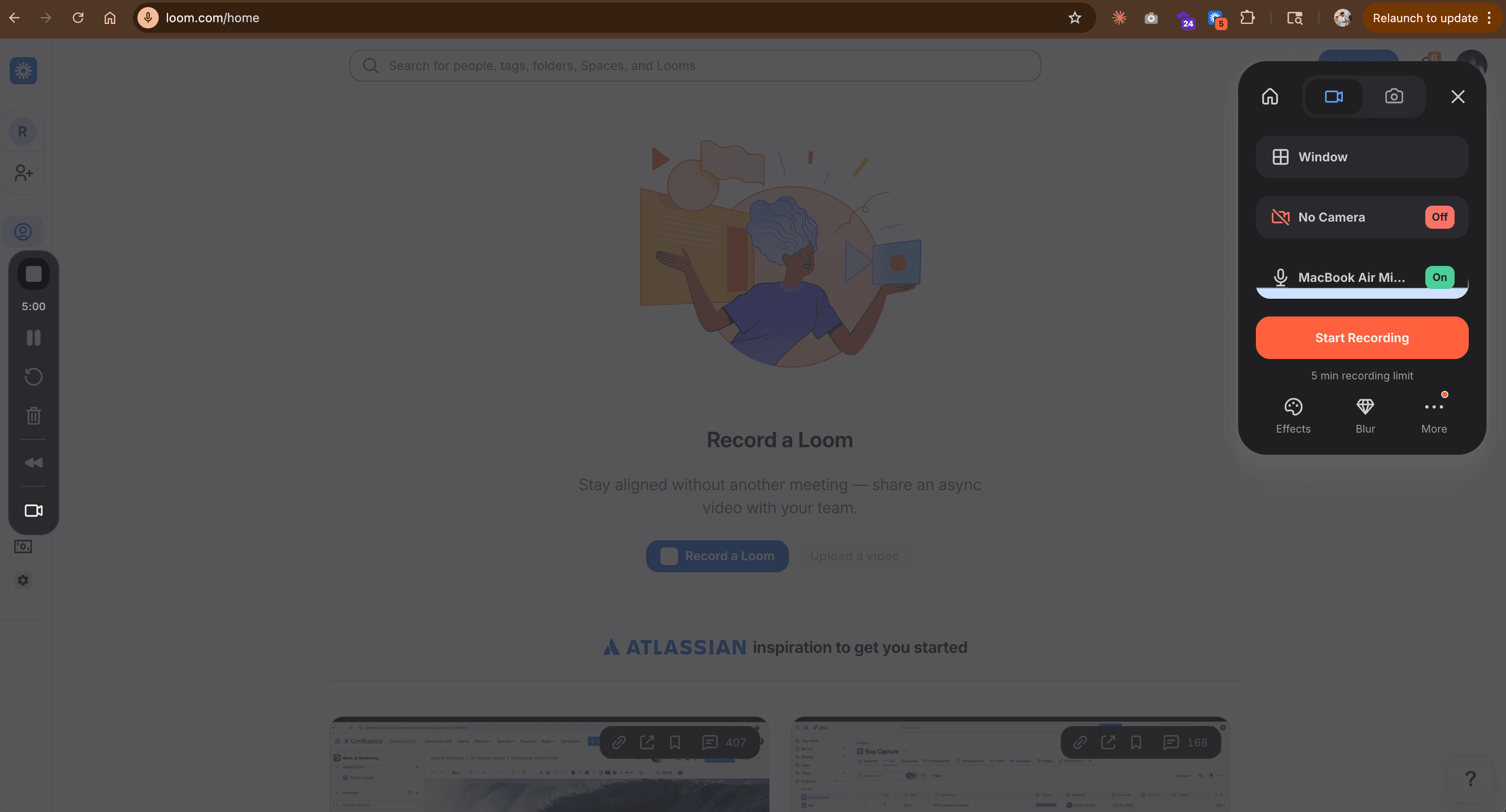
Loom is the default tool for quick async screen recordings - over 25 million users have adopted it for team communication. If your Clueso use case is recording a quick walkthrough and sharing it immediately, Loom does that faster than anything else on this list.
But that's also where Loom stops. There's minimal editing, no AI-powered polish, no auto-zoom, no brand kits, and no documentation generation.
Key features
- Instant recording - Click, record, share in under a minute
- AI summaries - Auto-generated video summaries and chapters
- Viewer analytics - Who watched, how long, engagement data
- Integrations - Slack, Notion, Gmail, Chrome extension
- Free tier - Generous free plan with 25 videos
What users say
Users love the speed. The universal complaint across Reddit and G2: "Great for internal updates, but I'd never send a Loom to a prospect." If you need professional output with brand consistency, Loom's raw recording aesthetic won't cut it. For a detailed comparison, check our ngram vs Loom comparison.
Best for
Teams that prioritize recording speed over production quality. Ideal for internal async communication, not for customer-facing documentation.
Free plan available. Paid plans start at $15/month.
7. Camtasia
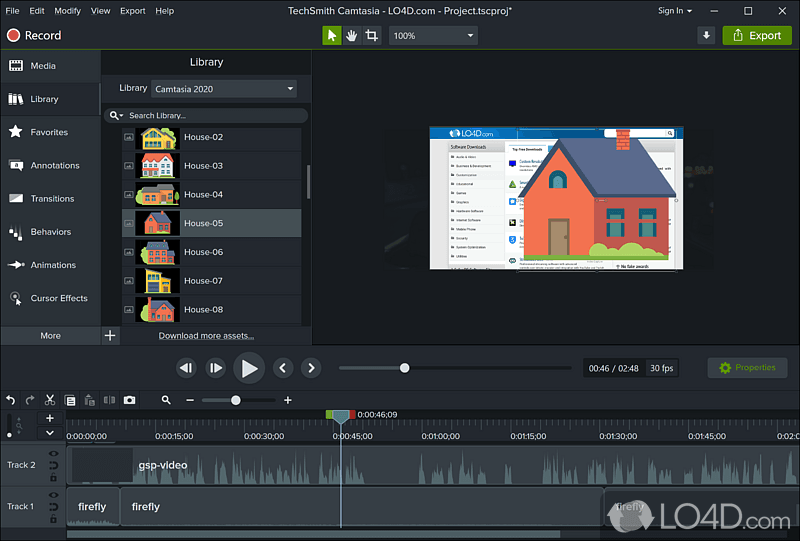
Camtasia is the desktop powerhouse for tutorial creation - TechSmith has been building it since 2002. If Clueso's web-based editing feels limiting and you want frame-by-frame control over every transition, zoom, cursor effect, and audio track, Camtasia gives you the deepest editing toolkit on this list.
The tradeoff: Camtasia is a desktop application with a real learning curve. There's no AI-powered automation, no one-click voiceover generation, and no team collaboration features.
Key features
- Full timeline editor - Keyframes, tracks, transitions, annotations
- Screen recording - Built-in high-quality capture
- Template library - Pre-built themes for tutorials
- Cursor effects - Custom highlighting and smoothing
- PowerPoint integration - Import presentations directly
What users say
Long-time users praise the editing depth and reliability. Newer users report a steep learning curve, especially coming from AI-automated tools like Clueso. The annual pricing ($179.88/yr for Essentials) is straightforward compared to Clueso's per-seat model. See our ngram vs Camtasia comparison for a detailed breakdown.
Best for
Individual creators and training teams who need full editing control and are willing to invest time learning a desktop tool.
Where Clueso falls short in 2026
Clueso is real technology backed by a strong team. But five friction points consistently push teams to evaluate alternatives:
Pricing starts at $120/month for just 2 users. That's 650% higher than comparable tools. The Growth plan ($200/month) adds 2 more seats, but per-user costs remain steep for scaling teams.
Export caps create artificial scarcity. The Starter plan limits video exports to 6 hours per year. That works out to roughly $240 per finished hour of video - more expensive per hour than many freelance editors charge. Unused exports don't roll over.
Limited integrations narrow the workflow. Clueso relies on link sharing, YouTube publishing, and embeds. Teams using Zendesk, Confluence, Salesforce, or Slack for documentation distribution need workarounds that tools like Guidde handle natively.
Editing friction adds up. G2 reviewers praise the AI output quality but note that the editing interface can be cumbersome, rendering is occasionally slow, and video playback sometimes glitches.
The free trial is too short to evaluate properly. Seven days with 10 minutes of video exports is enough to see the AI quality but not enough to test it on a real documentation workflow.
To be clear, Clueso's AI editing - auto-zoom, transitions, voiceovers in 37+ languages - is genuinely impressive. SOC 2 Type II and ISO 27001 certifications make it enterprise-ready from a security standpoint. The question isn't quality; it's whether the pricing model fits your team's output needs.
Here's how the AI video creation market has grown, reflecting why more teams are evaluating specialized tools:
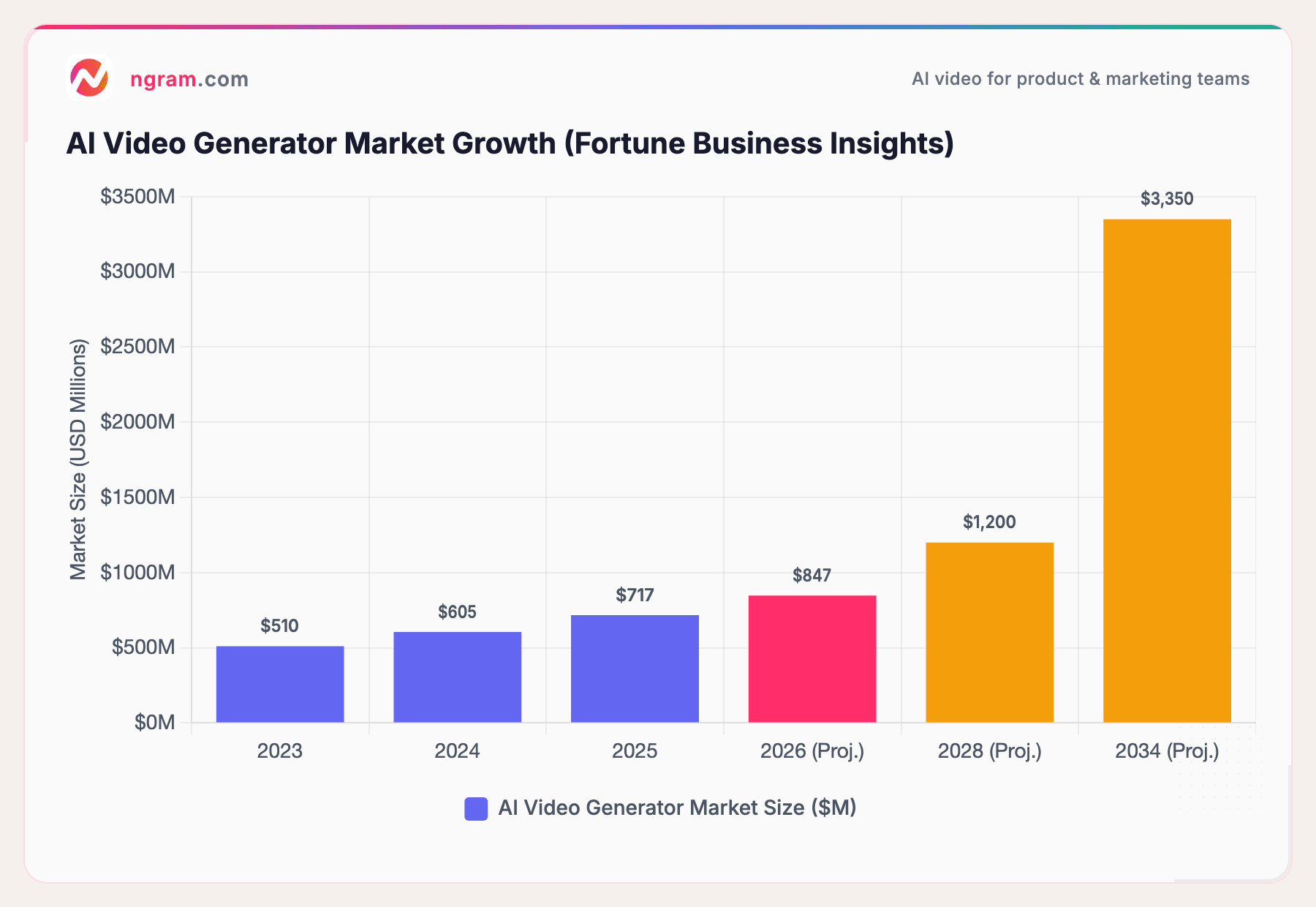
The AI video generator market hit $717 million in 2025 and is projected to reach $3.35 billion by 2034 at 18.8% CAGR. For context, traditional video production averages $4,500 per minute while AI tools bring that to roughly $400 per minute - a 91% cost reduction driving the adoption wave. With 73% of Fortune 500 companies now using AI video tools in their content workflows, the category has moved from experiment to expectation.
What we actually tested
We tested each tool, read hundreds of user reviews, and compared them across five weighted criteria:
| Criteria | Weight | What we looked at |
|---|---|---|
| Ease of Use | 30% | Learning curve, time from install to first output, UI clarity |
| Features | 25% | Core capabilities, output types, editing depth, export options |
| Value | 20% | Pricing relative to output, free tier generosity, export limits |
| AI Capabilities | 15% | AI editing, voiceover quality, automation, smart features |
| Export Flexibility | 10% | Format options, integration depth, sharing workflow |
We also factored in:
- Real user reviews from G2, Capterra, Product Hunt, and Reddit (qualitative sentiment, not numerical scores)
- Market presence and company stability (funding, user base, years in market)
- Integration ecosystem with common business tools
Export flexibility replaced the standard "Support & Community" criterion because Clueso's export limits are the #1 reason teams seek alternatives - any honest evaluation needs to weight that directly.
Frequently Asked Questions
Is there a free alternative to Clueso?
Several tools on this list offer free plans. Loom's free tier includes 25 videos with basic recording. Scribe has a free plan for individual use. Guidde offers 25 free videos with the browser extension. ngram has a free tier for getting started with AI video creation - no export caps even on free.
How does Clueso compare to Guidde?
Both transform screen recordings into documentation with AI voiceovers. The core difference is the business model: Clueso caps video exports at 6-12 hours annually starting at $120/month, while Guidde offers unlimited creation starting at $18/creator/month. Clueso provides deeper editing control; Guidde prioritizes speed and business tool integrations.
Can I create video documentation without screen recording?
Yes. ngram accepts text, documents, URLs, images, and screen recordings as input - you don't need to record your screen at all. Scribe and Tango generate text-based guides from browser actions without any video. Descript can create video from transcript-first workflows.
What's the cheapest Clueso alternative?
Camtasia's annual license ($179.88/yr) works out to roughly $15/month with no per-user fees or export caps. Loom's free tier covers basic screen recording. For AI-powered video documentation specifically, Guidde at $18/creator/month (annual) is the most affordable direct Clueso replacement.
Is Clueso worth $120/month?
For small teams producing fewer than 6 hours of polished video per year, Clueso's AI editing quality justifies the cost. For growing teams that need more output, the export caps become a real bottleneck. At $240 per hour of exported video on the Starter plan ($120/mo for 6 hrs/yr), teams producing regular documentation should compare the per-video cost against alternatives.
Does Clueso offer a free trial?
Yes, Clueso offers a 7-day free trial with 10 minutes of video exports and 15 article exports. That's enough to test the AI editing quality but not enough to evaluate it for a real documentation workflow at team scale.
Which one should you pick?
The video documentation space is split between tools that automate recording-to-polish (Clueso, Guidde, ngram), tools that generate written guides from browser actions (Scribe, Tango), and tools that give you manual editing depth (Descript, Camtasia). If you're a product or marketing team that needs polished, on-brand videos without export caps or freelancer timelines, ngram is the strongest fit. If you only need internal process docs and video is overkill, Scribe or Tango will save you time and money. Either way, a 5-minute test beats a 30-minute pricing spreadsheet.
Try ngram free - your first video in under 5 minutes. Turn raw screen recordings, docs, or images into polished, on-brand videos without worrying about export limits. Start free