
Quick comparison
| Tool | Best For | Starting Price | Key Differentiator |
|---|---|---|---|
| ngram | AI-powered video from any asset | Free / $17.40/mo | Turns recordings into polished, on-brand videos automatically |
| Loom | Async team communication | Free / $15/mo | Fastest record-and-share workflow |
| Descript | Transcript-based editing | Free / $24/mo | Edit video by editing text |
| Tella | Polished recordings for creators | Free / $15/mo | Beautiful recording UI with layouts |
| Camtasia | Tutorial and training videos | $179.88/yr | Most powerful desktop editing suite |
| OBS Studio | Free screen recording | Free | Open source, unlimited recording |
| Cap | Open source screen recorder | Free | Beautiful design, local-first recording |
Screen Studio changed its pricing, and creators noticed
Screen Studio built its reputation on one promise: record your screen on Mac, and the output looks like a professionally edited demo. Auto-zoom on cursor movements, smooth panning, click emphasis, custom backgrounds. For developers and indie makers shipping product demos, it was worth the $89 one-time purchase.
Then the pricing changed. Screen Studio moved from a $89 lifetime license to a subscription model at $29 per month, or $108 per year on the annual plan. The founder publicly acknowledged regretting the $229 price point that preceded the subscription shift, calling it a move that cost reputation.
The timing matters because the screen recording market has grown significantly. According to Wyzowl's 2025 State of Video Marketing report, 91% of businesses now use video as a marketing tool. The demand for polished screen recordings has outpaced what one Mac-only app can serve.
We tested 7 Screen Studio alternatives across recording quality, AI features, platform support, pricing, and real user feedback from Reddit, G2, and Product Hunt. Here is what we found.
The case for switching off Screen Studio
Screen Studio is a capable tool for what it does. But several limitations are pushing users to look elsewhere:
Mac-only locks out half your team. Screen Studio runs exclusively on macOS. If anyone on your team uses Windows or Linux, they need a separate tool. For distributed teams, that means managing two workflows for the same output.
Subscription pricing adds up. At $29 per month ($108 per year on annual billing), Screen Studio costs more than several alternatives that offer broader feature sets. Loom's paid plan starts at $15 per month. ngram starts at $17.40. OBS is free.
No built-in sharing or hosting. Screen Studio records locally. You export a file and then figure out where to host it, how to share it, and how to track who watched it. Tools like Loom and ngram handle recording, hosting, sharing, and analytics in one workflow.
Limited editing beyond zoom effects. Screen Studio excels at auto-zoom and cursor emphasis, but it is not a full video editor. If you need to add captions, voiceover, callouts, or brand elements, you need a second tool.
No collaboration features. There is no commenting, no shared workspace, no team library. For solo creators, that is fine. For teams producing demo content at scale, it creates friction.
1. ngram
If Screen Studio's recordings look great but still need a second tool for editing, captions, and branding, ngram collapses that workflow into one step.
Upload your screen recording to ngram, tell it who the video is for and what it needs to accomplish, and get a polished, on-brand video back in minutes. ngram handles the script, storyboard, visuals, captions, pacing, and brand styling automatically. You review a draft, request changes in plain language, and export.
What makes ngram stand out
Context-aware generation adapts the video to your audience, goal, and channel. A LinkedIn announcement gets fast pacing and a hook. A customer onboarding walkthrough gets more context and step labels. You define the intent, ngram builds the structure.
AI-powered editing turns rough screen recordings into polished walkthroughs. Automatic filler word removal, smart zoom on interactions, cursor emphasis, and callouts driven by your prompts. No timeline editing needed.
Brand kits ensure every video matches your identity. Logo, colors, fonts, intro, and outro applied automatically. Screen Studio has no brand kit equivalent.
Key features
- Context-aware generation - Adapts structure, pacing, and tone to your audience and channel
- AI-powered editing - Auto-cut, filler removal, smart zoom, cursor emphasis
- Brand kits - Logo, colors, fonts applied automatically to every video
- Multi-format export - 16:9, 9:16, 1:1 with captions included
- Start from anything - Text, images, docs, URLs, screen recordings as input
- Plan first, generate second - Review script and storyboard before rendering
Pros
- ✅ Turns raw screen recordings into polished, branded videos without manual editing
- ✅ Works on any platform (web-based), not locked to macOS
- ✅ Built-in captions, voiceover, and brand styling in one tool
Cons
- ❌ Not a screen recorder itself; you bring your own recordings (or other assets)
- ❌ Overkill if you just need a quick, unedited screen capture
Who is ngram best for?
Product Marketing, Growth, Sales, and Customer Success teams who already have screen recordings but need them to look professional. If you are spending time in Screen Studio plus a separate editor plus a caption tool, ngram replaces that entire chain.
ngram has a generous free plan with paid plans starting at $17.40 per month. For a detailed head-to-head, see our ngram vs Screen Studio comparison.
Ready to try ngram? Create your first video in under 5 minutes. Start free
See ngram in action:
2. Loom
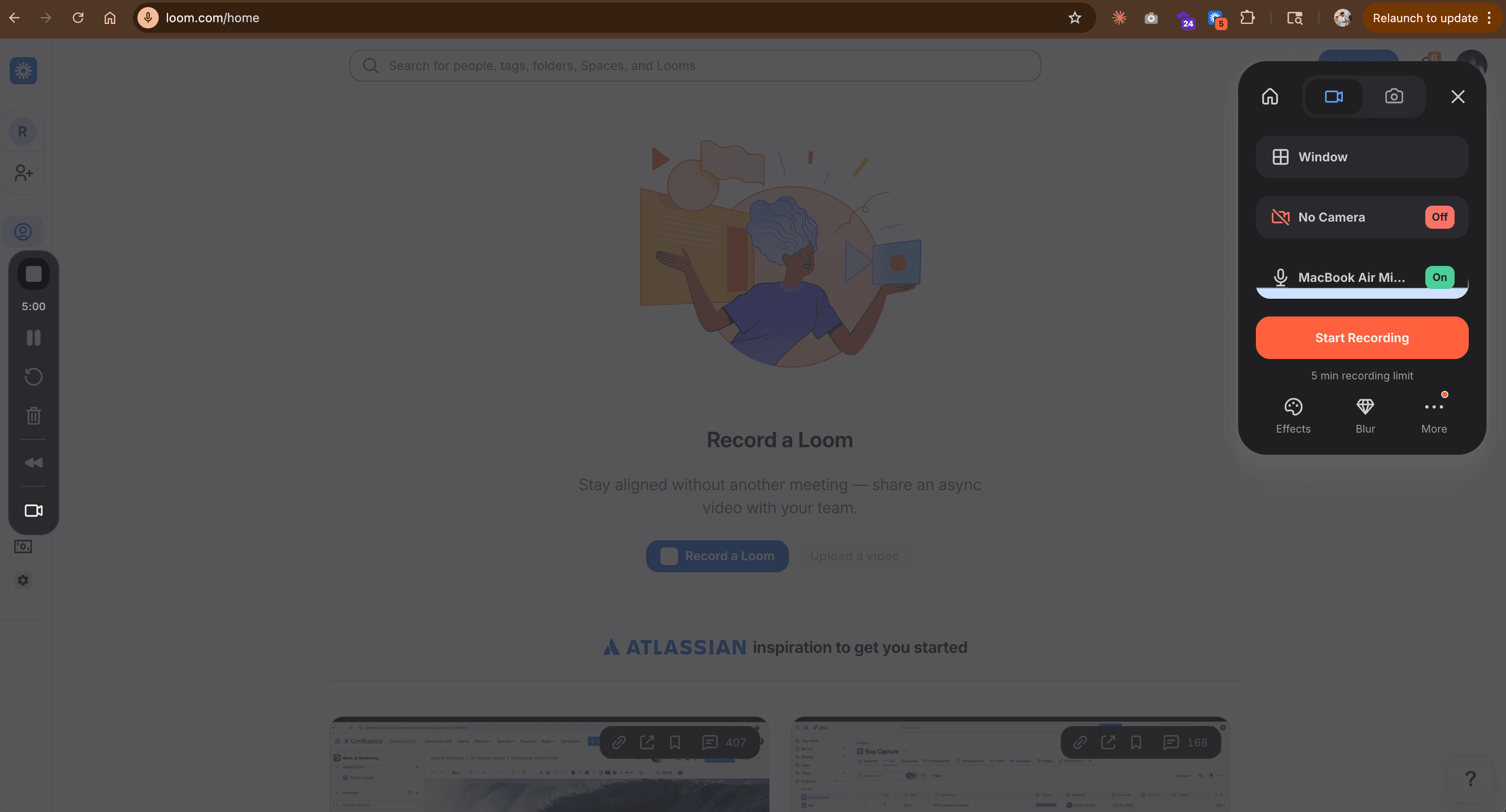
Loom is the default screen recording tool for async team communication. With over 25 million users, it owns the "record and share instantly" workflow that Screen Studio does not even attempt. You hit record, speak over your screen, and send a shareable link. No export, no upload, no separate hosting.
Loom was acquired by Atlassian in 2023 for $975 million, which brought enterprise stability but also triggered concerns about pricing changes and Atlassian integration overhead.
Key features
- Instant sharing - One-click recording to shareable link, no file management
- Webcam overlay - Picture-in-picture recording with your face
- AI summaries - Automatic meeting recaps and video summaries
- Viewer analytics - See who watched, how long, and where they dropped off
- Team workspace - Shared libraries, comments, and organization
What users say
Reddit users consistently call Loom the fastest way to communicate asynchronously. The praise centers on how frictionless the record-to-share workflow is. The most common complaint is limited editing. Loom recordings look like screen recordings, not polished demos. Users who need professional output often pair Loom with a separate editing tool.
Pros
- ✅ Fastest record-to-share workflow in the category
- ✅ Built-in hosting, analytics, and viewer tracking
- ✅ Generous free plan with up to 25 videos
Cons
- ❌ Limited editing (no auto-zoom, no cursor emphasis, no custom backgrounds)
- ❌ Output quality is raw screen recording, not polished demo
Best for
Teams that need async communication and fast sharing more than polished output. If your priority is getting a message across quickly rather than creating marketing-quality demos, Loom is the pick.
Free plan available. Paid plans start at $15 per month.
3. Descript
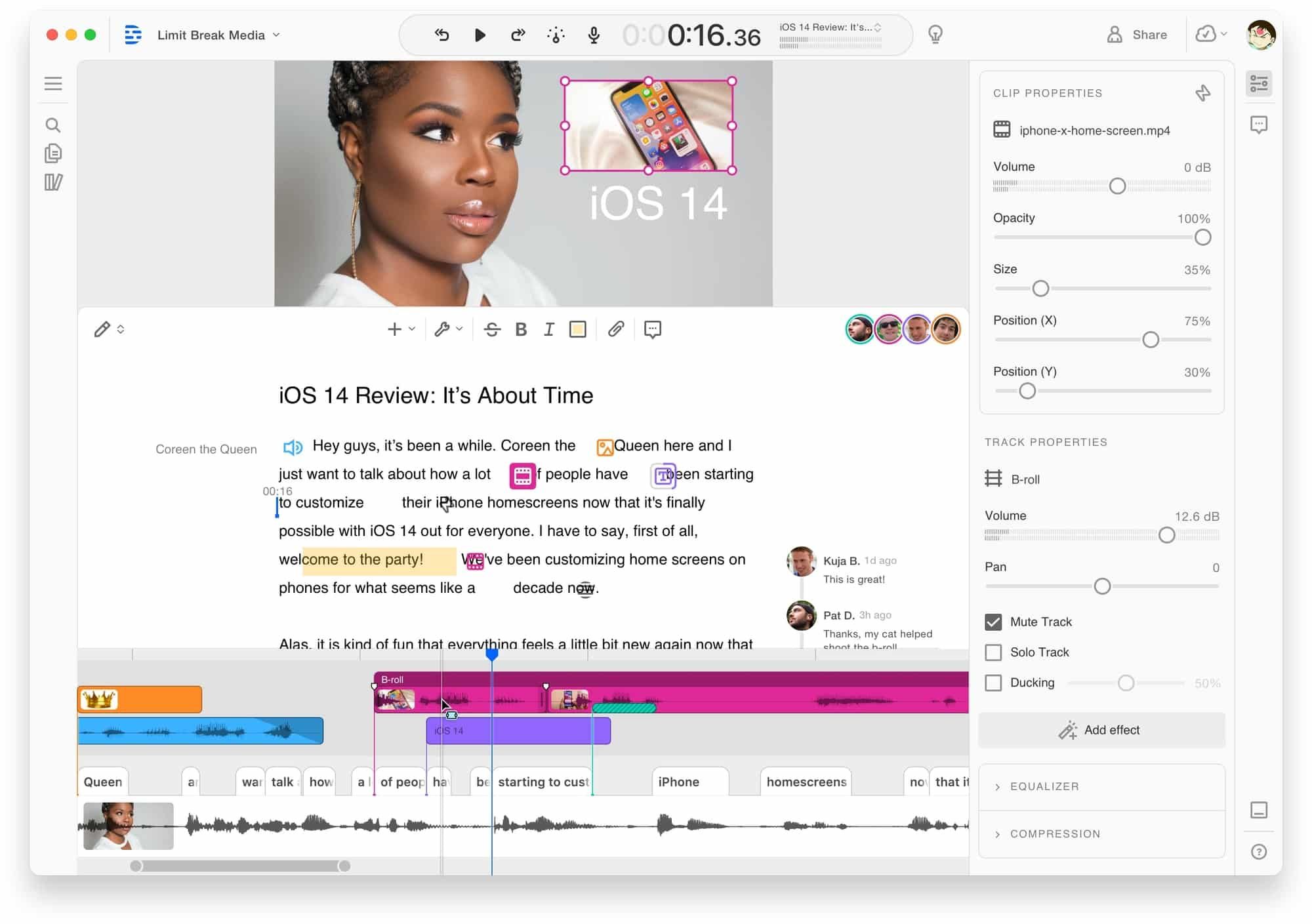
Descript approaches video editing from a fundamentally different angle: edit video by editing a text transcript. Delete a word from the transcript, and Descript removes that segment from the video. It holds over 500 reviews on G2 with strong sentiment for its text-first editing paradigm.
Descript raised $100 million in Series C funding from Spark Capital and Andreessen Horowitz, bringing total funding to over $150 million.
Key features
- Text-based editing - Edit video by editing the transcript
- Filler word removal - Automatic detection and removal of ums and ahs
- AI voice cloning - Clone your voice for corrections without re-recording
- Screen recording - Built-in recorder with webcam overlay
- Podcast editing - Strong audio editing for podcast producers
What users say
Reddit discussions praise the transcript-based editing as a breakthrough for long-form content. Creators mention saving hours compared to traditional timeline editing. The most frequent criticisms are rendering speed (exports can be slow for longer videos) and occasional sync issues between audio and video. Some users note the learning curve for advanced features is steeper than expected.
Best for
Content creators and educators who work with long-form video and want transcript-level control. Descript gives you more editing depth than Screen Studio, especially for tutorials, courses, and podcast-adjacent content.
Free tier available. Paid plans start at $24 per month.
4. Tella
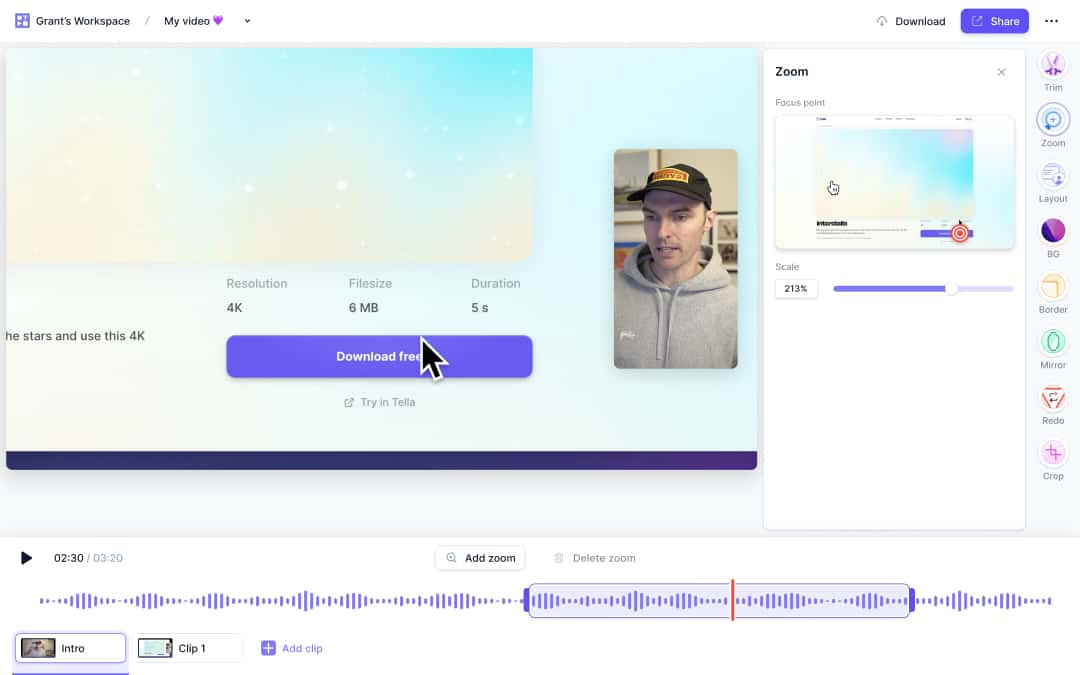
Tella is the closest competitor to Screen Studio's core promise: make screen recordings look beautiful. It offers a polished recording experience with custom backgrounds, webcam layouts, and presentation modes. Where Screen Studio focuses on post-recording effects, Tella bakes the polish into the recording process itself.
Tella holds strong user sentiment on G2 with consistent praise for its design quality and ease of use.
Key features
- Beautiful recording UI - Custom backgrounds, layouts, and webcam positioning during recording
- Presentation mode - Combine slides and screen recording in one flow
- AI auto-editing - Automatic filler word removal and silence cutting
- Instant sharing - Record and share via link without exporting
- Video clipping - Cut longer recordings into social-ready clips
What users say
Product Hunt reviewers highlight Tella's design as the standout feature. The recording experience feels premium, with creators mentioning that the output looks professional without post-production work. The main limitation is that Tella does not match Screen Studio's auto-zoom and cursor tracking precision. Users who need heavy post-recording effects may find Tella's editing more limited.
Best for
Solo creators, educators, and small teams who want polished recordings without the post-production workflow of Screen Studio. If you value the recording experience as much as the output, Tella is a strong pick.
Free plan available. Paid plans start at $15 per month.
Looking for the fastest way to create professional videos? ngram turns your screen recordings, docs, and images into polished videos in minutes. Try ngram free
5. Camtasia
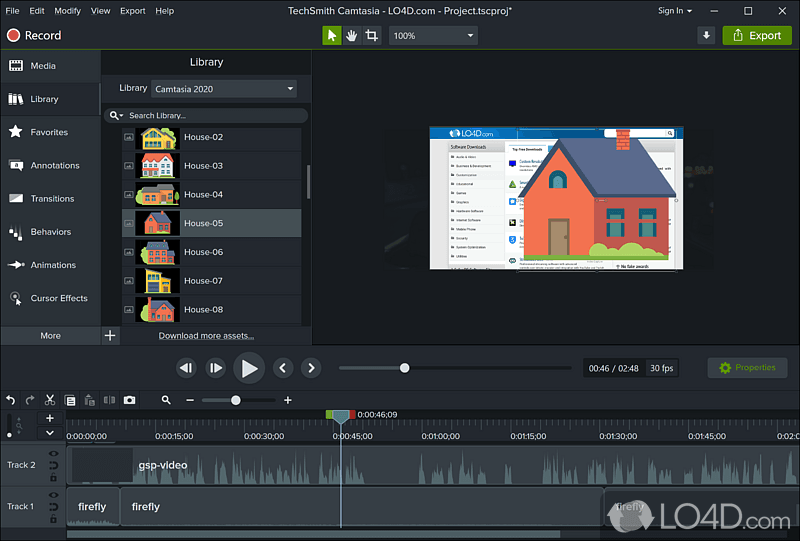
Camtasia is the enterprise-grade screen recording and editing suite from TechSmith, the same company behind Snagit. It has been in the market for over 20 years and remains the go-to for organizations creating training and tutorial content at scale.
Camtasia runs on both Mac and Windows, which immediately solves Screen Studio's biggest limitation.
Key features
- Full timeline editor - Multi-track editing with keyframes, transitions, and effects
- Annotation tools - Callouts, arrows, shapes, and step labels
- Interactive quizzes - Embed quizzes directly in training videos
- Templates and assets - Built-in library of intros, outros, lower thirds, and music
- Cross-platform - Available on both Mac and Windows
What users say
G2 reviewers praise Camtasia's depth for tutorial creation but note the learning curve is significantly steeper than Screen Studio or Loom. Power users love the control. Casual users often feel overwhelmed by the timeline interface. Pricing is a common discussion point: at $179.88 per year, it sits in the middle of the range but requires desktop installation and does not include hosting.
Best for
L&D teams, educators, and training departments that need deep editing control and interactive elements. If you are creating 30-minute training modules with quizzes and annotations, Camtasia is purpose-built for that.
Pricing starts at $179.88 per year (subscription) or $299.99 one-time purchase.
6. OBS Studio
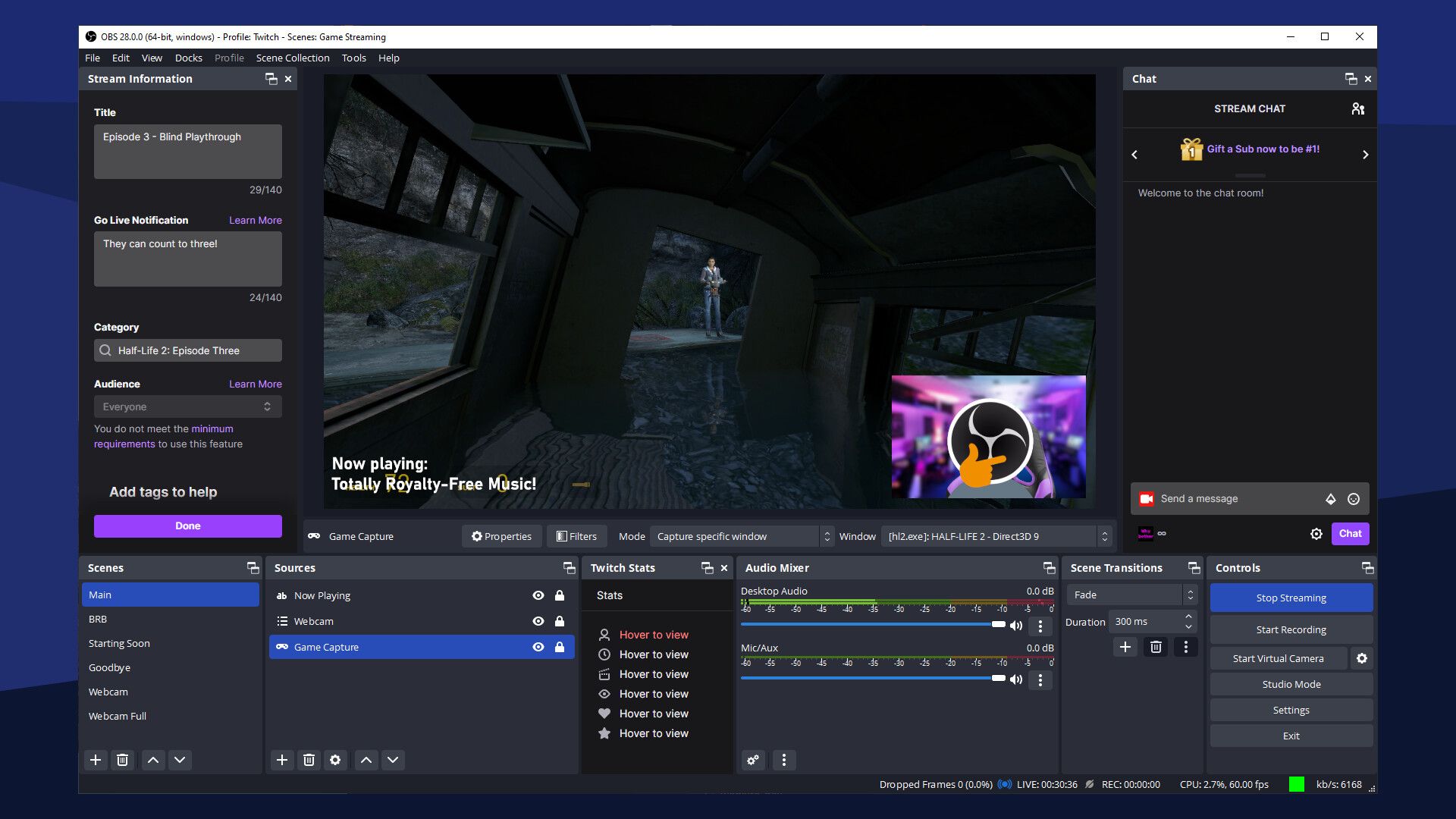
OBS Studio is the only truly free Screen Studio alternative with no limits on recording time, export quality, or features. It is open source, cross-platform (Mac, Windows, Linux), and used by millions of streamers and content creators worldwide.
OBS has been downloaded over 100 million times and powers a significant portion of live streaming on Twitch, YouTube, and other platforms.
Key features
- Unlimited free recording - No time limits, no watermarks, no paywalls
- Cross-platform - Mac, Windows, and Linux support
- Scene composition - Multiple sources, overlays, and layouts
- Plugin ecosystem - Hundreds of community plugins for extended functionality
- Live streaming - Built-in streaming to Twitch, YouTube, and custom RTMP servers
What users say
Reddit users recommend OBS as the default free option but consistently note the steep learning curve. Setting up scenes, sources, and audio routing requires technical comfort. The output quality matches or exceeds Screen Studio, but OBS does not include auto-zoom, cursor emphasis, or the polished post-processing effects that made Screen Studio popular. You get raw control at zero cost.
Best for
Developers, streamers, and technical users who want maximum control at zero cost. OBS is the right pick if you are comfortable with configuration and do not need automatic polish.
Free and open source.
7. Cap
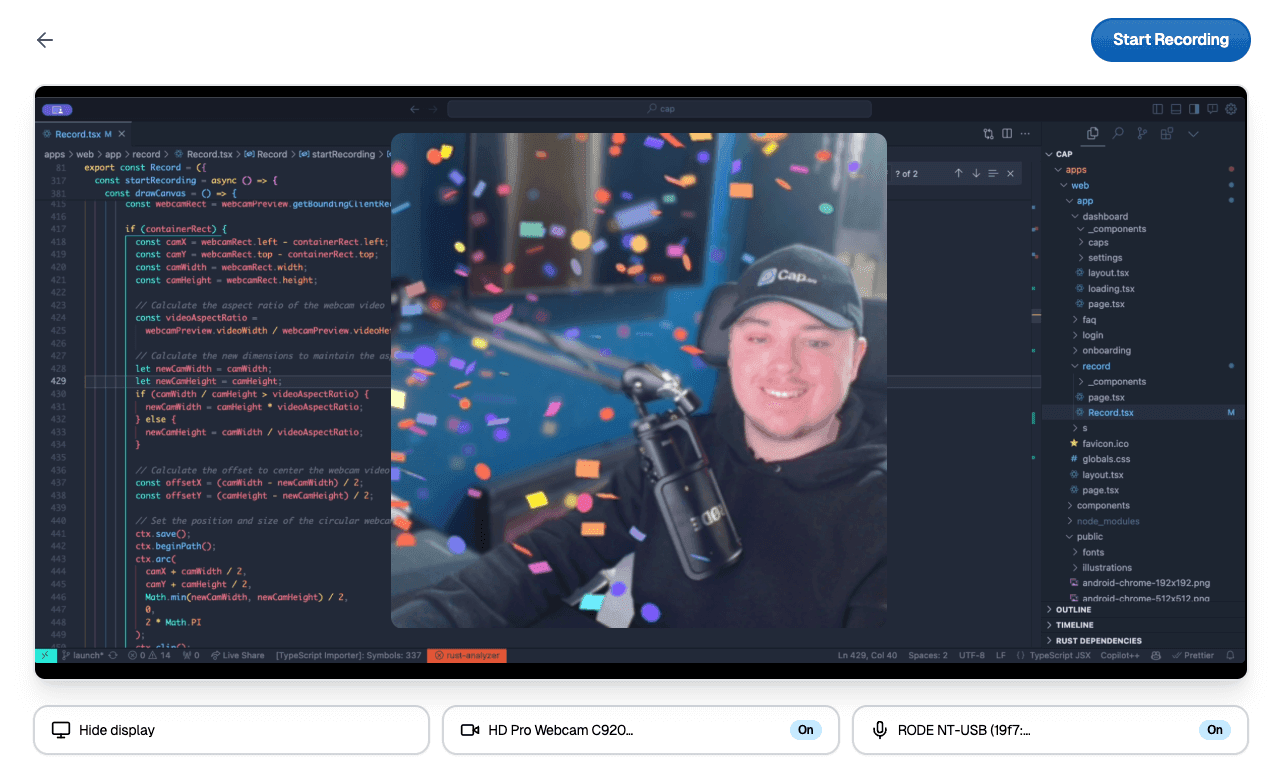
Cap is the newest entry on this list: an open-source screen recorder built to look and feel like a modern Mac app. It offers two modes: Instant Mode for quick record-and-share, and Studio Mode for local recording with a full editing timeline.
Cap positions itself as the open-source answer to Screen Studio's design sensibility, with a focus on privacy (local-first recording) and no subscription fees.
Key features
- Two recording modes - Instant (quick share) and Studio (full editing)
- Local-first recording - All recordings stay on your machine by default
- Automatic transcription - AI-powered captions included
- Open source - Free to use, modify, and self-host
- Beautiful design - Modern UI that feels native on macOS
What users say
Product Hunt reviewers highlight Cap's design quality and open-source philosophy as major draws. Early adopters praise the Instant Mode for matching Loom's speed while keeping recordings local. The main criticism is maturity. As a newer tool, Cap lacks the plugin ecosystem and advanced effects of established alternatives. Some users report occasional stability issues on certain macOS versions.
Best for
Privacy-conscious creators and developers who want a beautiful, free screen recorder without subscriptions or cloud dependencies. If you value open source and local-first recording, Cap is the strongest option.
Free and open source.
Here is how Screen Studio's pricing compares to the alternatives:
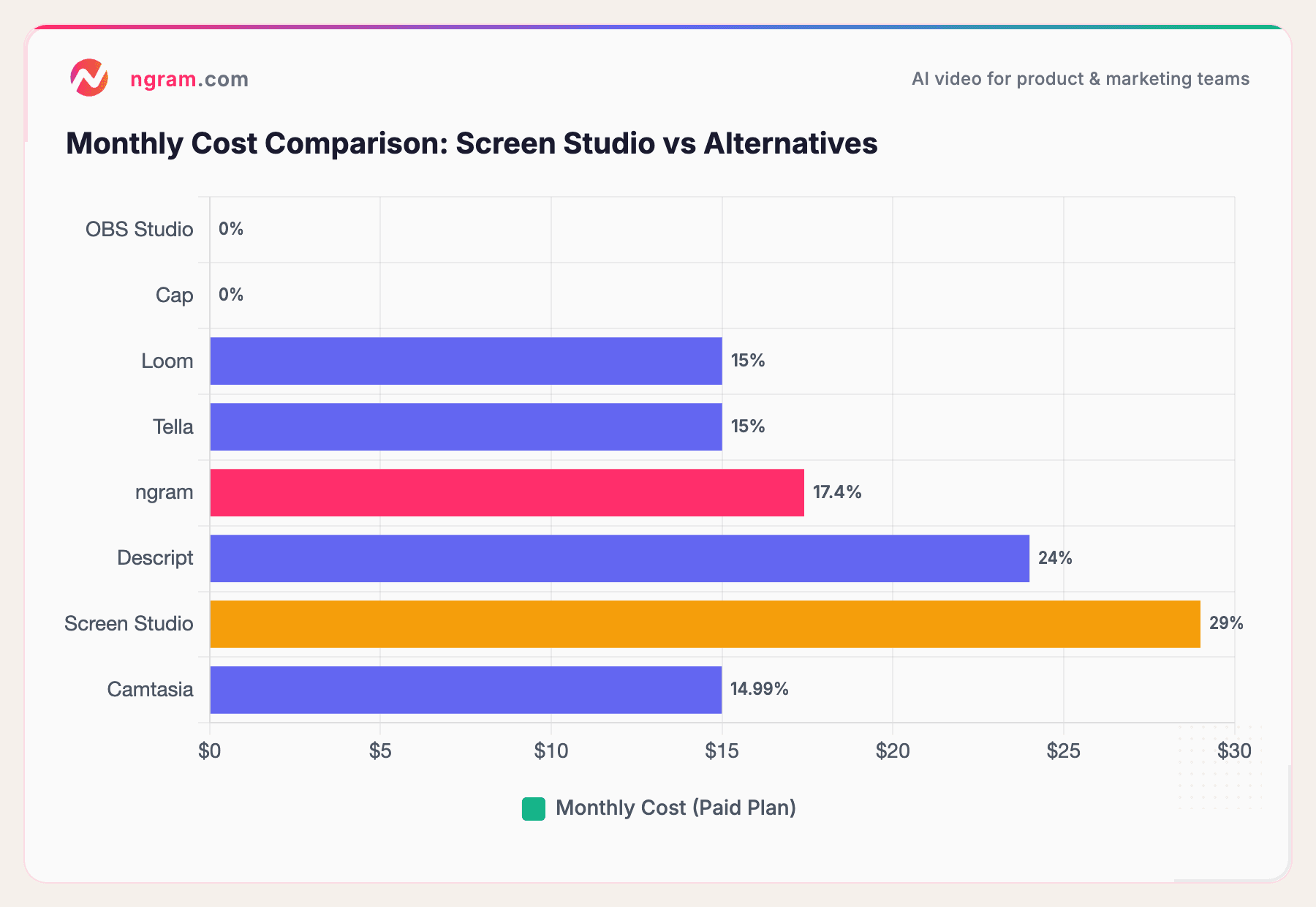
Two of the seven alternatives are completely free. The remaining paid tools start between $15 and $24 per month, all below Screen Studio's $29 per month price point.
How we compared these tools
We tested each tool, read hundreds of user reviews, and compared them across five weighted criteria:
| Criteria | Weight | What we looked at |
|---|---|---|
| Ease of Use | 30% | Time to first recording, learning curve, UI quality |
| Features | 25% | Recording quality, editing tools, auto-zoom, effects |
| AI Capabilities | 15% | AI editing, captions, voice cloning, smart features |
| Value | 20% | Pricing relative to features, free tier availability |
| Support and Community | 10% | Documentation, community size, update frequency |
We also factored in:
- Real user reviews from G2, Reddit, and Product Hunt (qualitative sentiment, not scores)
- Platform support (Mac, Windows, Linux, web)
- Recording and sharing workflow (how quickly you go from idea to shared video)
- Post-recording editing capabilities (what you can do after hitting stop)
We weighted ease of use highest because Screen Studio's core appeal is simplicity. Any alternative that requires a steeper learning curve needs to justify it with significantly better output.
Common questions
Is there a free Screen Studio alternative?
Yes. OBS Studio and Cap are both free and open source. OBS gives you maximum control and cross-platform support. Cap gives you a more modern, design-forward experience with local-first recording. Both lack Screen Studio's automatic zoom and cursor effects.
What is the best Screen Studio alternative for Windows?
ngram (web-based, works on any platform), Camtasia (Mac and Windows native), and OBS Studio (cross-platform) all work on Windows. Screen Studio is Mac-only, so these alternatives immediately open up your team to cross-platform workflows.
How does Screen Studio compare to Loom?
Screen Studio produces polished, marketing-quality recordings with auto-zoom and effects. Loom produces fast, raw screen recordings optimized for sharing and team communication. Choose Screen Studio if output quality is the priority. Choose Loom if speed and collaboration matter more.
Can I get Screen Studio's auto-zoom effect in another tool?
ngram offers smart zoom on interactions as part of its AI editing suite. Camtasia has manual zoom and pan effects on its timeline. Cap and Tella offer some automatic emphasis effects. None replicate Screen Studio's exact auto-zoom behavior identically, but ngram's AI-driven approach produces similar results without manual editing.
Is Screen Studio still worth it at $29 per month?
If you are a solo Mac creator who ships polished demos daily and the auto-zoom effect is critical to your workflow, Screen Studio still delivers. But at $29 per month ($348 per year), it costs more than most alternatives while offering fewer features (no hosting, no collaboration, no cross-platform support). For teams, the value proposition has weakened significantly since the pricing change.
Can ngram replace Screen Studio?
ngram is not a screen recorder, so it does not replace the recording step. But if you already record with any tool (including Screen Studio's competitors), ngram replaces everything that happens after: editing, captions, brand styling, and export. For a detailed comparison, see our ngram vs Screen Studio comparison.
Our verdict
The screen recording market in 2026 offers more options than Screen Studio had competition when it launched. If you need AI-powered video production from raw recordings, ngram turns any screen capture into polished, on-brand content without timeline editing. If you need the fastest async communication tool, Loom is still the standard. If you want free and flexible, OBS Studio and Cap cover that lane.
Screen Studio remains the best at one specific thing: automatic zoom-and-pan effects on Mac screen recordings. If that narrow feature is your workflow's bottleneck, nothing else replicates it exactly. But the moment you need cross-platform support, collaboration, hosting, or AI editing, the alternatives on this list do more for less.
Try ngram free - your first video in under 5 minutes. Turn raw screen recordings, docs, or images into polished, on-brand demo videos without touching a timeline. Start free