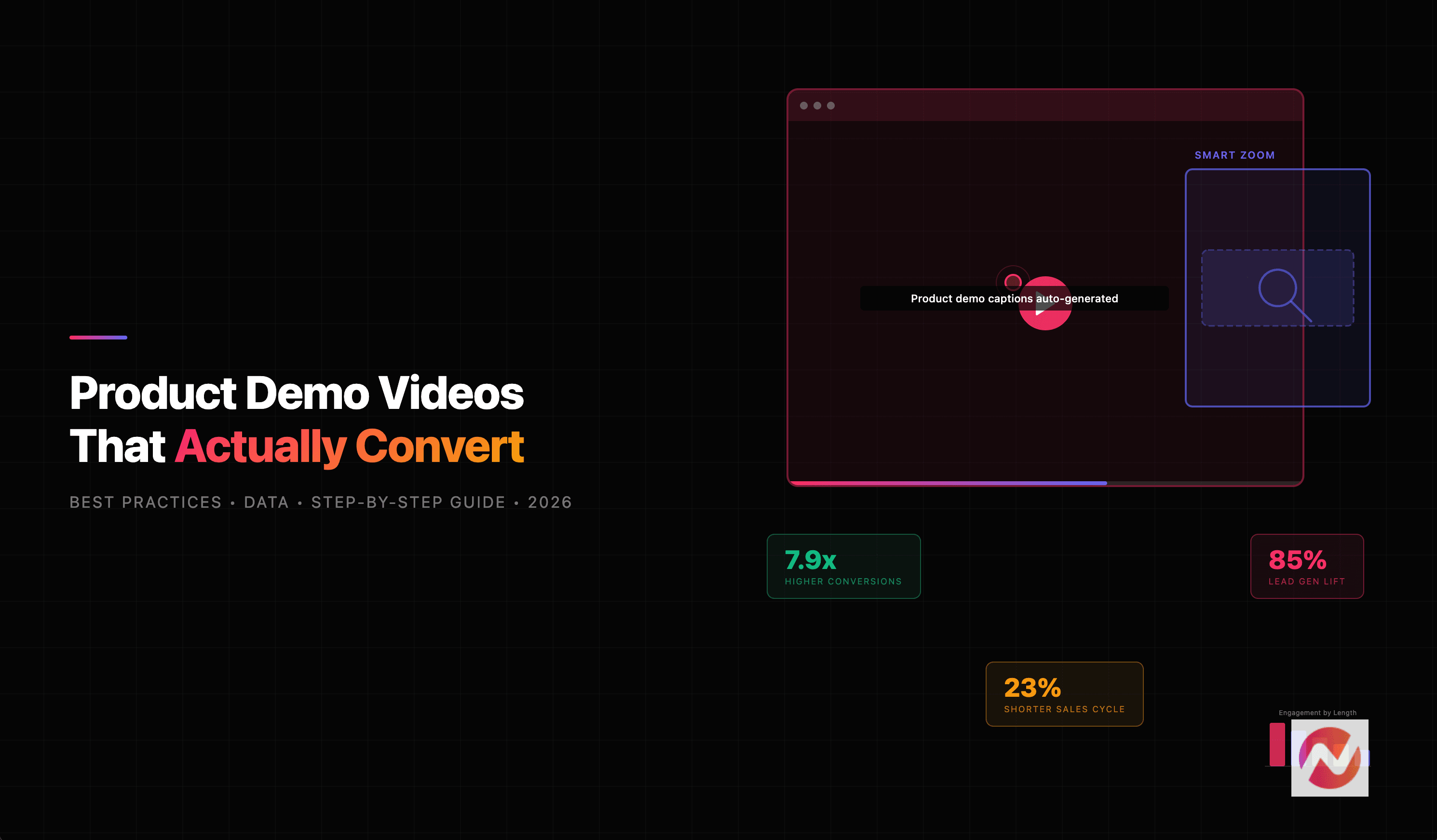

Most product demo videos fail. Not because the product is bad, but because the video leads with a feature tour nobody asked for.
Here's the thing: prospects who engage with product demo videos convert at 7.9x higher rates than those who don't, according to ContentBeta. And Wyzowl's 2026 State of Video Marketing report found that 85% of people have been convinced to buy a product or service after watching a video.
So the question isn't whether you need a product demo video. It's whether your demo video is actually doing its job.
This guide breaks down what separates high-converting product demo videos from the ones that get skipped, backed by real data, industry benchmarks, and practical best practices you can apply today.
What Is a Product Demo Video?
A product demo video (also called a product demonstration video) shows how your product works in a real context. It walks viewers through the interface, highlights key workflows, and demonstrates the value your product delivers.
But here's what a product demo video is not:
- Not an explainer video. Explainers focus on the problem you solve. Demos focus on how you solve it.
- Not a tutorial. Tutorials teach users who already have the product. Demos convince prospects to try it.
- Not an ad. Ads create awareness. Demos build confidence and drive decisions.
Product demo videos work across the entire buyer journey, but they carry the most weight in the middle and bottom of the funnel, where prospects are evaluating options and making decisions.
The chart below shows how video influences B2B buyers at each stage of the purchase process.
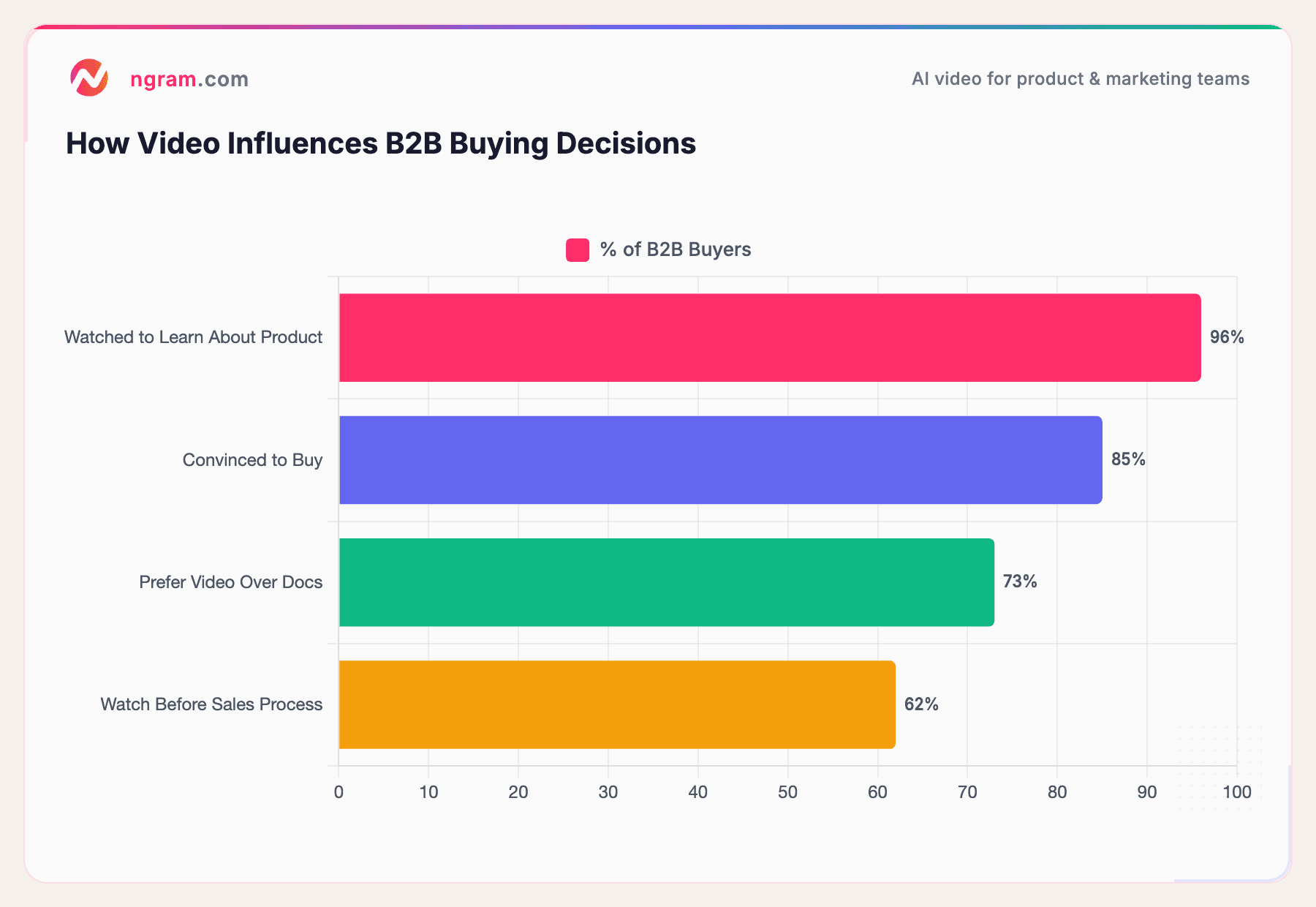
Sources: Wyzowl 2026 State of Video Marketing, Zebracat B2B Video Statistics
The data is clear: B2B buyers don't just tolerate video, they actively prefer it over written content when evaluating products.
Why Product Demo Videos Drive Real Business Results
Product demo videos aren't just "nice to have" marketing assets. They directly impact revenue metrics that matter.
According to Wyzowl's 2026 report, 83% of video marketers say video has directly increased sales, and 85% say video has helped them generate leads. Those aren't vanity metrics, they're pipeline numbers.
Here's how demo videos move the needle across key business metrics.
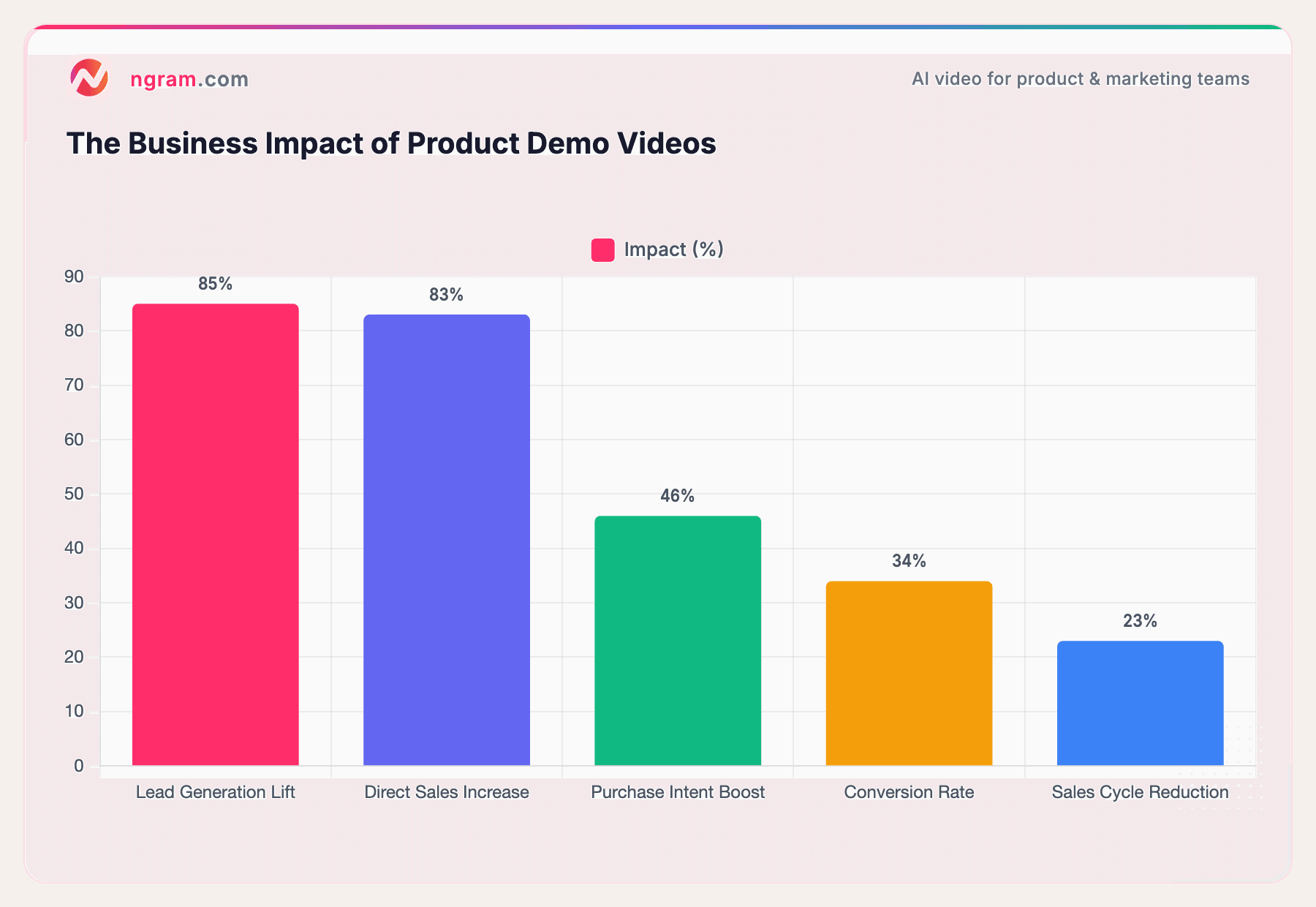
Sources: Wyzowl 2026, Zebracat
The numbers speak for themselves. B2B video content shortens sales cycles by 23% on average, according to Zebracat's B2B video research. That means deals that used to take 33 days now close in roughly 25.
For product marketing teams shipping multiple launches per quarter, that acceleration compounds fast.
And it's not just about closing faster. Landing pages with embedded video see a 4.8% conversion rate versus 2.9% for pages without video, according to SQ Magazine. That's a 65% lift just by adding a product demo to your page.
5 Types of Product Demo Videos
Not all demo videos are created equal. The right format depends on your audience, your product's complexity, and where the viewer is in their buying journey.
1. Screen Recording Walkthroughs
The most common type for SaaS products. You record your actual product interface and walk the viewer through a real workflow. Best for: mid-funnel prospects who want to see the real product, not a polished animation.
Tools like ngram's screen recording editor turn raw screen captures into polished walkthroughs by automatically cutting dead air, adding zoom effects, and inserting callouts.
2. Animated Product Demos
Motion graphics and illustrations represent your product's workflows without showing the actual interface. Best for: top-of-funnel awareness, complex enterprise products, or when your UI changes frequently and you need evergreen content.
3. Live-Action Demos
A real person (often a founder, PM, or sales rep) walks through the product on camera. Best for: building trust and personal connection, especially in early-stage companies where the founder's passion is a selling point.
4. Interactive Demos
Clickable, self-guided product experiences that let viewers explore at their own pace. Best for: bottom-of-funnel evaluation, where prospects want hands-on experience before talking to sales.
5. Hybrid Demos (Screen + Motion Graphics)
Combines screen recordings with animated overlays, callouts, and transitions. Best for: creating polished, professional demos that feel intentional rather than like a raw recording. This is where smart zoom and motion graphics overlay make the biggest difference.
Choosing the right type:
| Funnel Stage | Best Demo Type | Why |
|---|---|---|
| Top of Funnel (Awareness) | Animated or live-action | Easy to share, quick to understand, low commitment |
| Middle of Funnel (Evaluation) | Screen recording or hybrid | Shows the real product, builds confidence |
| Bottom of Funnel (Decision) | Interactive or detailed walkthrough | Hands-on experience, answers specific questions |
10 Best Practices for Product Demo Videos That Convert
These aren't theoretical tips. They're backed by data from thousands of demo videos across SaaS, ecommerce, and B2B companies.
1. Lead with the Problem, Not Features
The biggest mistake in product demo videos is starting with "Here's our dashboard" instead of "Here's the problem you're dealing with every day."
Problem-solution demos that focus on specific pain points convert 37% better than feature tours, according to Levitate Media. Your first 10 seconds should make the viewer think, "Yes, that's exactly my problem."
Framework: Problem (5 seconds) - Solution preview (5 seconds) - Walkthrough (60-90 seconds) - CTA (5 seconds)
2. Script and Storyboard Before You Record
Winging it shows. Viewers can tell when a demo is improvised, and it creates a rambling, unfocused experience.
Write down the top 1 to 3 features your sales team demonstrates most often. Those are generally the features that belong in your product demo video, not every button and menu item.
A script doesn't mean a rigid teleprompter read. It means knowing exactly what you'll show, in what order, and what you'll say at each step.
3. Keep It Under 2 Minutes
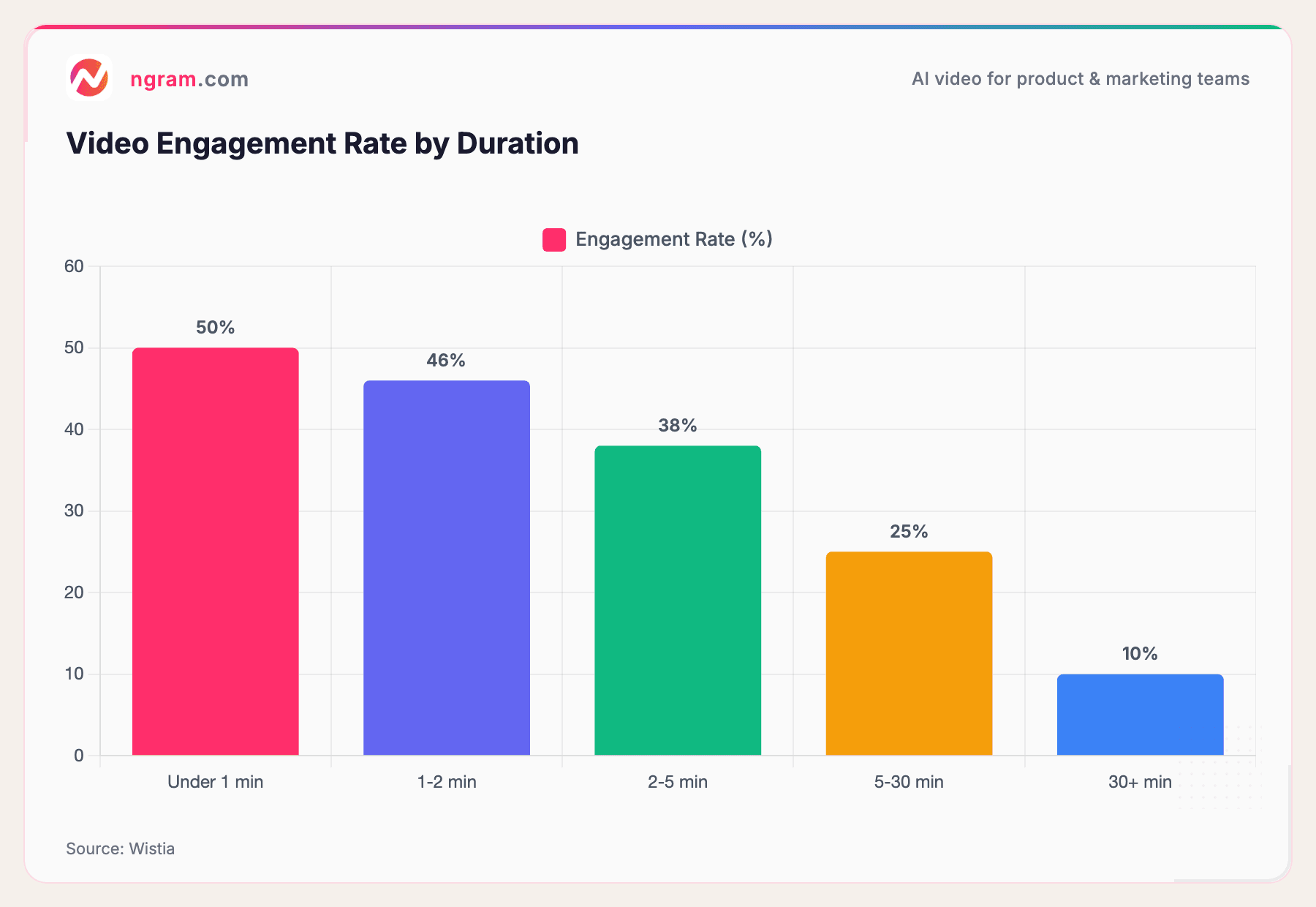
This one is backed by hard data. Videos under 1 minute achieve a 50% engagement rate, while those over 5 minutes drop to just 38%, according to Wistia's video engagement research.
Source: Wistia
The drop-off is steep. Every extra minute you add costs you viewers. For most product demo videos, the sweet spot is 60-120 seconds. If your product is complex enough to need more time, break it into a series of shorter demos, each focused on one workflow.
4. Show Real Workflows, Not Staged Perfection
Viewers can spot a fake demo from a mile away. Don't use a perfectly organized dashboard with impossible sample data. Show your product doing real work with realistic content.
Authenticity builds trust. A founder walking through a real use case with genuine enthusiasm is more convincing than a polished script read by a voiceover artist, especially in B2B where 91% of consumers say video quality impacts their trust in a brand (ContentBeta). Quality here doesn't mean Hollywood production values. It means clarity, intentionality, and honest representation.
5. Use Smart Zoom and Callouts to Guide Attention
Screen recordings of software interfaces are dense with information. If you don't guide the viewer's eye, they'll get lost trying to figure out what to look at.
Auto-zoom on clicks, cursor emphasis, and callout annotations turn a flat screen recording into a guided tour. These visual cues reduce cognitive load and keep viewers focused on what matters.
The difference between a raw recording and a polished demo often comes down to these micro-interactions, smart zoom on key actions, callouts that highlight important UI elements, and smooth transitions between steps.
6. Add Captions - Always
This isn't optional in 2026. A large percentage of viewers watch video without sound, especially on mobile and social media. If your demo relies entirely on narration, you're losing those viewers.
Automated captions serve double duty: they make your demo accessible to deaf and hard-of-hearing viewers, and they improve engagement for everyone scrolling through feeds on mute.
7. Stay On Brand
Consistent brand elements (colors, fonts, logo placement, intro/outro) build recognition and trust across multiple touchpoints. When prospects see your demo on LinkedIn, then visit your website, the experience should feel cohesive.
Define your brand kit once, including logo, colors, fonts, and lower-thirds, and apply it to every demo video. This is especially important for teams producing demos at scale, where inconsistency can make your company look disorganized.
8. Include One Clear Call to Action
Every product demo video needs exactly one CTA. Not three. Not zero. One.
The CTA should match the funnel stage. For top-of-funnel demos, "Learn more" or "See pricing" works. For bottom-of-funnel, "Start your free trial" or "Book a demo" is more appropriate.
Place the CTA at the end of the video, and reinforce it with an on-screen text overlay or clickable annotation. Make it impossible to miss.
9. Optimize for Multiple Formats
Your product demo video won't just live on your website. It'll be shared on LinkedIn (1:1 or 9:16), embedded in emails, posted on YouTube (16:9), and clipped for TikTok or Instagram Reels.
Plan for multi-format from the start. Record in 16:9, but design your key moments to work when cropped to 1:1 or 9:16. Keep important UI elements away from the edges, and use text overlays that remain legible at smaller sizes.
10. Test, Measure, Iterate
Your first product demo video won't be your best. The companies that win at demo video are the ones that track performance, learn from the data, and iterate.
A/B test different hooks, lengths, and CTAs. Track view-through rate, engagement rate, and downstream conversions. Then make your next demo better.
How to Create a Product Demo Video (Step by Step)
Here's the practical process for going from idea to published demo video.
Step 1: Define Your Audience and Goal
Before you record anything, answer two questions:
- Who is watching this? A technical buyer evaluates differently than a C-suite executive.
- What should they do after watching? Sign up? Book a call? Share with their team?
The audience and goal determine everything: tone, length, format, level of detail, and CTA.
Step 2: Write the Script
Structure your script around the problem-solution framework:
- Hook (5-10 seconds): State the problem your viewer faces
- Solution preview (5-10 seconds): Show the end result
- Walkthrough (60-90 seconds): Walk through 2-3 key workflows
- CTA (5 seconds): Tell them what to do next
Keep the language conversational. Read it out loud. If it sounds stiff, rewrite it.
Step 3: Capture Your Footage
For screen recordings, use your product with realistic data. Walk through the exact workflow you scripted. Don't worry about mistakes during recording, you'll edit those out.
For live-action, keep the setup simple. Good lighting, clean audio, and a real person who knows the product is all you need.
Step 4: Edit With Intention
This is where raw footage becomes a polished demo. Cut dead air, remove mistakes, add zoom effects on key interactions, and insert callouts where the viewer needs guidance.
Tools like ngram handle the heavy lifting here, turning rough screen recordings into polished product demos with auto-cut, smart zoom, cursor emphasis, callouts, and step labels.
Building product demo videos? ngram turns your screen recordings and raw assets into polished, on-brand demos in minutes. Try it free
Step 5: Add Captions and Brand Elements
Apply your brand kit (colors, fonts, logo), add captions, and include a branded intro/outro if you have one. These finishing touches are what separate a professional demo from a screen recording with narration.
Step 6: Export in the Right Format
Export your demo in the formats you need:
- 16:9 for website embeds and YouTube
- 1:1 for LinkedIn feed posts and email
- 9:16 for Stories, Reels, and TikTok
Step 7: Distribute and Measure
Publish across your channels and track performance from day one. Embed on your landing page, share on LinkedIn, send in email sequences, and include in sales outreach.
What Product Demo Videos Cost in 2026
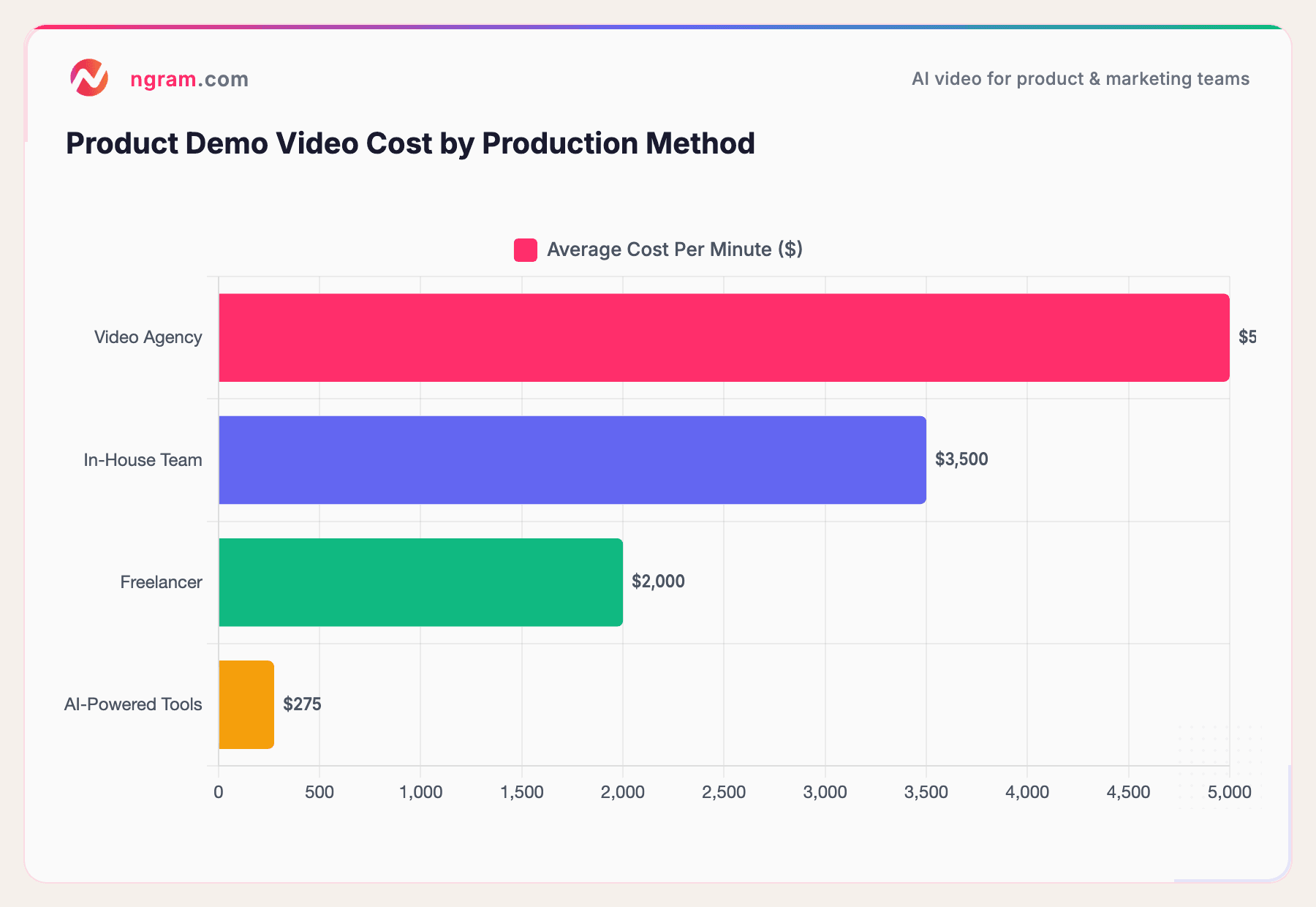
The cost of a product demo video varies dramatically depending on your production approach. Here's what the market looks like.
Sources: Advids, Synthesia
Agency-produced software product videos average $2,990 for a 60-second clip, with enterprise-quality work running $4,400-$7,600 per video, according to Advids pricing data.
AI-powered video tools have dramatically changed the economics. What used to require a $5,000+ agency engagement can now be done in-house for a fraction of the cost, with AI handling editing, zoom effects, and captions automatically.
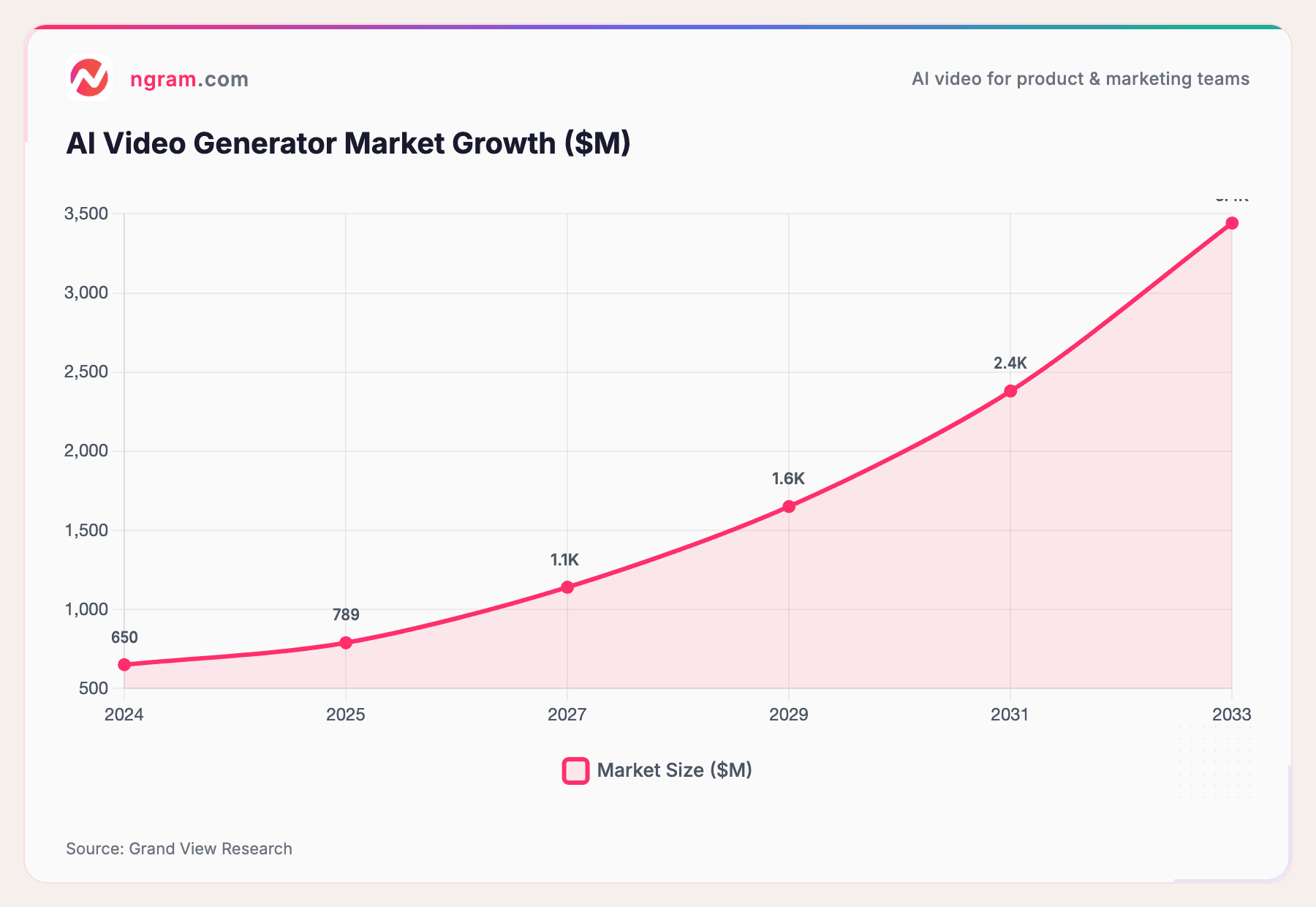
This shift is driving massive market growth. The AI video generator market is projected to grow from $789 million in 2025 to $3.4 billion by 2033, a 20.3% CAGR, according to Grand View Research.
Source: Grand View Research
The takeaway: you no longer need a big budget to produce professional product demo videos. The tools have caught up to the demand.
Measuring Product Demo Video Performance
Creating the video is half the job. Measuring its impact is the other half.
Here are the key metrics to track for every product demo video:
View-Through Rate (VTR): What percentage of viewers watch to the end? For demo videos under 2 minutes, aim for 60%+ VTR. If viewers are dropping off early, your hook needs work.
Engagement Rate: How much of the video do viewers actually watch? Videos under 90 seconds maintain a 53% retention rate on average, according to Rocketwheel. If your 3-minute demo has 25% engagement, consider cutting it in half.
Conversion Rate: How many viewers take the desired action (sign up, book a demo, request pricing)? Landing pages with embedded demo videos average a 4.8% conversion rate versus 2.9% without, according to SQ Magazine.
Pipeline Influence: How many deals in your pipeline touched a demo video before closing? This is the metric that gets executive buy-in for video investment.
Play Rate: What percentage of page visitors actually click play? If your play rate is low, test different thumbnails, autoplay settings, or video placement on the page.
Track these metrics consistently, and you'll build a feedback loop that makes every subsequent demo video better than the last.
5 Common Product Demo Video Mistakes
Avoid these pitfalls that tank demo video performance.
1. Feature-Dumping Without Context
Showing every feature in your product doesn't impress prospects. It overwhelms them. Focus on 2-3 features that solve the specific problem your audience cares about. Leave the full feature tour for the documentation.
2. Making It Too Long
If your demo video is over 3 minutes, you're probably losing half your audience. When in doubt, cut. Every second should earn its place by showing product value, demonstrating a benefit, or guiding the viewer toward the CTA.
3. Skipping the Script
Improvised demos feel improvised. You'll ramble, repeat yourself, and lose the narrative thread. Even a bullet-point outline is better than nothing.
4. No Captions
A significant portion of video viewers watch without sound. No captions means no message for those viewers. It also hurts accessibility and SEO.
5. No CTA
You'd be surprised how many demo videos just... end. No next step, no link, no direction. Every demo video needs a clear, single CTA that tells the viewer exactly what to do next.
Frequently Asked Questions
How do you make a product demo video?
Start by defining your target audience and the specific problem your demo will address. Write a script following the problem-solution framework, record your screen or live footage, then edit for clarity with zoom effects, callouts, and captions. Export in the right format for your distribution channel and track performance from day one.
How long should a product demo video be?
For most use cases, 60-120 seconds is the sweet spot. Videos under 1 minute achieve 50% engagement rates, while those over 5 minutes drop to 38%, according to Wistia. If your product requires a longer walkthrough, consider breaking it into a series of shorter demos, each focused on one workflow.
What is a product demo video?
A product demo video shows how your product works in a real context, walking viewers through the interface, key workflows, and the value it delivers. It's different from an explainer video (which focuses on the problem) or a tutorial (which targets existing users).
How much does it cost to create a product demo video?
Costs range from $275 per minute with AI-powered tools to $5,000+ per minute with a professional agency. In-house teams typically fall in the $2,000-$3,500 range. AI video tools have made it possible to produce professional-quality demos at a fraction of traditional costs.
What makes a great product demo video?
Great demo videos share five traits: they lead with a problem the viewer cares about, they're under 2 minutes, they show real workflows rather than staged perfection, they include captions, and they end with one clear CTA. The data consistently shows that authenticity and brevity beat high production values.
Do product demo videos actually increase conversions?
Yes. Landing pages with embedded demo videos see a 4.8% conversion rate versus 2.9% without, a 65% lift. Additionally, 85% of consumers say they've been convinced to buy a product after watching a video, according to Wyzowl's 2026 report.
Product demo videos are one of the highest-leverage marketing assets you can create. The data is clear: they shorten sales cycles, increase conversions, and give buyers the confidence to act.
The best part? You don't need a production team or a big budget to make them. With the right approach and modern tools, you can go from raw screen recording to polished product demo in minutes.
Ready to create product demo videos that convert? Try ngram for free and turn your raw recordings into polished, on-brand demos without the production overhead.