
Riverside.fm built its name on one promise: studio-quality remote recording. Local-to-device capture means your audio and video don't degrade when someone's WiFi drops. For podcast hosts and remote interviewers, that's a genuine differentiator.
But Riverside's pricing model has become the most common complaint across G2, Capterra, and Reddit. The Standard plan at $19/month limits you to 15 hours of recording. Go over, and overage charges hit at 2-3x the effective per-hour cost. The free tier caps at 720p with watermarks and 2 hours per month. And the editing tools are basic - trimming and combining clips is about it. For anything more, you're exporting to another tool.
Meanwhile, the podcast and video recording market keeps growing. According to Edison Research, over 100 million Americans now listen to podcasts monthly, and Wyzowl's 2026 report shows 91% of businesses using video as a marketing tool. The tools available to record, edit, and repurpose that content have matured significantly since Riverside launched.
We tested 7 Riverside alternatives across recording quality, editing features, ease of use, pricing, and real user sentiment. Here's what held up.
What's pushing users off Riverside
Riverside is a strong recording platform. But the frustrations are real and consistent across review sites.
Overage charges add up fast. The Standard plan includes 15 hours of recording. That sounds like a lot until you're running weekly hour-long podcast episodes with pre-show warmups. Hit the cap, and you're paying premium rates per extra hour or upgrading to Pro at $29/month.
The editing tools are bare-bones. Riverside offers trimming, clip combining, and basic text-based editing. But there's no advanced audio mixing, no multi-track timeline, and no motion graphics. Most serious podcasters export to Descript or DaVinci Resolve for post-production anyway.
AI features are inconsistent. Automated show notes, magic audio cleanup, and AI-generated clips work well sometimes and miss the mark others. Users on Reddit report having to manually fix AI transcriptions for accuracy.
Technical glitches persist. Reports of app crashes, delayed uploads, sync issues, and lost recordings surface regularly on Trustpilot and G2. One user described losing an entire interview because the upload failed silently after recording.
The free plan barely qualifies. 720p resolution with watermarks and a 2-hour monthly cap makes the free tier a demo, not a usable product.
For a detailed comparison, see our ngram vs Riverside comparison.
Quick comparison
| Tool | Best For | Starting Price | Key Differentiator |
|---|---|---|---|
| ngram | Repurposing recordings into polished video | Free / $29/mo | AI turns raw recordings into finished video |
| Descript | Transcript-based podcast editing | Free / $16/mo | Edit audio/video by editing text |
| StreamYard | Live streaming + recording | Free / $25/mo | Stream to multiple platforms simultaneously |
| Zencastr | Budget-friendly remote recording | Free / $20/mo | Separate audio tracks, auto-post-production |
| SquadCast | Reliable remote podcast recording | $20/mo | Progressive upload prevents data loss |
| Podcastle | AI podcast recording + editing | Free / $12/mo | AI voice cloning and audio enhancement |
| VEED | Browser-based video editing | Free / $12/mo | 10M+ monthly users, auto subtitles |
1. ngram
If you're using Riverside to record content that then needs to become a polished video - a product demo, a customer interview, a thought-leadership clip for LinkedIn - ngram handles the entire post-production step that Riverside can't.
Instead of exporting a raw recording from Riverside and spending hours in an editor, ngram takes your recording (or any other asset - docs, images, URLs) and builds a professional video. Tell it who the video is for, what it should accomplish, and where it's going. ngram writes the script, builds the storyboard, adds visuals, captions, and brand styling.
What makes ngram stand out
Context-aware generation adapts the output to your audience, goal, and channel automatically. A LinkedIn interview clip gets different pacing and structure than an internal training recap.
AI-powered editing for recordings. Upload a rough podcast recording or interview, and ngram auto-cuts dead air, adds smart zoom on the speaker, emphasizes key moments, and inserts callouts. No timeline editing required.
Plan first, generate second. Review the script and storyboard before anything renders. Fix direction before the AI generates the wrong video.
Brand kits keep every video consistent - logo, colors, fonts, intro/outro applied automatically.
Key features
- Context-aware generation - Adapts structure, pacing, and tone to your audience and channel
- Any asset in - Screen recordings, podcast audio, docs, images, URLs as input
- AI editing - Auto-cut, filler removal, smart zoom, cursor emphasis
- Multi-format export - 16:9, 9:16, 1:1 with captions included
- Brand kits - Logo, colors, fonts applied to every video automatically
Pros
- ✅ Turns raw recordings into polished, on-brand video without manual editing
- ✅ Context-aware output adapts to audience and channel
- ✅ No recording limits or overage charges
Cons
- ❌ Not a recording platform - you still need a tool to capture the raw interview
- ❌ Web-based only, no desktop app
Who is ngram best for?
Content teams who record podcasts or interviews and need to turn that raw footage into professional video for social, websites, or internal use. ngram has a generous free plan with paid plans starting at $29 per month.
Ready to try ngram? Create your first video in under 5 minutes. Start free
See ngram in action:
2. Descript
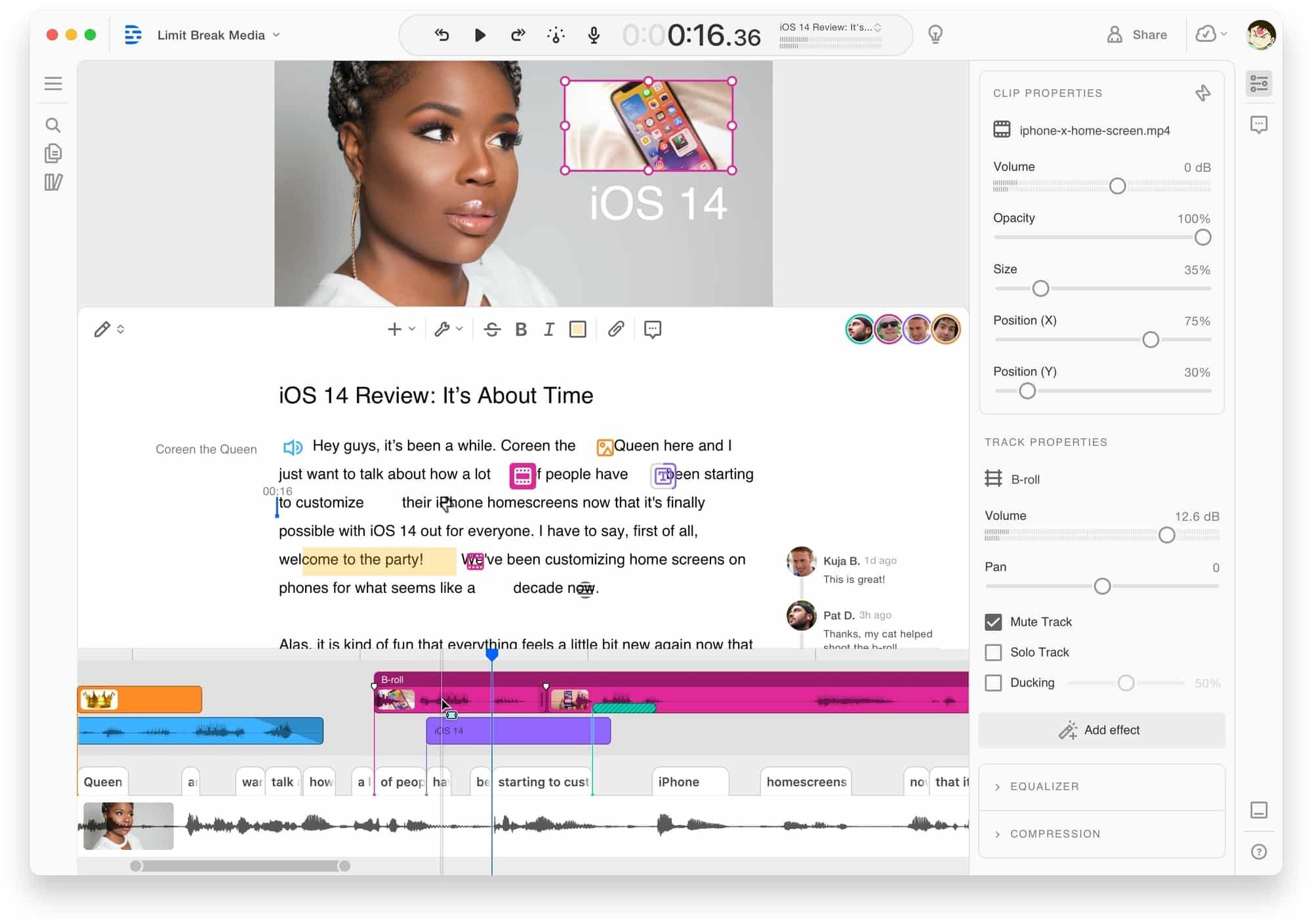
Descript is the post-production tool that most Riverside users already know. Its headline feature - edit video by editing text - makes podcast editing feel like editing a Google Doc. Import your recording, and Descript generates a transcript. Delete a word, and the audio/video cuts accordingly. Users report 60-70% time savings compared to traditional timeline editing.
In 2026, SquadCast (another Riverside competitor) was fully absorbed into Descript, giving it both recording and editing in one platform. The combined tool now handles the full podcast workflow: record remote guests, edit via transcript, add AI voiceover, remove filler words, and export.
Key features
- Text-based editing - Edit audio/video by editing the transcript
- SquadCast recording - Remote recording built into Descript
- AI voice cloning - Fix mistakes without re-recording
- Filler word removal - One-click elimination of ums and ahs
- Collaboration - Real-time team editing and commenting
What users say
Reddit users call transcript-based editing "mind-blowing for long-form content." The biggest complaints: Descript's 2026 shift to credit-based AI features means costs escalate fast. "Credits burn very fast" is a recurring G2 complaint. Customer support relies heavily on AI chatbots. See our ngram vs Descript comparison.
Pros
- ✅ Transcript editing is genuinely faster than timeline editing
- ✅ SquadCast integration means recording + editing in one tool
- ✅ AI voice cloning fixes mistakes without re-recording
Cons
- ❌ Credit-based AI features escalate costs unpredictably
- ❌ Customer support relies on chatbots, slow human response
Best for
Podcasters who want recording and transcript-based editing in one platform. Hobbyist at $16/month, Creator at $24/month, Business at $65/month.
3. StreamYard
StreamYard is the go-to for creators who need both live streaming and recording. It lets you broadcast to YouTube, LinkedIn, Facebook, Twitch, and custom RTMP destinations simultaneously, while also recording locally for later editing.
Where Riverside focuses purely on recording quality, StreamYard adds live engagement features: on-screen comments, banners, overlays, and audience interaction tools. For creators who do both live shows and recorded interviews, StreamYard eliminates the need for two separate platforms.
Key features
- Multi-platform streaming - Broadcast to 8+ platforms at once
- Local recording - Up to 4K quality alongside live stream
- On-screen branding - Logos, banners, overlays, lower thirds
- Guest management - Easy invite links, no downloads for guests
- Audience engagement - Live comments, reactions, Q&A on screen
What users say
G2 and Capterra reviews praise StreamYard's reliability and ease of use for live events. The main criticism: recording quality doesn't match Riverside's local-to-device approach, and the editing features are minimal. Pricing starts at $25/month for the Basic plan.
Best for
Creators and brands that combine live streaming with recorded content. If you already do live shows and want to record them too, StreamYard consolidates both workflows. Free plan available, Basic at $25/month.
Looking for the fastest way to create professional videos? ngram turns your screen recordings, docs, and images into polished videos in minutes. Try ngram free
4. Zencastr
Zencastr focuses on the same core problem as Riverside - high-quality remote podcast recording - but with a more accessible pricing model. Separate audio tracks for each participant, automatic post-production processing, and built-in editing tools come standard.
Zencastr's free plan is more generous than Riverside's: unlimited recording in MP3 format with up to 2 guests. The paid Podcaster plan at $20/month adds WAV recording, video, and automatic post-production.
Key features
- Separate audio tracks - Each participant recorded independently
- Automatic post-production - Noise reduction, leveling, mixing
- Built-in editor - Trim, arrange, and mix without exporting
- Soundboard - Play clips and effects during recording
- Free tier - Unlimited MP3 recording with 2 guests
What users say
Product Hunt and Reddit users praise Zencastr's simplicity and free plan generosity. The criticisms: occasional sync issues between tracks, and the video recording quality doesn't quite match Riverside's. But for audio-first podcasters, the price-to-quality ratio is strong.
Best for
Audio-first podcasters on a budget who want reliable remote recording without Riverside's overage charges. Free plan available, Podcaster at $20/month.
5. SquadCast
SquadCast pioneered progressive upload technology - recording uploads in chunks during the session, so even if someone disconnects, you never lose footage. In 2026, SquadCast is now part of Descript, but it still operates as a standalone recording option within the Descript ecosystem.
For Riverside users worried about data loss (a recurring complaint), SquadCast's progressive upload is the most direct solution. Recordings are never lost to upload failures because they're saved incrementally.
Key features
- Progressive upload - Audio/video saves incrementally during recording
- Separate tracks - Each participant on their own audio and video track
- Descript integration - One-click export to Descript for editing
- Green room - Test audio/video before going live
- Cloud backups - Automatic redundant storage
What users say
Reddit and podcast communities praise SquadCast's reliability above everything else. The integration with Descript means you go from recording to transcript editing without exporting files. The pricing at $20/month is competitive, though the feature set is narrower than Riverside's.
Best for
Podcasters who prioritize recording reliability above all else. If you've lost recordings to upload failures before, SquadCast's progressive upload is the fix. Starting at $20/month.
6. Podcastle
Podcastle positions itself as the AI-powered all-in-one podcast platform. Record, edit, enhance, and distribute from one browser-based tool. Its AI voice cloning feature (Revoice) lets you generate voiceover from text using a clone of your own voice, and the Magic Dust audio enhancer cleans up recordings automatically.
At $12/month for the Storyteller plan, Podcastle undercuts Riverside's $19/month Standard plan while offering comparable recording quality and stronger AI editing tools.
Key features
- AI voice cloning (Revoice) - Generate voiceover from text in your own voice
- Magic Dust - One-click audio enhancement and noise removal
- Remote recording - Up to 10 participants, separate tracks
- Built-in editor - Full multi-track audio editor with effects
- AI transcription - Automatic transcripts in 60+ languages
What users say
Product Hunt reviews praise Podcastle's AI features and pricing. The main criticisms: the video recording quality is below Riverside's, and the platform is better suited for audio-first content. Some users report UI quirks in the editor that slow down workflows.
Best for
Audio-first podcasters who want AI-powered recording and editing in one platform at a lower price than Riverside. Free plan available, Storyteller at $12/month.
7. VEED
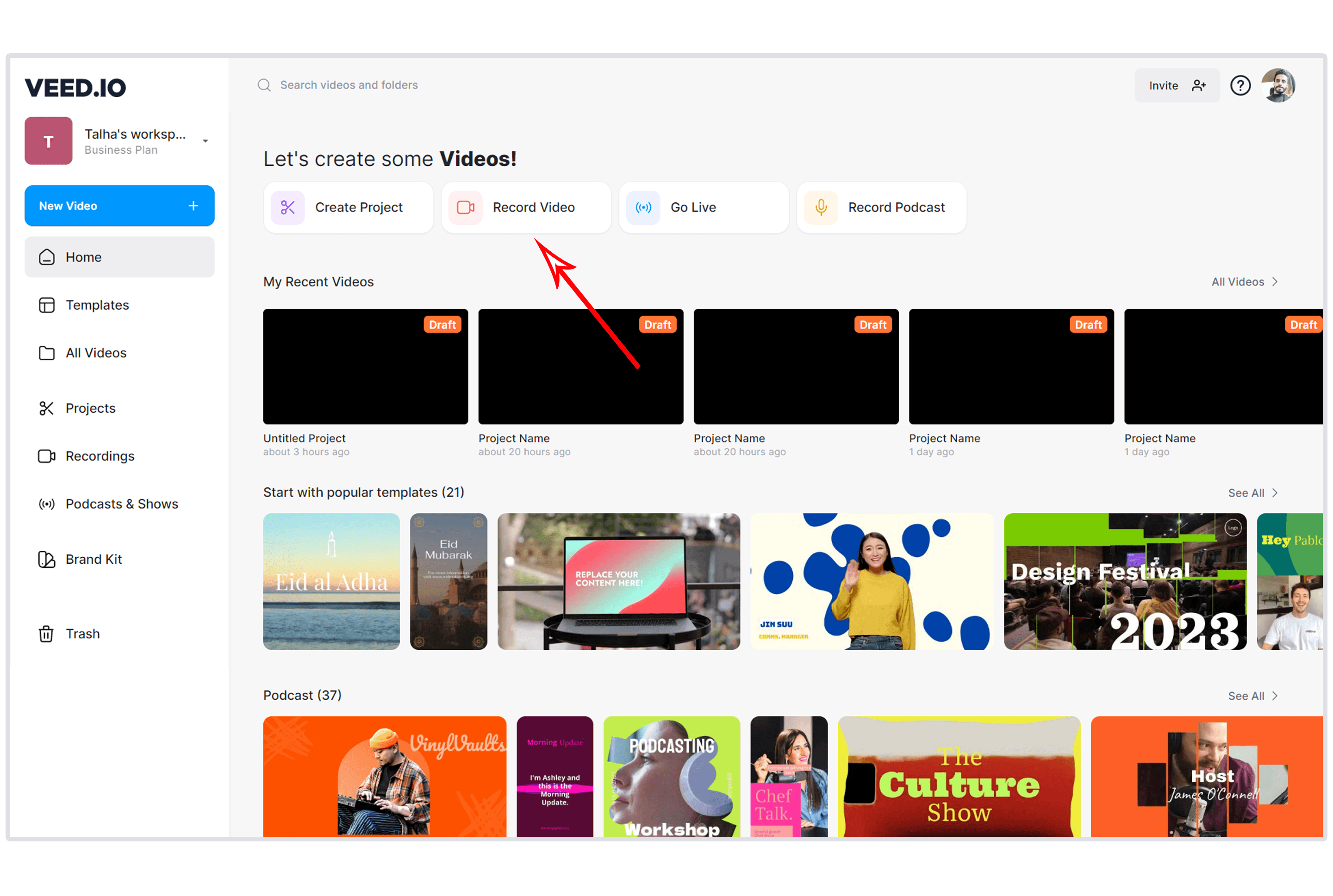
VEED is the browser-based editor for teams that need to turn recorded content into publishable video. With over 10 million monthly active users and $35 million in Sequoia Capital backing, VEED handles the editing side that Riverside doesn't.
For Riverside users who record interviews and then need to add subtitles, resize for social, remove backgrounds, or add branding, VEED is the editing layer that completes the workflow. See our ngram vs VEED comparison.
Key features
- Auto subtitles - AI-generated captions in 50+ languages
- Screen recording - Record screen and webcam in-browser
- Background removal - AI-powered background replacement
- Multi-platform export - Auto-resize for YouTube, Instagram, TikTok
- Collaboration - Team editing with commenting
What users say
Capterra and G2 reviews praise VEED's subtitle accuracy and interface simplicity. The Pro plan at $24/month is seen as the best value. Criticism focuses on transcription accuracy with accents and the free tier's watermark.
Best for
Teams that record with Riverside (or another tool) and need a dedicated editor for subtitles, resizing, and social distribution. Free plan available, Lite at $12/month, Pro at $24/month.
Here's how monthly recording hours compare across the top alternatives:
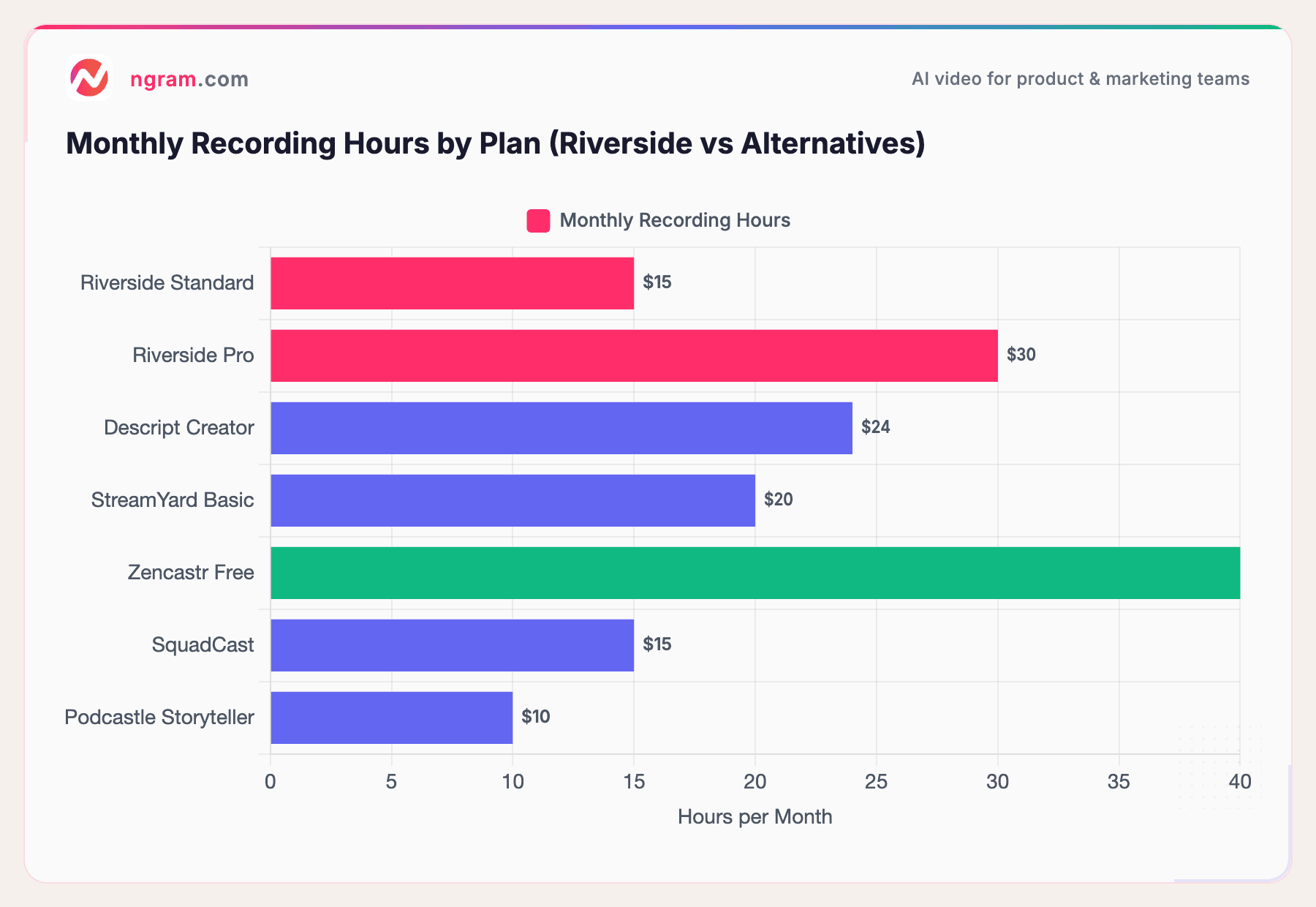
Zencastr's free plan offers unlimited MP3 recording - the most generous free tier for audio-first podcasters. Riverside's Standard plan at $19/month limits you to 15 hours, which is where overage complaints start.
Our testing approach
We tested each tool hands-on, recorded sample podcast episodes and video interviews, read hundreds of user reviews across G2, Capterra, Reddit, and Product Hunt, and compared them across five weighted criteria:
| Criteria | Weight | What we looked at |
|---|---|---|
| Features | 25% | Recording capabilities, editing tools, export options, collaboration |
| Ease of Use | 25% | Onboarding, guest experience, UI quality, learning curve |
| Recording Quality | 20% | Audio fidelity, video resolution, local vs. cloud recording, track separation |
| Value | 20% | Price per recording hour, free tier generosity, overage transparency |
| Support & Community | 10% | Documentation, response times, community size, update cadence |
We also factored in:
- Real user reviews from G2, Capterra, Reddit, and Product Hunt (qualitative sentiment, not numerical scores)
- Guest experience - how easy it is for non-technical guests to join
- Data reliability - upload stability, progressive saving, backup systems
Recording Quality replaces the standard AI Capabilities criterion because Riverside alternatives are primarily judged on how well they capture audio and video, not on AI generation features.
Frequently Asked Questions
What's the best free Riverside alternative?
Zencastr offers the most generous free plan for podcasters: unlimited MP3 recording with up to 2 guests, no watermarks. Podcastle's free tier includes AI editing features. For video editing after recording, VEED and ngram both offer free tiers.
Is Descript better than Riverside?
They solve different problems. Riverside excels at high-quality remote recording (local-to-device capture). Descript excels at editing (transcript-based, faster than timeline editing). In 2026, Descript absorbed SquadCast, so it now offers both recording and editing, but recording quality doesn't match Riverside's local capture. Most serious podcasters use Riverside to record and Descript to edit.
Can I use ngram with Riverside recordings?
Yes. Record in Riverside, export the file, and upload it to ngram. ngram turns the raw recording into a polished, on-brand video with smart zoom, auto-cuts, captions, and brand styling. It handles the post-production step that Riverside skips.
How much does Riverside really cost?
The headline pricing ($19/month Standard, $29/month Pro) doesn't tell the full story. Overage charges for exceeding recording hours hit at 2-3x the effective per-hour rate. 4K export requires the Pro plan. And the free tier (720p, watermarked, 2 hours/month) is barely usable. Most serious podcasters end up on the $29/month Pro plan.
Which Riverside alternative has the best recording quality?
Riverside's local-to-device recording is still the gold standard for raw capture quality. Among alternatives, SquadCast's progressive upload comes closest in reliability. StreamYard adds live streaming capability but with lower recording quality. For most podcasters, the recording quality differences are marginal compared to the editing and pricing differences.
Is there a Riverside alternative for video interviews?
ngram is built for turning recorded interviews into publishable video content. StreamYard handles live video interviews with multi-platform streaming. VEED adds subtitle, branding, and social formatting layers after recording. For pure recording quality, Riverside itself remains strong.
The honest answer
Riverside's recording quality is genuine. If local-to-device capture is your top priority and you're willing to pay Pro pricing ($29/month), it's still a strong choice. The problems start when you need editing, hit recording hour limits, or try to do anything beyond basic trimming.
If you record and need polished output, ngram turns raw recordings into on-brand video without manual editing. If you want recording and transcript editing in one platform, Descript plus SquadCast covers both. If you need live streaming alongside recording, StreamYard does that. And if you're an audio-first podcaster on a budget, Zencastr's free unlimited recording is hard to beat.
The podcast tools market in 2026 is deep enough that no single platform needs to do everything. Pick the one that solves your biggest bottleneck.
Try ngram free - your first video in under 5 minutes. Turn raw podcast recordings, interviews, or screen captures into polished, on-brand video without touching a timeline. Start free