
Beyond talking heads: 8 AI video tools for teams who need more
Synthesia built a $4 billion business on a simple promise: type a script, pick an avatar, get a video. For enterprise training teams producing compliance modules in 40 languages, it's hard to beat. Over 50,000 companies use Synthesia, and the platform has generated millions of AI avatar videos since launch.
But here's the pattern we keep seeing across G2, Reddit, and Capterra: teams sign up for Synthesia expecting a complete AI video platform and discover they've bought an avatar generator with a script input box. The moment you need video from existing assets - product recordings, docs, screenshots, marketing decks - Synthesia's "type a script, pick a talking head" workflow doesn't fit.
Synthesia pricing starts at $18/month (annual) for just 10 minutes of video. That's one 10-minute training module per month. For teams producing regular content, the math breaks quickly.
We tested 8 Synthesia alternatives across AI capabilities, features, pricing, and real user sentiment. Here's what holds up for different use cases in 2026.
Where Synthesia falls short in 2026
Synthesia does avatar videos well. That's also its limitation.
10 minutes per month on Starter. At $18/month (annual), you get 10 minutes of video. A single 5-minute training module uses half your monthly allocation. Teams producing regular content hit the ceiling before the second week. Credits don't roll over.
Locked into the talking-head format. Every Synthesia video follows the same pattern: avatar on screen, reading a script. You can't upload a screen recording and polish it. You can't turn a product doc into a visual explainer. You can't create from your existing assets. If your video needs aren't "avatar reads script," you're paying for capability you won't use.
Content moderation surprises. Healthcare, biotech, and medical diagnostics companies report having their accounts banned or restricted for creating factual educational content. Synthesia's Acceptable Use Policy restricts avatar use in these sectors, but users say the limitation isn't clearly communicated before purchase.
Custom avatars cost $1,000/year extra. The stock avatars work for generic content, but anyone wanting a branded avatar on their training videos needs to budget an additional $1,000/year per avatar - on top of their plan cost.
The uncanny valley. G2 and Reddit reviews consistently note that avatar lip sync, while improving, still falls into "almost-but-not-quite real" territory. For internal training, it's fine. For customer-facing or marketing video, the artificial delivery can undermine credibility.
Quick comparison
| Tool | Best For | Starting Price | AI Type | Key Differentiator |
|---|---|---|---|---|
| ngram | Professional video from any asset | Free / $29/mo | Asset-to-video AI | Creates from docs, recordings, URLs - not just scripts |
| HeyGen | Realistic AI avatars + translation | Free / $29/mo | Avatar + translation | 175+ language video translation with lip-sync |
| Colossyan | Enterprise training + L&D | Free / $27/mo | Avatar + interactive | Branching scenarios, quizzes, SCORM export |
| Elai | Interactive e-learning videos | $23/mo (annual) | Avatar + interactive | Quiz elements, clickable buttons, voice cloning |
| Pictory | Long-form to short-form clips | Free / $19/mo | Text-to-video | Turns blog posts and scripts into video clips |
| VEED.io | Browser-based video editing | Free / $12/mo | AI editing | Subtitle generation, Magic Cut, social-first |
| D-ID | API-first avatar generation | Free / $4.70/mo | Avatar API | Developer-focused, Creative Reality API |
| InVideo | Template-based video creation | Free / $25/mo | Template + AI | 5,000+ templates, stock media library |
1. ngram
If you're looking at Synthesia alternatives because avatar videos aren't enough for your team's video needs, ngram takes a fundamentally different approach to AI video.
Where Synthesia starts with a script and an avatar, ngram starts with whatever you already have. Upload a screen recording, a product doc, a slide deck, some screenshots, or even just a URL. Tell ngram who the video is for, what it needs to accomplish, and where it's going. The AI handles the script, storyboard, visuals, pacing, captions, and brand styling.
What makes ngram stand out
Context-aware generation adapts every video to your audience, goal, and channel. A developer onboarding video gets different pacing and structure than a LinkedIn product announcement. A sales demo leads with the prospect's pain point. This isn't template swapping - the AI restructures the entire video around your intent.
Plan first, generate second. ngram shows you the script and storyboard before anything renders. You review the plan, fix direction if needed, then generate. Most AI video tools make you commit to a final product before you've confirmed the direction. With ngram, you fix problems at the cheapest moment - before rendering starts.
Start from what you have. Blank pages waste time. Your docs, decks, screenshots, and recordings already contain the story. ngram extracts it, organizes it, and builds a polished video from it. Teams regularly go from a messy Google Doc to a finished product video in under 15 minutes.
AI-powered editing turns rough screen recordings into polished walkthroughs: automatic filler word removal, smart zoom on interactions, cursor emphasis, and callouts driven by your prompts.
Key features
- Context-aware generation - Adapts structure, pacing, and tone to your audience and channel
- Plan first, generate second - Script and storyboard review before rendering
- Any asset in - Text, images, docs, URLs, screen recordings as input
- AI editing - Auto-cut, filler word removal, smart zoom, cursor emphasis
- Multi-format export - 16:9, 9:16, 1:1 with captions included
- Brand kits - Logo, colors, fonts applied automatically
Pros
- ✅ Creates complete videos from raw assets, not limited to avatar-reads-script format
- ✅ Script and storyboard review before rendering prevents wasted render time
- ✅ Brand consistency across every video without manual effort
- ✅ AI editing turns rough recordings into polished walkthroughs automatically
Cons
- ❌ Web-based only, no native desktop app yet
- ❌ Not designed for AI avatar talking-head videos specifically
Who is ngram best for?
Product Marketing, Growth, Sales Enablement, Customer Success, and Agencies who need professional videos from existing assets - not just avatar scripts. If your videos go to customers, prospects, or public audiences and need to look intentional, ngram is the pick.
ngram has a very generous free plan with paid plans starting at $29 per month.
Ready to try ngram? Create your first video in under 5 minutes. Start free
See ngram in action:
2. HeyGen
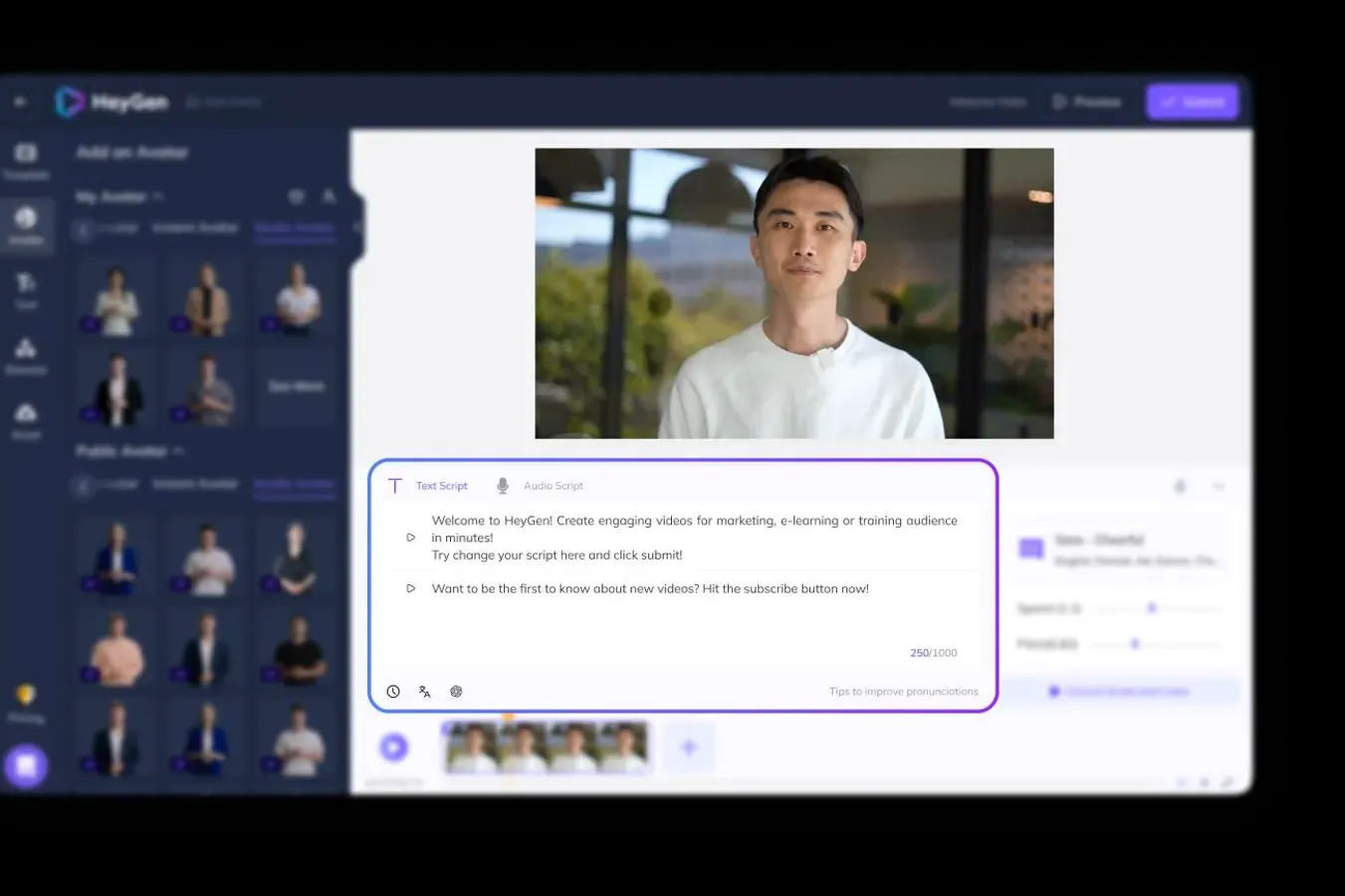
HeyGen is Synthesia's closest direct competitor, and in many ways it's pulled ahead. With 500,000+ users, HeyGen offers more realistic avatars (their Avatar IV model is genuinely impressive), 175+ language video translation with automated lip-sync, and a more generous pricing structure.
The "synthesia vs heygen" keyword gets 320 monthly searches - as much as "synthesia alternatives" itself. That tells you where the market's attention is.
Key features
- Avatar IV - Latest-generation photorealistic avatars with natural expressions
- 175+ language translation - Automated lip-sync translation of existing videos
- Streaming avatars - Real-time interactive avatar conversations
- Custom avatar creation - Create your own avatar from video footage (Creator plan+)
- Talking photos - Animate still photos with voice and lip-sync
What users say
Reddit users consistently rate HeyGen's avatar quality above Synthesia's, particularly for lip-sync accuracy. The main complaints center on the Premium Credit system - Avatar IV videos consume 20 credits per minute, meaning Creator's 200 monthly credits cover only 10 minutes of premium avatar content. Some users report the free plan feels restrictive (3 videos with watermark). G2 reviewers praise the translation feature as "the single best AI dubbing tool available."
Pros
- ✅ Avatar IV quality leads the market for realistic AI presenters
- ✅ 175+ language video translation with lip-sync is unmatched
- ✅ Streaming avatars enable real-time interactive conversations
Cons
- ❌ Premium Credit system means Avatar IV is expensive at scale (20 credits/minute)
- ❌ Free plan limited to 3 watermarked videos
Best for
Teams that need the most realistic AI avatars available, especially for multilingual content. If video translation with lip-sync is your primary use case, HeyGen is the clear leader. Compared to Synthesia, HeyGen offers better avatar quality and translation at a similar price point.
Creator plan starts at $29/month. Free plan available (3 videos, watermarked).
3. Colossyan
Colossyan is built specifically for enterprise training and L&D teams. While Synthesia serves training use cases too, Colossyan goes deeper with interactive branching scenarios, embedded quizzes, SCORM export for LMS delivery, and multi-avatar conversations (up to 4 avatars in a scene).
Over 1,000 companies use Colossyan for training content, including organizations that report saving up to 80% on video production costs compared to traditional workflows.
Key features
- Interactive branching scenarios - Create choose-your-own-path training videos
- Embedded quizzes - Add knowledge checks directly into videos
- SCORM export - Deliver directly to any LMS (Cornerstone, Docebo, etc.)
- Multi-avatar conversations - Up to 4 realistic avatars interacting in a scene
- 100+ language localization - Auto-translate both slides and scripts
What users say
L&D teams praise Colossyan for "finally making training video production accessible without a video team." The branching scenario feature gets the most love from teams building compliance and onboarding content. Complaints focus on the Starter plan's limited minutes (120/year = 10/month), the UI being complex for first-time users, and avatar quality falling slightly behind HeyGen's latest models. Compared to Synthesia, users consistently note Colossyan's superior interactive features.
Pros
- ✅ Best-in-class interactive features for L&D (branching, quizzes, SCORM)
- ✅ Multi-avatar conversations create more engaging training content
- ✅ 100+ language localization without Enterprise pricing
Cons
- ❌ Starter plan limited to 120 minutes/year (10/month)
- ❌ UI complexity steeper than simpler tools like HeyGen
Best for
Enterprise L&D and training teams who need interactive, quiz-embedded training videos with LMS integration. If you're choosing between Synthesia and Colossyan specifically for training content, Colossyan's interactive features and SCORM export give it the edge.
Free tier available (5 minutes). Starter from $27/month. Pro from $88/month.
Looking for the fastest way to create professional videos? ngram turns your screen recordings, docs, and images into polished videos in minutes. Try ngram free
4. Elai
Elai occupies a similar space to Colossyan but differentiates with stronger interactive e-learning features and competitive pricing. Its quiz elements prevent learners from skipping ahead without answering knowledge checks, and it supports voice cloning in 28 languages.
Key features
- Interactive quizzes - Learners can't skip ahead without answering questions
- 80+ avatars + 300+ voices - Broad library of presenters and voice options
- Voice cloning - Clone your voice in 28 languages (Advanced plan)
- 75+ language translation - Auto-translate videos with voice adaptation
- Screen recording - Built-in capture tool for tutorial creation
What users say
Users praise Elai for being "the most complete e-learning video platform for the price." The interactivity features consistently get highlighted as significantly better than Synthesia's standard linear playback. Main complaints include occasional avatar rendering delays on longer videos and the Basic plan's 15-minute monthly limit. G2 reviewers note the UI is straightforward compared to Colossyan.
Best for
Training teams and course creators who need interactive e-learning videos with quiz elements and voice cloning at a competitive price point. Good middle ground between Synthesia's simplicity and Colossyan's enterprise complexity.
Basic plan starts at $23/month (annual). Advanced plan at $100/month (annual).
5. Pictory
Pictory takes a different approach from avatar-based tools entirely. Instead of generating talking-head videos, it transforms existing text content - blog posts, articles, scripts, and long-form video - into short-form video clips with stock footage, music, and captions.
Key features
- Blog-to-video - Paste a URL and Pictory creates a video from the article
- Script-to-video - Turn any text into a video with stock footage and music
- Long-to-short - Extract key moments from long videos into clips
- Auto-captions - AI-generated subtitles and highlighting
- Brand kit - Custom fonts, colors, and logos (Premium plan)
What users say
Content marketers love Pictory for "turning a 2,000-word blog post into 5 social clips in 10 minutes." The blog-to-video feature is genuinely useful for repurposing content. Complaints focus on the stock footage sometimes feeling generic and the AI's tendency to pick visually irrelevant clips. G2 reviewers note it's not a replacement for Synthesia if you need avatars - it's a different tool for a different job.
Best for
Content marketing teams who want to repurpose existing written content into video format. If your primary need is "turn blog posts and articles into social video clips," Pictory handles that natively. Not a Synthesia replacement for avatar-based training content.
Free plan available. Starter at $19/month (annual).
6. VEED.io
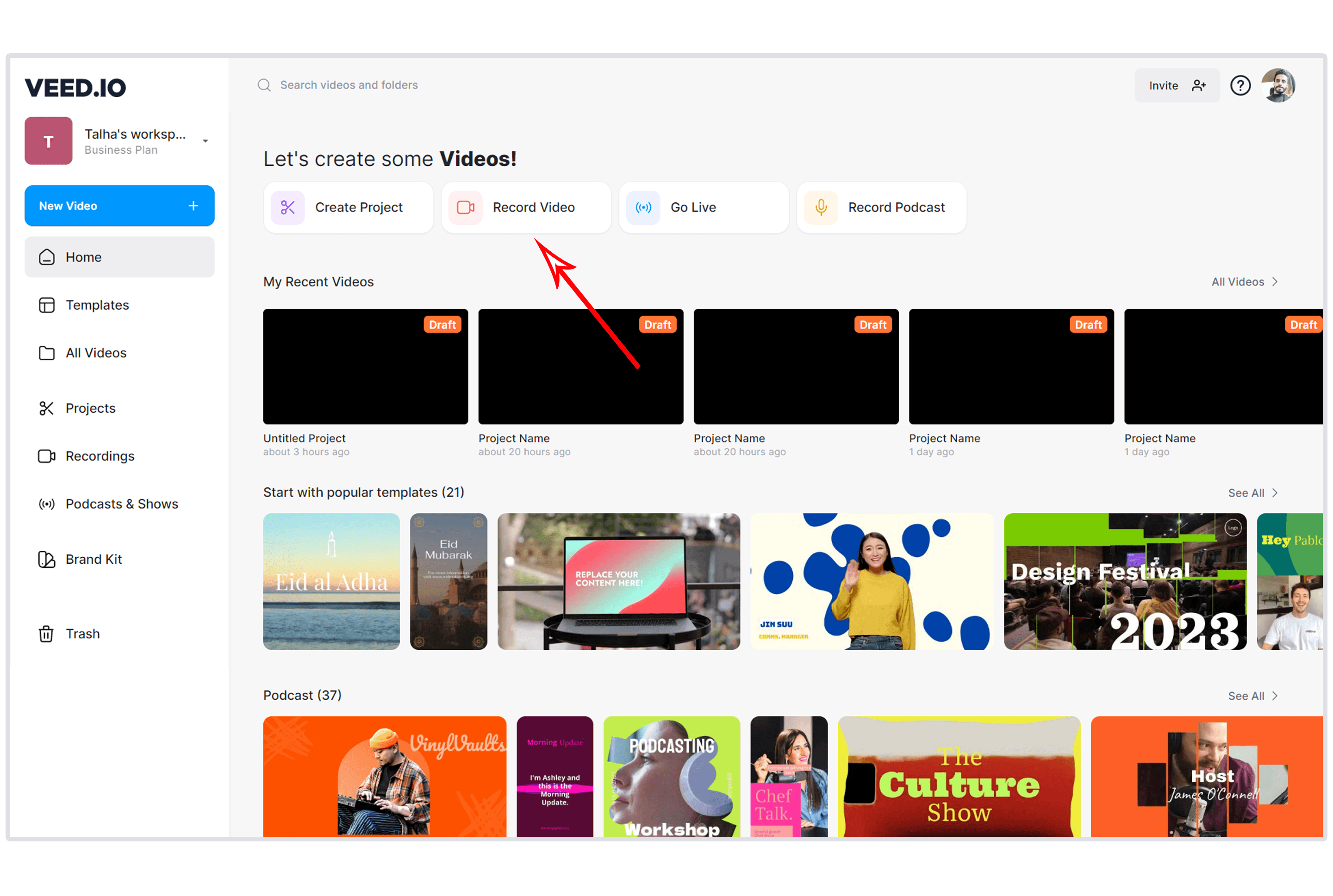
VEED.io is the browser-based Swiss Army knife of video editing. It's not an avatar tool like Synthesia, but teams looking for AI-powered video creation often end up here because it handles subtitles, social clip creation, and basic AI editing without any software installation.
Key features
- Browser-based - No install needed, works on any device including Chromebooks
- AI auto-subtitles - Automatic captions with 50+ language translations
- Magic Cut - AI identifies high-impact moments for short-form clips
- Text-based editing - Edit video by editing the auto-generated transcript
- AI avatars - Generate avatar videos (Pro plan, up to 4 hours/year)
What users say
Users praise VEED for being "the easiest video editor that actually does useful things." The subtitle accuracy and social clip generation get consistent praise. Complaints focus on the free plan's mandatory watermark and the pricing tiers feeling steep for individual creators ($12 Basic to $24 Pro). G2 reviewers note the AI avatar feature is limited compared to dedicated platforms like Synthesia or HeyGen.
Best for
Social media managers and creators who need fast subtitle generation, social clip creation, and basic editing in the browser. If you need both AI avatars AND editing tools in one platform, VEED covers both - though neither as deeply as dedicated tools.
Free plan available (watermarked). Basic at $12/month. Pro at $24/month (annual).
7. D-ID
D-ID is the developer's choice for AI avatar generation. While Synthesia focuses on self-serve video creation, D-ID's strength is its Creative Reality API, which lets development teams build avatar-powered experiences directly into their products.
Key features
- Creative Reality API - Embed AI avatar generation into any application
- Talking photos - Animate any still photo with voice and lip-sync
- Natural conversations - Real-time avatar chat for customer service
- 120+ languages - Broad voice and language support
- Low entry price - API access starts at $4.70/month
What users say
Developers praise D-ID for "the most accessible AI avatar API on the market." The ability to animate any photo with realistic lip-sync is popular for creative projects. Complaints focus on the self-serve Studio being basic compared to Synthesia or HeyGen, and the API pricing becoming expensive at scale. Product Hunt reviews highlight the "animate a photo" feature as the standout.
Best for
Development teams who need to integrate AI avatar generation into their own products, and creative professionals who want to animate photos with voice. Not ideal for teams who just want to create training videos through a web interface.
Lite plan starts at $4.70/month. API pricing scales by usage.
8. InVideo
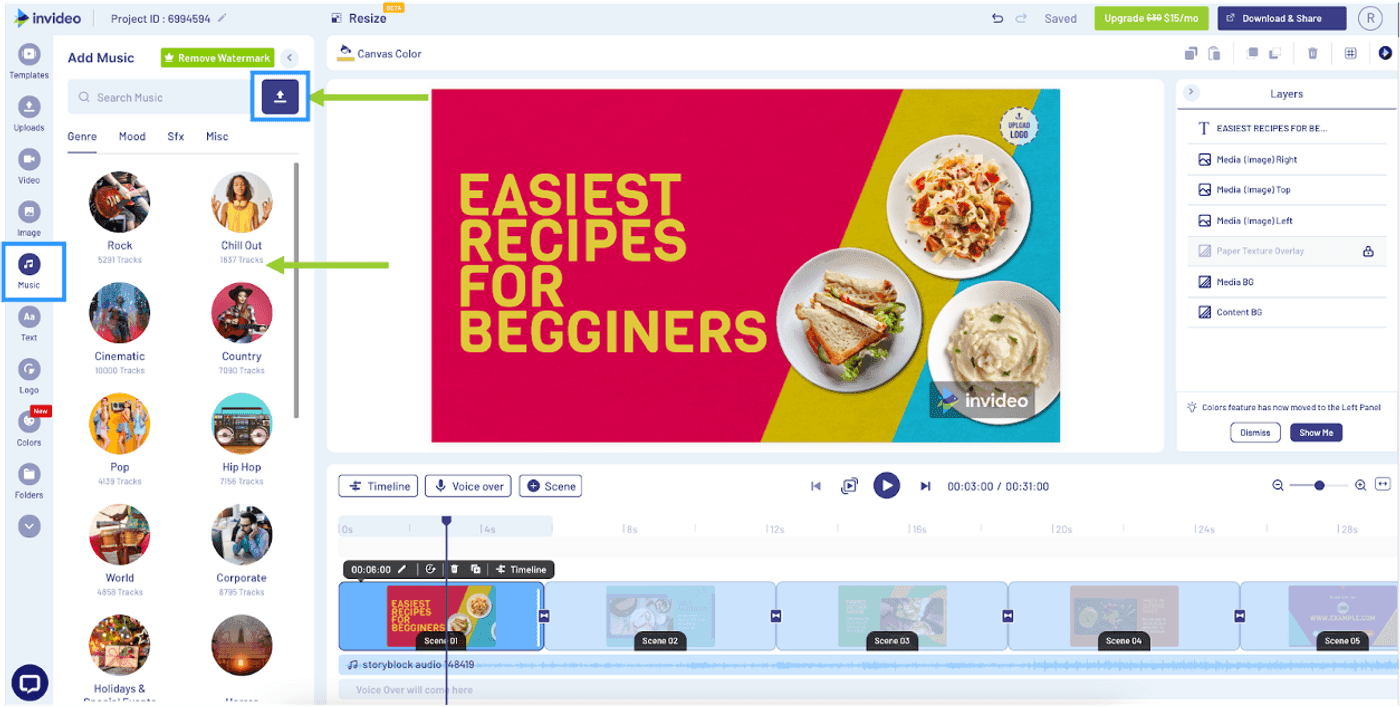
InVideo occupies a middle ground between AI video generators and traditional template editors. With 5,000+ pre-built templates and a massive stock media library (16M+ assets), it's designed for teams who want structured video creation without starting from scratch.
Key features
- 5,000+ templates - Pre-built designs for ads, social, presentations, and more
- 16M+ stock assets - iStock integration with images, video clips, and music
- AI script generation - Generate video scripts from text prompts
- AI voiceover - Multiple AI voices for narration
- Brand presets - Save colors, logos, and fonts for consistency
What users say
Marketing teams praise InVideo for "the broadest template library of any video tool." The stock media integration saves significant time on asset sourcing. Complaints center on the AI-generated content feeling template-driven (noticeable patterns across videos), the free plan's watermark, and rendering times on complex projects. Compared to Synthesia, InVideo offers more creative flexibility but lacks avatar quality.
Best for
Marketing teams and small businesses who need template-based video creation with extensive stock media. Good for ad creatives, social content, and presentations. Not a direct Synthesia replacement for avatar-based training.
Free plan available. Business plan at $25/month (annual).
Here's how Synthesia's pricing compares to alternatives for monthly video output:
Synthesia's Creator plan at $64/month is more than double most alternatives. At the Starter tier ($18/month), you get 10 minutes of video - meaning each minute costs $1.80, making it one of the most expensive per-minute options on the market.
How we compared these tools
We tested each tool, analyzed 400+ user reviews across G2, Capterra, Reddit, and Product Hunt, and compared them against five weighted criteria optimized for the AI video category:
| Criteria | Weight | What we looked at |
|---|---|---|
| AI Capabilities | 30% | Avatar quality, generation accuracy, AI editing, translation, voice cloning |
| Features | 25% | Video types supported, export options, interactivity, integrations |
| Value | 20% | Pricing vs. video minutes included, free tier generosity, hidden costs |
| Ease of Use | 15% | Time from signup to first video, learning curve, UI clarity |
| Support & Community | 10% | Documentation, community size, enterprise support quality |
We weighted AI capabilities highest because teams evaluating Synthesia alternatives are specifically looking for AI-powered video creation. The tools that win on AI quality and flexibility deliver the most value for these users.
Common questions about Synthesia alternatives
Is there a free alternative to Synthesia?
Several tools offer free plans. D-ID starts at $4.70/month with API access. HeyGen's free plan gives 3 watermarked videos. ngram has a generous free plan for creating videos from existing assets. VEED and Pictory also have free tiers with limitations. None match Synthesia's avatar quality for free, but they cover different use cases.
What's the best Synthesia alternative for training videos?
Colossyan, specifically for its interactive branching scenarios, embedded quizzes, and SCORM export. Elai is a strong second choice with similar interactive features at a lower price point. Both outperform Synthesia on interactivity for L&D content.
Can I create videos without avatars?
Yes. ngram creates professional videos from your existing assets (docs, recordings, screenshots) without any avatar. Pictory turns blog posts into video clips. VEED handles editing and subtitle generation. Not every video needs a talking head.
How does HeyGen compare to Synthesia in 2026?
HeyGen's Avatar IV is widely considered more realistic than Synthesia's current avatars. HeyGen's 175+ language video translation with lip-sync is the market leader. Pricing is comparable (HeyGen Creator at $29/month vs Synthesia Starter at $18/month), but HeyGen's credit system means premium features cost extra. "Synthesia vs HeyGen" is a 320/month search query, reflecting genuine market uncertainty.
What if I need both avatar videos AND regular video editing?
VEED.io offers both AI avatars (Pro plan) and a full editing suite in the browser. ngram handles video creation from any asset type, covering the "regular video" need. InVideo combines templates with AI generation. For a single platform that does both, VEED is the most balanced option.
The bottom line
Synthesia is the gold standard for one specific job: enterprise-grade AI avatar videos in dozens of languages. If that's exactly what you need - and your budget handles $64/month for Creator or custom Enterprise pricing - it's still a strong choice.
But if you've been using Synthesia and finding yourself limited by the talking-head format, frustrated by the 10-minute Starter cap, or needing video types that avatars can't deliver, the alternatives are strong and varied.
For complete video creation from any asset, ngram gives you AI-powered generation without the avatar-only limitation. For the most realistic avatars with translation, HeyGen's Avatar IV and 175+ language lip-sync lead the market. For enterprise training with interactivity, Colossyan's branching scenarios and SCORM export go deeper than Synthesia. For repurposing written content, Pictory turns blogs into video clips. For budget API access, D-ID starts at $4.70/month.
The AI video landscape has fragmented. No single tool does everything. The right choice depends on whether you need avatars, asset-to-video creation, interactive training, or content repurposing.
ngram turns your raw content into polished, on-brand videos in minutes. No avatars needed. No script boxes. Start from what you already have.