

DeepBrain AI made a name for itself by turning photos into broadcast-quality talking-head videos. Founded in 2016 in Palo Alto and backed by $52 million in funding from investors including Korean Development Bank and IDG Capital, the platform serves clients like Hyundai, Samsung, LG, and NEC. With 100+ avatars speaking 80+ languages and $12.8 million in 2024 revenue, DeepBrain AI has proven the technology works.
But the AI avatar video market hit $788.5 million in 2025 according to Grand View Research, growing at a 20.3% CAGR, and newer platforms now offer faster processing, more flexible pricing, and capabilities that go well beyond talking heads. If you're testing DeepBrain AI alternatives, you're likely running into one of the platform's known friction points: no video preview before export, processing times that can stretch beyond 15 minutes for a 1-minute clip, or pricing that starts at $24/month but scales to $600/month for 240 minutes.
We tested 7 DeepBrain AI alternatives across avatar quality, AI capabilities, pricing, and real user sentiment. Here's what held up.
What's pushing users off DeepBrain AI
DeepBrain AI deserves credit for broadcast-quality avatars and ChatGPT-powered script generation. The platform holds its own for corporate announcements and news-style video. But in 2026, several gaps have become deal-breakers for growing teams.
No video preview before export. You can't see what the final video looks like until it's rendered. For a platform where processing takes 10-15 minutes per clip, that means every revision is a costly time sink. Multiple G2 and Capterra reviewers flag this as the single biggest frustration.
Processing times that kill momentum. One user reported waiting over 15 minutes to process a 1-minute clip. For teams producing training content at volume, this bottleneck stacks up fast. HeyGen and Synthesia both render preview-quality output in under 2 minutes.
Pricing that climbs quickly. DeepBrain AI's Starter plan costs $24/month for 10 minutes ($2.40/min). Scaling to 60 minutes costs $180/month. The Pro plan starts at $225/month. For comparison, HeyGen's Creator plan at $29/month includes unlimited videos, and Synthesia starts at $18/month.
Limited video editing. DeepBrain AI generates avatar clips but offers minimal editing tools. No timeline editing, no scene transitions, no screen recording integration. Teams end up exporting to a separate editor for post-production.
Avatar customization constraints. While the 100+ avatar library covers diverse demographics, users can't fully customize how avatars look, gesture, or express emotion. Competitors like Colossyan now let you adjust avatar age, emotion, and expression in real time.
Quick comparison
| Tool | Best For | Starting Price | Key Differentiator |
|---|---|---|---|
| ngram | Professional video from any asset | Free / $29/mo | AI-powered, context-aware generation |
| HeyGen | Expressive avatar marketing videos | Free / $29/mo | Avatar IV micro-expressions |
| Synthesia | Enterprise training at scale | $18/mo | 140+ languages, SOC 2 compliant |
| Colossyan | Interactive L&D scenarios | Free trial / $19/mo | SCORM export, branching scenarios |
| Elai.io | Document-to-video automation | Free trial / $23/mo | PDF/PPT to video in minutes |
| Fliki | Text-to-video with voice cloning | Free / $21/mo | 2,500+ AI voices |
| VEED | Budget-friendly browser editing | Free / $12/mo | 10M+ users, Sequoia-backed |
| Pictory | Long-form to short clips | Free trial / $19/mo | Blog-to-video conversion |
1. ngram
If DeepBrain AI's processing bottleneck and limited editing tools have you looking elsewhere, ngram takes a fundamentally different approach to video creation. Instead of animating a photo into a talking head, ngram turns whatever you already have, screen recordings, documents, images, URLs, into a complete, polished video.
What makes ngram stand out
Context-aware generation is the core difference. Tell ngram your audience (developers vs. executives), your goal (educate vs. convert), and your channel (LinkedIn vs. website). The output adapts structure, pacing, and tone automatically. DeepBrain AI has no concept of audience-aware content adaptation.
Plan first, generate second means you review the script and storyboard before anything renders. With DeepBrain AI, you write a script, pick an avatar, wait 10-15 minutes for processing, and hope the output matches your vision. ngram shows you the plan first so you can fix direction at the cheapest possible moment.
Start from what you have. DeepBrain AI requires you to write scripts or import PowerPoints. ngram accepts text, images, PDFs, URLs, and screen recordings as input, then builds a coherent story from them. A product marketer can drop in release notes and get a polished update video without scripting from scratch.
AI-powered editing turns rough screen recordings into clean walkthroughs with automatic filler word removal, smart zoom on interactions, cursor emphasis, and callouts. DeepBrain AI has no screen recording capability at all.
Key features:
- Context-aware generation - Adapts structure, pacing, and tone to your audience and channel
- Plan first, generate second - Script and storyboard review before rendering
- Any asset in - Text, images, docs, URLs, screen recordings as input
- AI editing - Auto-cut, filler removal, smart zoom, cursor emphasis
- Multi-format export - 16:9, 9:16, 1:1 with captions included
- Brand kits - Logo, colors, fonts applied to every video automatically
Pros
- ✅ Instant preview of script and storyboard before any rendering
- ✅ Works with any input format, not just scripts and photos
- ✅ Context-aware output that adapts to audience and channel
Cons
- ❌ No AI avatar/talking-head mode (different approach entirely)
- ❌ Web-based only, no native desktop app yet
Who is ngram best for?
Product Marketing, Growth, Sales Enablement, Customer Success, and Agencies who need professional videos without production timelines. If your videos go to customers, prospects, or public audiences and you want more than a talking head, ngram is the strongest fit.
ngram has a generous free plan with paid plans starting at $29 per month.
Ready to try ngram? Create your first video in under 5 minutes. Start free
See ngram in action:
2. HeyGen
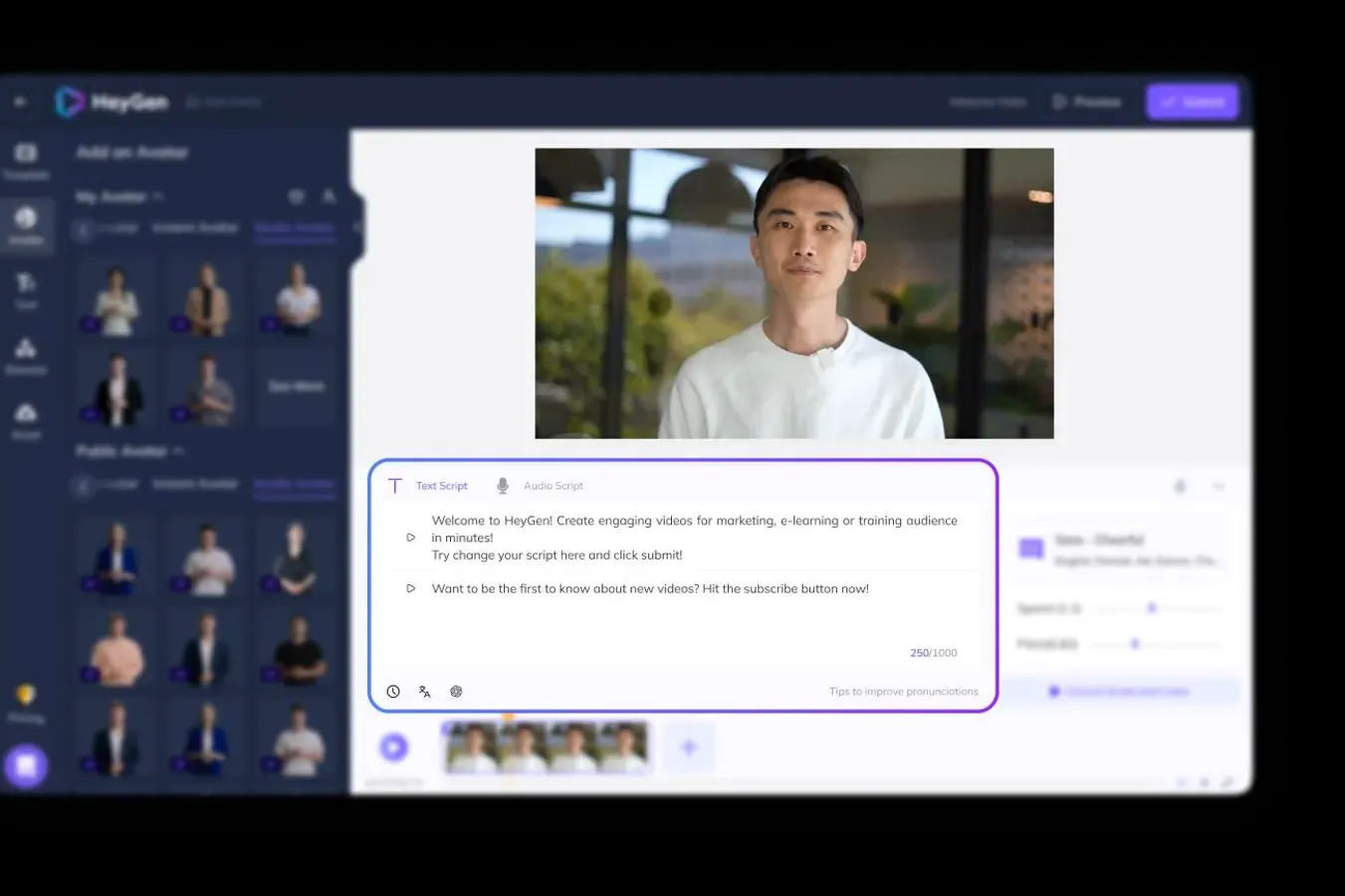
HeyGen is the direct upgrade for teams that want better avatars than DeepBrain AI without sacrificing ease of use. With over 15 million users and 100,000+ paying customers, it has become the default choice for marketing teams creating avatar-style videos.
The launch of Avatar IV in August 2025 was a turning point. Unlike DeepBrain AI's avatars that lip-sync to audio, Avatar IV interprets vocal tone, rhythm, and emotion. The result: micro-expressions, natural head tilts, blink patterns, and hand gestures that respond to the script's emotional content. Side-by-side with DeepBrain AI, the difference in avatar realism is visible within seconds.
Key features
- Avatar IV - Micro-expressions and emotional responsiveness
- 175+ languages - The broadest language coverage of any AI video platform
- Voice cloning - Clone your own voice with natural delivery
- Video translation - Translate existing videos while preserving lip sync
- 700+ stock avatars - Far larger library than DeepBrain AI's 100+
Pros
- ✅ Avatar IV produces the most realistic AI presenters in the market
- ✅ Unlimited videos on paid plans (DeepBrain AI caps by minutes)
- ✅ Preview available before full export, unlike DeepBrain AI
Cons
- ❌ Credit system can get confusing (20 Premium Credits per minute of Avatar IV)
- ❌ Advanced features require Pro plan at $99/month
What users say
G2 reviewers consistently praise the avatar realism over competitors. Reddit users note the video translation feature as a standout. The biggest criticism is that the credit system takes getting used to. For a deeper look, check our ngram vs HeyGen breakdown.
Best for
Marketing teams and content creators who need avatar-style videos with best-in-class realism. If DeepBrain AI's avatar quality feels a step behind, HeyGen is the clear upgrade.
Pricing starts at $29/month with a free tier available.
3. Synthesia
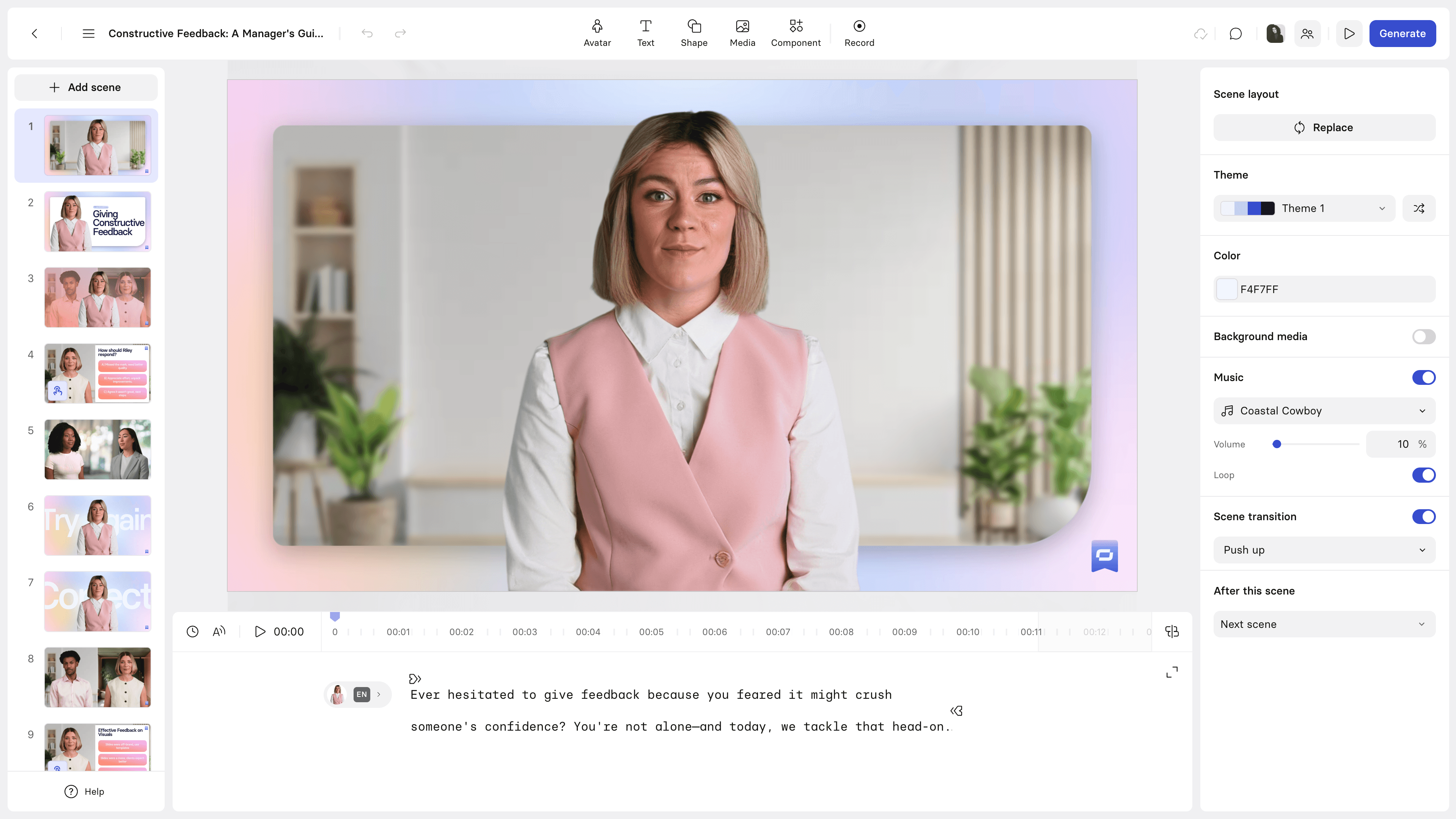
Synthesia is the enterprise heavyweight that DeepBrain AI aspires to compete with. Valued at $4 billion after a $200 million Series E in October 2025, it serves over 60,000 businesses including more than 90% of the Fortune 100. Where DeepBrain AI serves mid-market clients like Hyundai and Samsung, Synthesia locks in Fortune 100 enterprise deals.
Key features
- 230+ stock avatars - More than double DeepBrain AI's library
- 140+ languages and 400+ voices - Purpose-built for global enterprise
- SOC 2 Type 2 and GDPR compliant - Enterprise-grade security
- LMS integration - Direct export to learning management systems
- Document-to-video - Turn scripts, PowerPoints, and URLs into video drafts
Pros
- ✅ Deepest enterprise compliance and security stack in the category
- ✅ Multilingual video player deploys one video in 140+ languages instantly
- ✅ Much faster rendering than DeepBrain AI's 10-15 minute processing
Cons
- ❌ Pricing jumps sharply from Starter ($29/mo) to Creator ($89/mo)
- ❌ Less flexible for non-training use cases
What users say
G2 reviewers consistently highlight the multilingual capabilities and avatar quality. Reddit users on r/elearning appreciate the SCORM export and LMS integration. The most common complaint: the Starter plan feels restrictive. See our ngram vs Synthesia comparison for details.
Best for
Enterprise L&D, HR, and internal communications teams producing training content at scale in multiple languages.
Pricing starts at $18/month with Enterprise plans available on request.
Looking for the fastest way to create professional videos? ngram turns your screen recordings, docs, and images into polished videos in minutes. Try ngram free
4. Colossyan
Colossyan carved out a niche that DeepBrain AI never fully addressed: interactive AI video for workplace learning. While DeepBrain AI generates talking-head clips, Colossyan builds branching scenarios where viewers make choices that affect the video path. Their NEO 2 avatar model (launched 2025) produces expressive presenters with lip sync in 100+ languages.
A key advantage over DeepBrain AI: Colossyan lets you adjust avatar age, emotion, and expression in real time. DeepBrain AI's avatars are comparatively static.
Key features
- Branching scenarios - Interactive decision points within videos
- SCORM export - Direct integration with enterprise LMS platforms
- 170+ AI avatars - With real-time emotion and age adjustment
- NEO 2 avatar model - Latest-gen expressiveness
- PDF/PPT import - Convert training materials to video
What users say
G2 reviewers praise the interactive features and call Colossyan "the only AI video tool that genuinely improves learner engagement." L&D professionals note that SCORM compliance was the deciding factor over DeepBrain AI. For a side-by-side, see our ngram vs Colossyan comparison.
Best for
L&D teams that need interactive video scenarios with branching logic and SCORM compliance.
Starter plan at $19/month with Enterprise pricing available.
5. Elai.io
Elai.io excels at turning existing documents into avatar-presented videos. Upload a PDF, paste a URL, or import a PowerPoint, and Elai generates a storyboarded video with an AI presenter. DeepBrain AI has PowerPoint import too, but Elai's AI Storyboard feature auto-structures scenes from your content rather than requiring manual scene-by-scene setup.
A unique Elai feature: create a custom avatar from just a selfie. DeepBrain AI's custom avatar process requires a professional video recording session.
Key features
- Document-to-video - PDF, PPT, and URL import with automatic storyboarding
- 80+ AI avatars - Includes custom avatars from selfies
- AI Storyboard - Auto-generates scenes from content structure
- 75+ languages - Translation and localization built in
- Interactive elements - Quizzes and workflows for training
What users say
G2 reviewers highlight the document import: "I uploaded a 20-page training manual and had a draft video in 10 minutes." Reddit users note avatar quality is a step behind HeyGen but the price-to-feature ratio is competitive. See our ngram vs Elai comparison.
Best for
Teams with existing training documents or knowledge bases that need video conversion. If DeepBrain AI's PowerPoint import feels limited, Elai's AI Storyboard is the upgrade.
Basic plan starts at $23/month.
6. Fliki
Fliki started as a text-to-speech tool and expanded into video. That origin shows in its audio quality: with 2,500+ voices ranging from "24-year-old Singaporean female" to "mature Spanish male news anchor," it has the deepest voice library on this list. DeepBrain AI offers 80+ language voices, but Fliki's variety and quality of voice options is a tier above.
Key features
- 2,500+ AI voices - The largest voice library in the category
- Voice cloning - Replicate your own voice for consistent branding
- Text-to-video - Script to finished video with stock media
- 10M+ stock media library - Images, video clips, and music
- AI avatars - Professional presenters with lip sync
What users say
G2 reviewers love the voice quality and variety. Reddit users call it "the best text-to-speech available, and the video features are a bonus." The main criticism: video editing is basic compared to dedicated editors.
Best for
Content marketers who prioritize voice quality and need to produce video from text scripts at volume.
Standard plan starts at $21/month with a free tier.
7. VEED
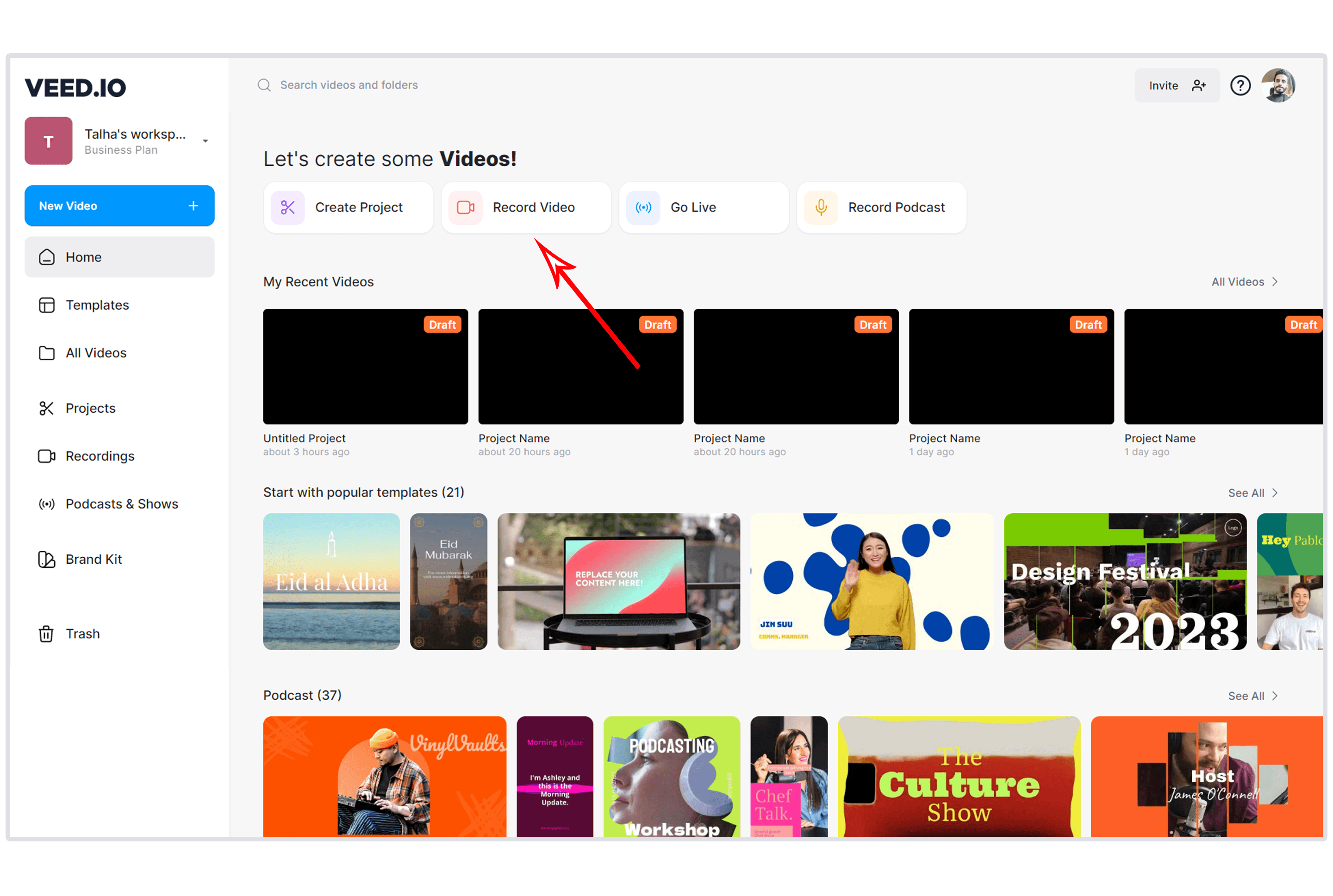
VEED is the budget-friendly option that offers more editing flexibility than DeepBrain AI. With 10 million monthly active users and $35 million in Sequoia Capital backing, it has grown from a subtitle tool into a full browser-based video editor. At $12/month, it costs half of DeepBrain AI's Starter plan.
Key features
- Auto-subtitles in 125+ languages - One of the fastest caption generators
- AI avatars - AI presenters with lip sync (newer feature)
- Magic Cut - Automatic filler word removal
- Background noise removal - AI-powered audio cleanup
- Eye contact correction - Adjusts gaze to camera
What users say
G2 and Capterra reviewers praise the ease of use: "I was editing my first video within 2 minutes of signing up." Reddit users note that VEED's AI avatars are less polished than HeyGen's but the overall editor is more versatile. See our ngram vs VEED breakdown.
Best for
Budget-conscious creators who need a general-purpose video editor with AI features. If DeepBrain AI costs too much for your volume, VEED is the most affordable path.
Lite plan starts at $12/month with a free tier.
8. Pictory
Pictory takes a completely different approach from DeepBrain AI. Instead of avatar videos from scripts, it converts long-form content (blog posts, webinars, Zoom recordings) into short, shareable clips. No avatars needed. It identifies key moments, selects relevant stock footage, adds captions, and produces clips optimized for social media.
Key features
- Blog-to-video - Paste a URL and get a video draft in minutes
- Long-form to clips - Extract highlights from recordings
- Auto-captions - Generated in 29 languages
- AI script editing - Refine narration with AI
- Brand templates - Consistent look across all videos
What users say
G2 reviewers praise the blog-to-video workflow. Reddit users note that stock footage selection is sometimes hit-or-miss. See our ngram vs Pictory comparison.
Best for
Content marketers repurposing blog posts and recordings into social clips. If you need DeepBrain AI alternatives and your use case is content repurposing rather than avatars, Pictory fits.
Starter plan at $19/month with a free trial.
Here's how the key DeepBrain AI alternatives compare on pricing and value:
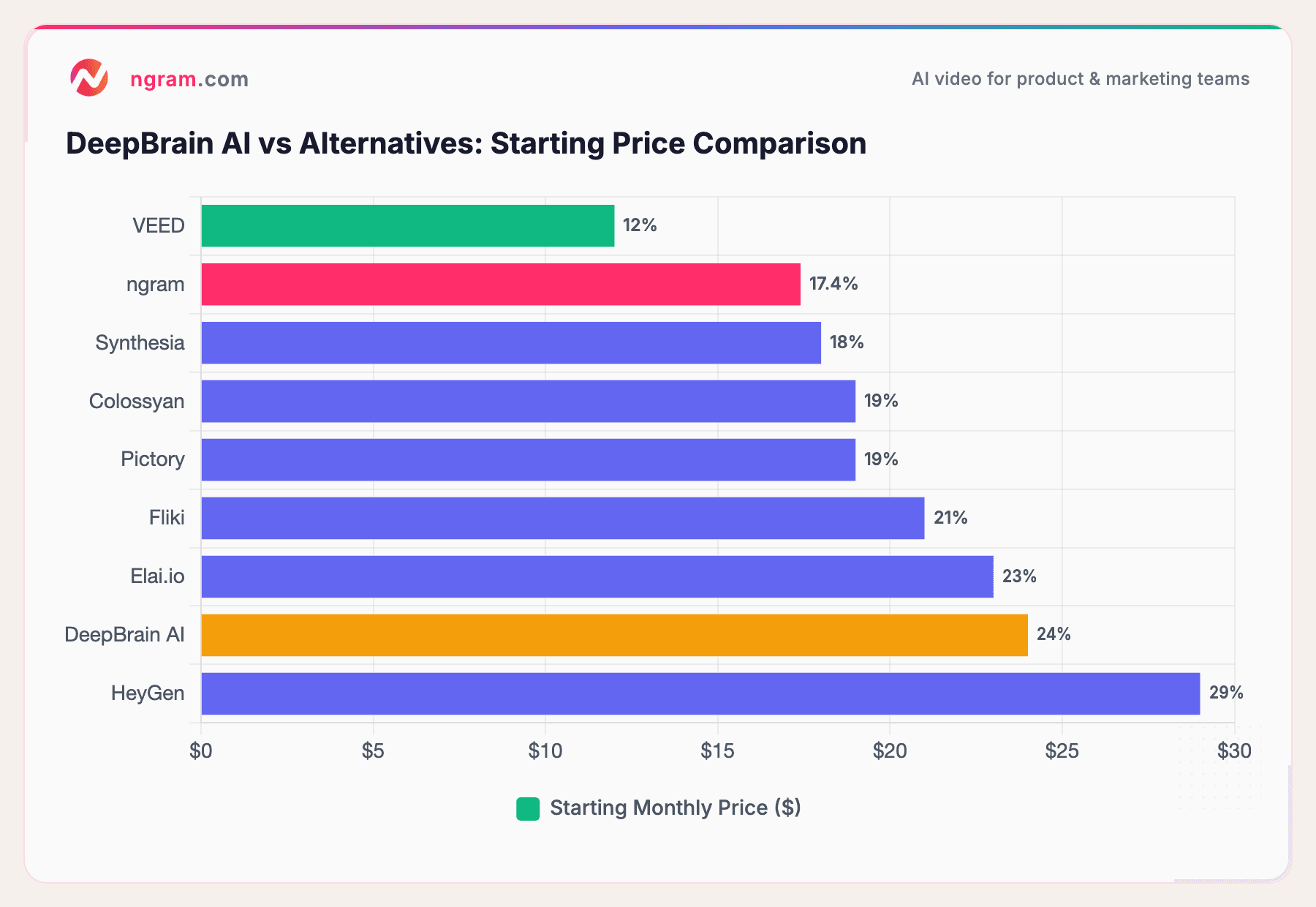
Most alternatives start below DeepBrain AI's $24/month entry point while offering comparable or greater output. The bigger gap is at scale: DeepBrain AI charges $180/month for 60 minutes, while HeyGen offers unlimited videos at $29/month.
How we compared these tools
We tested each platform, read hundreds of user reviews across G2, Capterra, TrustRadius, Reddit, and Product Hunt, and compared them across five weighted criteria:
| Criteria | Weight | What we looked at |
|---|---|---|
| AI Capabilities | 30% | Avatar realism, lip sync quality, emotional expressiveness, voice cloning, translation |
| Avatar Quality | 30% | Library size, diversity, custom avatar options, processing speed |
| Ease of Use | 20% | Onboarding, time-to-first-video, UI clarity, preview capabilities |
| Value | 15% | Price per minute, free tier generosity, feature-to-price ratio |
| Support & Community | 5% | Documentation quality, response times, community resources |
We also factored in:
- Real user reviews from G2, Capterra, TrustRadius, Reddit, and Product Hunt (qualitative sentiment only)
- Market presence and company stability (funding, user base, years in market)
- Integration ecosystem with common business tools
- Processing speed as a critical factor for production teams
For AI avatar tools, we weighted avatar quality and AI capabilities at 60% combined because that's the primary reason teams use these platforms.
Common questions
Is there a free alternative to DeepBrain AI?
Several alternatives offer free tiers. VEED has a free plan with basic editing and AI features. HeyGen offers 3 free videos per month. Fliki provides 5 minutes of free audio and video content monthly. ngram has a generous free plan for creating professional videos from any input. None fully replicate DeepBrain AI's avatar functionality for free, but the paid plans start lower.
How does DeepBrain AI compare to HeyGen in 2026?
HeyGen has pulled ahead in avatar realism since launching Avatar IV in August 2025. HeyGen avatars show micro-expressions and emotional responsiveness that DeepBrain AI's output doesn't match. HeyGen also offers unlimited videos on paid plans, while DeepBrain AI caps by minutes. DeepBrain AI's advantage is its ChatGPT script integration and broadcast-style avatar quality.
What is the cheapest DeepBrain AI alternative?
VEED at $12/month is the most affordable option with AI video features. ngram starts at $29/month. Synthesia starts at $18/month. All cost less than DeepBrain AI's $24/month Starter plan while offering comparable or broader capabilities.
Can I create custom avatars without DeepBrain AI?
Yes. Elai.io lets you create a custom avatar from a selfie. Synthesia offers custom avatars on higher tiers. HeyGen provides instant avatar creation. Colossyan allows real-time avatar emotion and age adjustment. Most require paid plans for custom avatar features.
Is DeepBrain AI still worth it in 2026?
DeepBrain AI holds its own for broadcast-quality corporate announcements and ChatGPT-powered script generation. Its GDPR and ISO certifications make it viable for regulated industries. But for teams prioritizing rendering speed, avatar realism, or video creation beyond talking heads, competitors like HeyGen (avatars), Synthesia (enterprise), or ngram (full video creation) offer more per dollar.
Which one should you pick?
The AI avatar video category in 2026 has grown past any single tool. If you need the most realistic avatar-style videos, HeyGen's Avatar IV sets the standard. If you need enterprise training at global scale with compliance, Synthesia's stack is unmatched. And if you need professional videos that go beyond talking heads, turning docs, recordings, and images into polished output, ngram is the strongest fit.
DeepBrain AI still works for broadcast-style corporate clips and regulated-industry use cases. But if processing speed, pricing, or editing flexibility drove you here, every tool on this list solves at least one of those problems better.
Try ngram free - your first video in under 5 minutes. Turn any content into a polished, on-brand video without the avatar bottleneck. Start free