
Quick comparison
| Tool | Best For | Starting Price | Key Differentiator |
|---|---|---|---|
| ngram | Professional video from any asset | Free / $29/mo | AI-powered, context-aware generation |
| Canva Video | Social media templates at scale | Free / $13/mo | Design ecosystem integration |
| InVideo | Template-heavy marketing videos | Free / $25/mo | 5,000+ customizable templates |
| CapCut | Short-form social editing | Free | TikTok-native, completely free |
| Clipchamp | Windows-native video editing | Free / $14/mo | Built into Windows 11 |
| VEED | Browser-based AI editing | Free / $12/mo | 10M+ users, Sequoia-backed |
| Pictory | Blog-to-video conversion | Free trial / $19/mo | Long-form content repurposing |
| Fliki | Text-to-video with AI voices | Free / $21/mo | 2,500+ AI voices |
Animoto launched in 2006, making it one of the oldest names in online video creation. For nearly two decades, its pitch was simple: pick a template, drop in your photos and clips, add music, and export. For small businesses and social media managers who needed "good enough" video without editing skills, it worked.
But 2026 is a different landscape. According to Wyzowl's State of Video Marketing report, 91% of businesses now use video as a marketing tool, and 78% of marketing teams incorporate AI-generated video into at least one campaign per quarter. Animoto hasn't kept pace with either trend. Its template library feels dated, it has no AI capabilities, and its editing tools are limited compared to free alternatives like CapCut and Clipchamp.
Search volume for "animoto review" has dropped from 170/month to 70/month over the past year, signaling declining market interest. We tested 7 Animoto alternatives for teams that need more than templates. Here's what held up.
1. ngram
If Animoto's template-based approach feels limiting and you need videos that adapt to different audiences and channels, ngram is built for exactly that gap. Instead of picking a template and filling in blanks, ngram turns whatever you already have, screen recordings, documents, images, URLs, into a complete, polished video with full creative control.
What makes ngram stand out
Context-aware generation is the core difference. Tell ngram your audience (developers vs. executives), your goal (educate vs. convert), and your channel (LinkedIn vs. website). The output adapts structure, pacing, and tone automatically. Animoto uses the same template regardless of where the video is going.
Plan first, generate second means you review the script and storyboard before anything renders. Animoto shows you a template and lets you fill in slots. ngram shows you the complete plan, the narrative structure, the visual flow, so you fix direction before spending time.
Start from what you have. Animoto requires you to manually arrange photos and clips into a template. ngram accepts text, images, PDFs, URLs, and screen recordings as input, then builds a coherent story. A product marketer can drop in release notes and get a polished update video without touching a template.
AI-powered editing turns rough screen recordings into clean walkthroughs with automatic filler word removal, smart zoom, cursor emphasis, and callouts. Animoto has no screen recording editing and no AI capabilities.
Key features:
- Context-aware generation - Adapts structure, pacing, and tone to your audience and channel
- Plan first, generate second - Script and storyboard review before rendering
- Any asset in - Text, images, docs, URLs, screen recordings as input
- AI editing - Auto-cut, filler removal, smart zoom, cursor emphasis
- Multi-format export - 16:9, 9:16, 1:1 with captions included
- Brand kits - Logo, colors, fonts applied to every video automatically
Pros
- ✅ AI-powered creation, not just template filling
- ✅ Works with any input format including screen recordings
- ✅ Context-aware output adapts to audience and channel
Cons
- ❌ No pre-made template library (generates from scratch instead)
- ❌ Web-based only, no native desktop app
Who is ngram best for?
Product Marketing, Growth, Sales Enablement, Customer Success, and Agencies who need professional videos that go beyond what templates can deliver. If your team has outgrown the "pick a template, fill in the blanks" workflow, ngram is the next step.
ngram has a generous free plan with paid plans starting at $29 per month.
Ready to try ngram? Create your first video in under 5 minutes. Start free
See ngram in action:
2. Canva Video
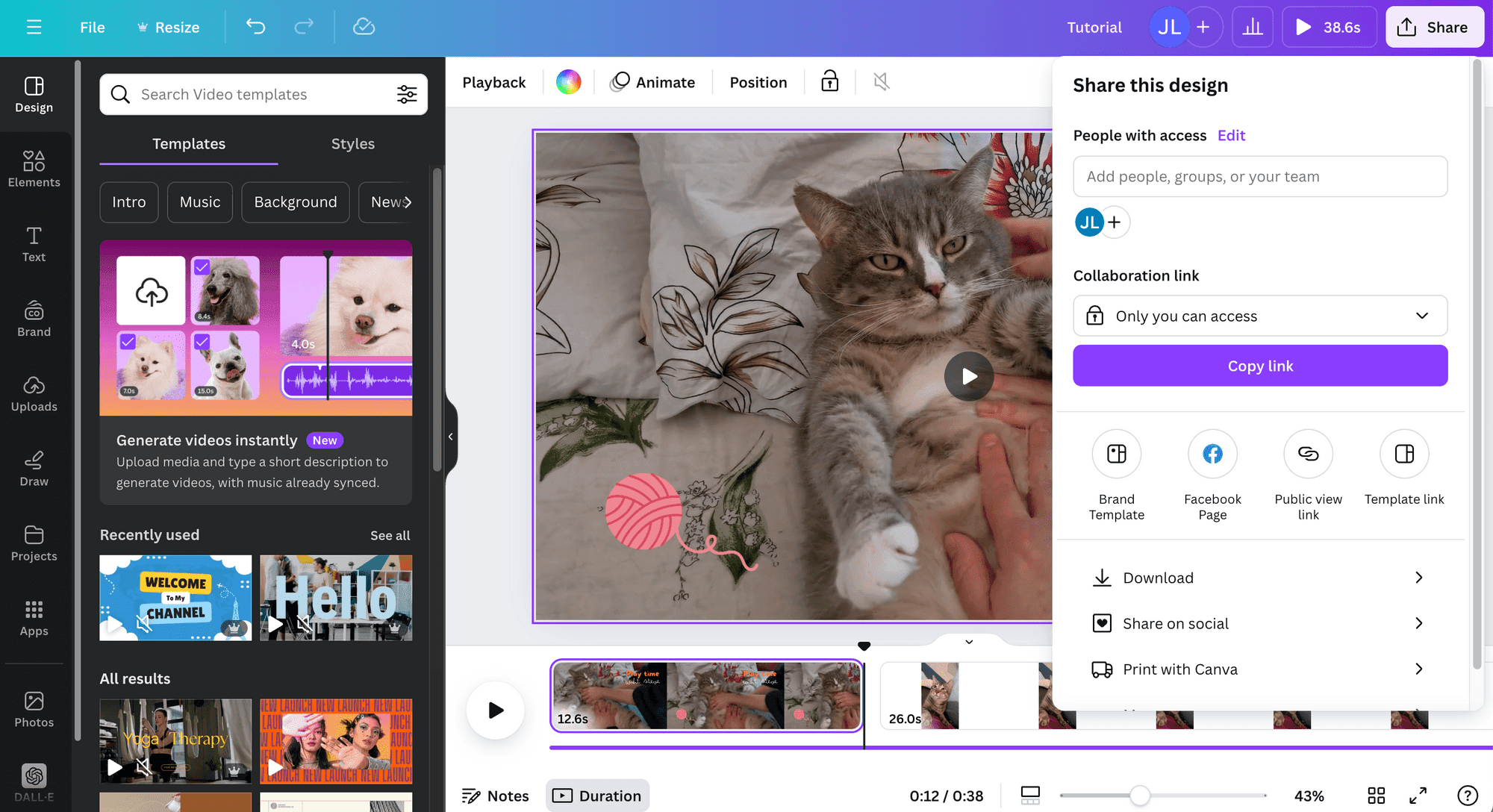
Canva Video is the most direct Animoto replacement. If you already use Canva for graphics (and at 190+ million monthly active users, there's a good chance you do), the video editor is built right into the same workspace. Same drag-and-drop interface, same brand kit, same template library, but with video capabilities.
The key upgrade over Animoto: Canva's design ecosystem. Your brand colors, fonts, logos, and design assets carry over from Canva's graphic design tools into video. Animoto's brand tools are basic by comparison. Canva also offers Magic Studio AI features for background removal, text-to-image, and auto-resize across formats.
Key features
- Design ecosystem - Video, graphics, presentations all in one workspace
- Brand Kit - Colors, fonts, logos applied consistently across all content
- Magic Studio - AI-powered background removal, auto-resize, text-to-image
- Thousands of templates - Social media, ads, presentations, stories
- Collaboration - Real-time team editing and commenting
Pros
- ✅ Free tier is far more generous than Animoto's (no 3-minute limit)
- ✅ Design ecosystem means your brand assets carry over seamlessly
- ✅ AI features (Magic Studio) that Animoto completely lacks
Cons
- ❌ Video editing is still basic compared to dedicated editors
- ❌ Limited audio editing capabilities
What users say
G2 reviewers consistently praise the all-in-one design ecosystem. Reddit users on r/smallbusiness call it "the obvious Animoto replacement" for social media content. The biggest criticism: video-specific features lag behind dedicated video tools. For a deeper look, check our ngram vs Canva comparison.
Best for
Small businesses and social media managers who already use Canva for graphics and want video in the same workspace. If you're paying for Animoto plus Canva, switching to Canva Video consolidates your tools.
Free plan available. Pro starts at $13/month.
3. InVideo
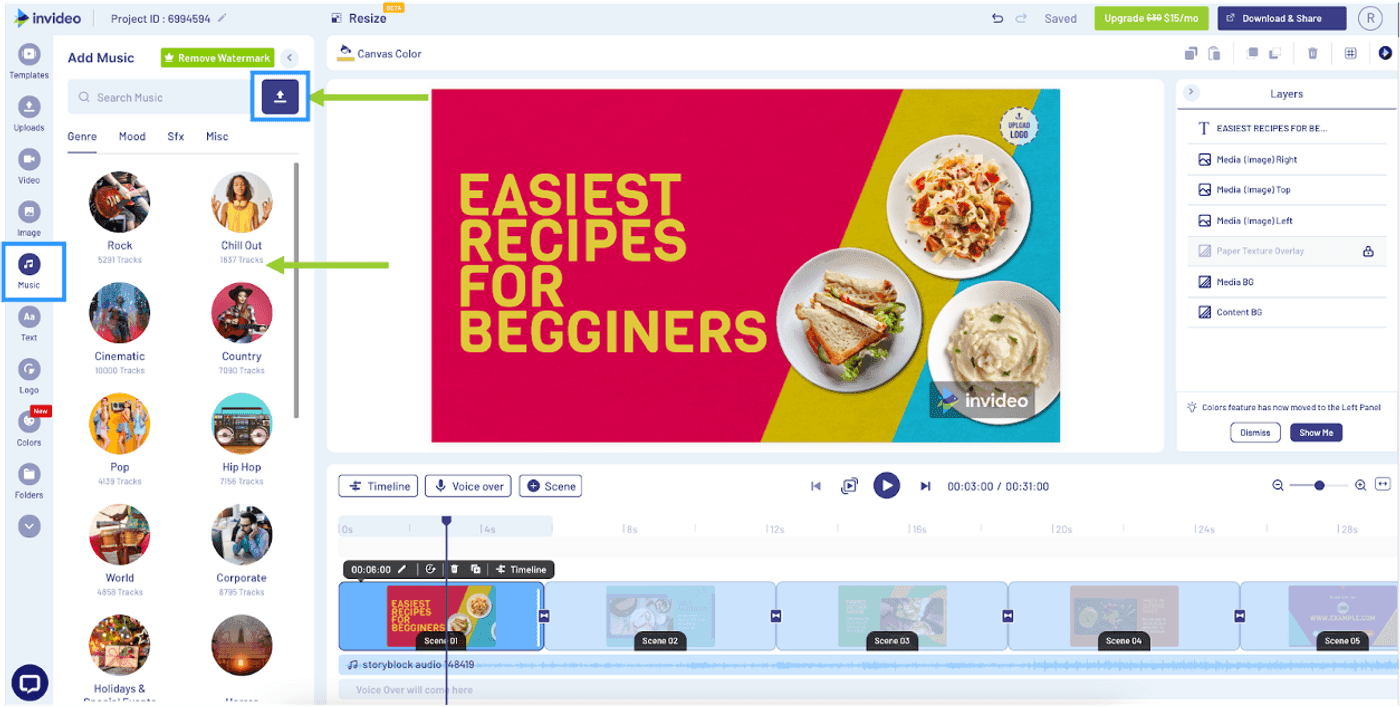
InVideo is the template-heavy alternative for teams that want Animoto's approach but with modern AI capabilities added on top. With 5,000+ customizable templates and an AI assistant that generates scripts and suggests layouts, InVideo takes the template model and adds the intelligence Animoto never built.
The platform has grown to 7 million+ users across 195 countries, making it one of the largest template-based video tools. Where Animoto's templates feel frozen in 2018, InVideo's library is actively updated with trending formats for Reels, TikTok, YouTube Shorts, and LinkedIn.
Key features
- 5,000+ templates - Updated for current social media formats
- AI assistant - Script generation, layout suggestions, auto-editing
- 8M+ stock library - Footage, images, music included
- Text-to-video - Paste a script and generate a video draft
- Multi-format export - Optimized presets for every platform
Pros
- ✅ Massive template library dwarfs Animoto's selection
- ✅ AI assistant adds intelligence to the template workflow
- ✅ Active template updates for trending social formats
Cons
- ❌ Free tier adds a watermark
- ❌ Can feel overwhelming with so many template options
What users say
G2 reviewers praise the template variety and AI assistant. Reddit users compare it to "Animoto but with AI bolted on." Main criticism: the learning curve is steeper than Animoto's stripped-down interface.
Best for
Marketing teams producing high-volume social media video content who want a template-based workflow with AI assistance.
Free plan available. Business starts at $25/month.
Looking for the fastest way to create professional videos? ngram turns your screen recordings, docs, and images into polished videos in minutes. Try ngram free
4. CapCut
CapCut is the free option that has eaten into Animoto's market from the bottom. Owned by ByteDance (TikTok's parent company), it offers a full video editor with AI features, no watermark, and no price tag. For teams creating short-form social content, CapCut delivers more editing power than Animoto at zero cost.
The platform has grown to 200+ million monthly active users, making it one of the most-used video editors globally. Its direct TikTok integration and AI features (auto-captions, background removal, style transfer) represent the kind of innovation Animoto never pursued.
Key features
- Completely free - No watermark, no subscription needed
- AI editing - Auto-captions, background removal, style transfer
- TikTok integration - Direct publish to TikTok
- Multi-track timeline - More editing control than Animoto
- 200M+ monthly users - Massive community and template ecosystem
What users say
G2 reviewers consistently mention the "unbeatable free tier." Reddit users on r/VideoEditing call it "the reason Animoto doesn't make sense anymore for social video." Main criticism: desktop app can be resource-heavy.
Best for
Creators and teams focused on short-form social content (TikTok, Reels, Shorts). If you're paying Animoto for social video and your content is under 3 minutes, CapCut does it better for free.
Completely free.
5. Clipchamp
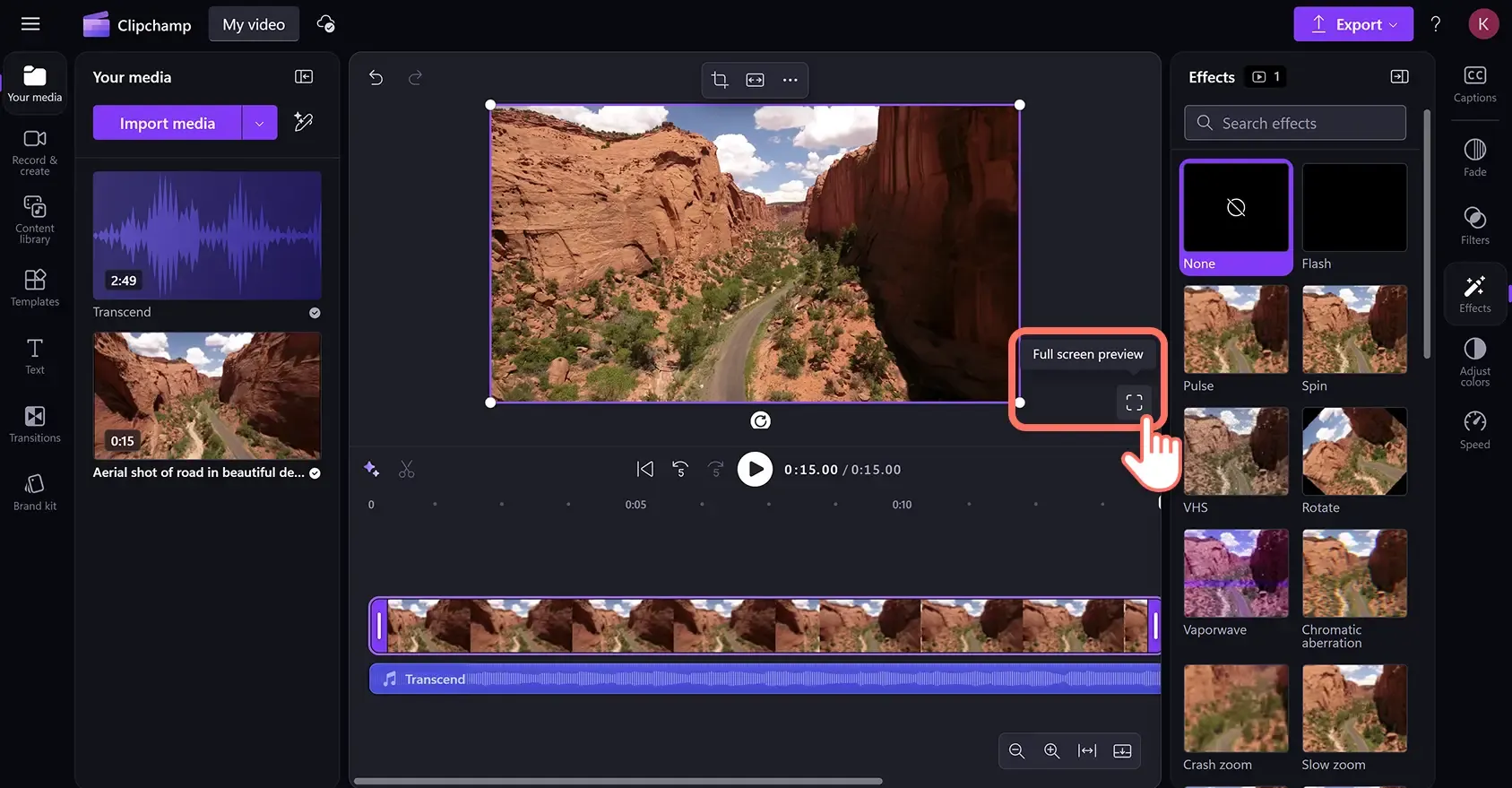
Clipchamp is Microsoft's answer to simple video editing, built directly into Windows 11. For teams in the Microsoft ecosystem, it's the most convenient Animoto replacement: no new account needed, no separate subscription, direct integration with OneDrive and Microsoft 365.
The free tier offers 1080p export with no watermark, something Animoto's free plan doesn't match (Animoto limits free videos to 3 minutes with a watermark). The editing interface is clean and modern, with a proper multi-track timeline that gives you more control than Animoto's slot-based approach.
Key features
- Built into Windows 11 - No separate app or account needed
- Free 1080p export - No watermark on the free tier
- Multi-track timeline - Proper editing control
- Microsoft 365 integration - OneDrive, Teams, PowerPoint
- Stock library - Free and premium footage included
What users say
G2 reviewers praise the Microsoft integration and free tier. Reddit users note it's "the best free option for Windows users." Main criticism: Mac users are limited to the web version.
Best for
Microsoft-ecosystem teams who want a free, built-in video editor. If you're on Windows and paying for Animoto, Clipchamp is the no-brainer switch.
Free plan available. Essentials at $14/month.
6. VEED
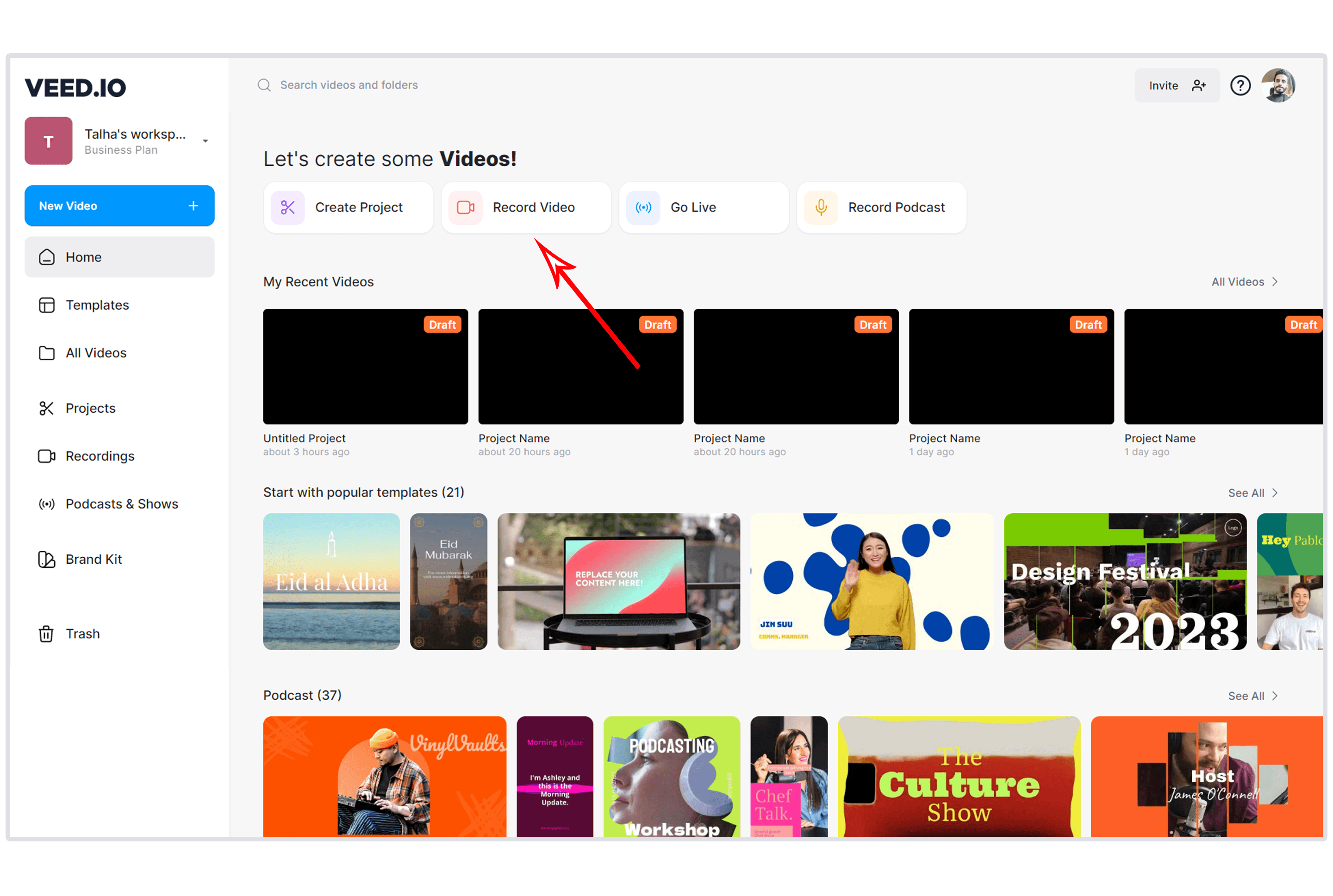
VEED is the browser-based editor that offers more AI capabilities than Animoto at a lower price point. With 10 million monthly active users and $35 million in Sequoia Capital backing, it has grown from a subtitle tool into a full video creation platform.
The AI features, auto-subtitles in 125+ languages, Magic Cut for filler word removal, background noise removal, eye contact correction, represent everything Animoto should have built but didn't. At $12/month for the Lite plan, it costs less than Animoto's Professional plan.
Key features
- Auto-subtitles in 125+ languages - Fast, accurate caption generation
- Magic Cut - AI filler word removal
- Background noise removal - Audio cleanup
- Eye contact correction - Adjusts gaze to camera
- AI avatars - AI presenters (newer feature)
What users say
G2 reviewers praise the AI features and ease of use. Reddit users call VEED "Animoto with a brain." Main criticism: free tier adds a watermark. See our ngram vs VEED breakdown.
Best for
Teams that want AI-powered editing in a simple browser interface. If Animoto's lack of AI features drove you here, VEED is the closest upgrade.
Lite plan at $12/month with a free tier.
7. Pictory
Pictory takes a completely different approach from Animoto. Instead of starting with a template, you start with existing content: blog posts, webinars, Zoom recordings, articles. Pictory's AI identifies key moments, selects relevant stock footage, adds captions, and produces clips optimized for social media.
For content marketing teams, this is the workflow Animoto never offered. Instead of manually creating videos from scratch, you repurpose the content you've already created.
Key features
- Blog-to-video - Paste a URL, get a video draft in minutes
- Long-form to clips - Extract highlights from recordings
- Auto-captions - 29 languages on Professional plan
- AI script editing - Refine narration with AI
- Brand templates - Consistent visual identity
What users say
G2 reviewers praise the content repurposing workflow. Reddit users note stock footage selection is sometimes hit-or-miss. See our ngram vs Pictory comparison.
Best for
Content marketers repurposing blogs, webinars, and recordings into social clips. If you're creating content and then separately creating Animoto videos about the same content, Pictory eliminates the duplication.
Starter plan at $19/month.
8. Fliki
Fliki is the voice-first alternative. With 2,500+ AI voices across 80+ languages, it converts text scripts into narrated videos with stock visuals. Animoto requires you to provide your own narration or use its limited music library. Fliki generates the voiceover for you.
Key features
- 2,500+ AI voices - Largest voice library available
- Voice cloning - Replicate your voice for branding
- Text-to-video - Script to narrated video with visuals
- 10M+ stock media - Images, video clips, music
- AI avatars - Professional AI presenters
What users say
G2 reviewers love voice quality. Reddit users call it "the best option if you need narrated marketing videos without recording yourself."
Best for
Teams that need narrated video content from scripts without recording their own voices.
Standard plan at $21/month with a free tier.
Where Animoto hits its ceiling
Animoto served a specific era of online video: the 2010s, when "good enough" slideshows with background music were a step up from nothing. But in 2026, four gaps have made the platform increasingly hard to justify.
Zero AI capabilities. Every alternative on this list includes at least basic AI features, auto-captions, background removal, AI-assisted editing. Animoto has none. In a market where 78% of marketing teams use AI-generated video quarterly (per Wyzowl), that's a glaring omission.
Templates that feel frozen in time. G2 and Capterra reviewers consistently note that Animoto's template library hasn't kept up. While InVideo offers 5,000+ templates updated for Reels and TikTok formats, Animoto's selection feels dated and limited.
Aggressive billing practices. BBB complaints document auto-renewal traps, a "no refunds, ever" policy, and customers spending months trying to cancel. Multiple Reddit threads flag this as a reason to switch, regardless of feature comparisons.
Limited editing control. Animoto's slot-based editor gives you less control than a free tool like CapCut or Clipchamp. No multi-track timeline, no keyframes, no advanced transitions. Teams that outgrow the template approach hit a wall.
Here's how video creation tools have evolved across three generations:
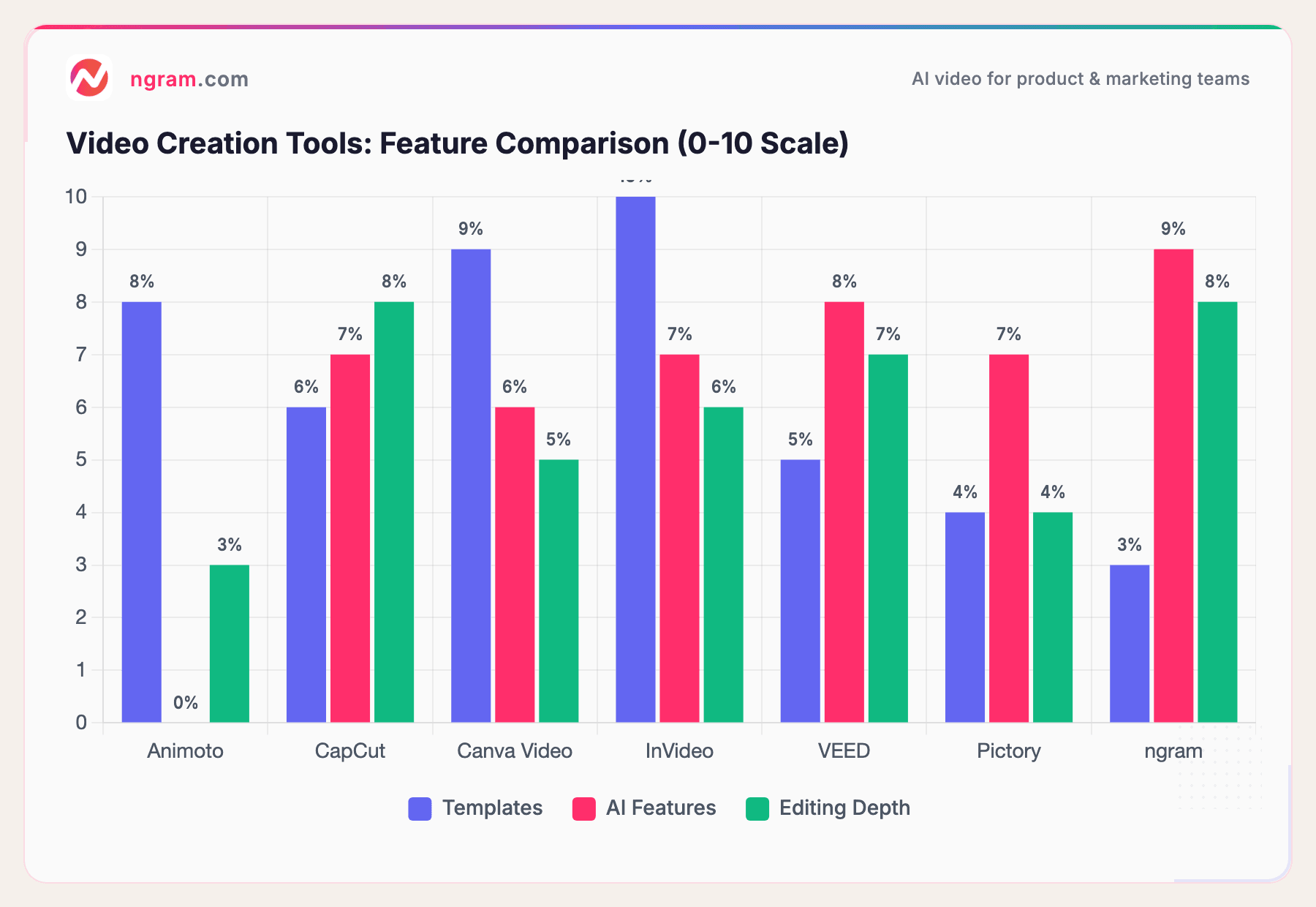
Animoto scores high on templates but zeros on AI features. Every modern alternative combines templates with AI capabilities, making Animoto's approach feel like a product from a different era.
What we actually tested
We tested each platform, read hundreds of user reviews across G2, Capterra, TrustRadius, Reddit, and Product Hunt, and compared them across five weighted criteria:
| Criteria | Weight | What we looked at |
|---|---|---|
| Template Library | 25% | Template count, freshness, format variety, customization depth |
| Ease of Use | 25% | Onboarding speed, learning curve, UI modernness |
| AI Capabilities | 20% | Auto-captions, AI editing, script generation, background removal |
| Value | 20% | Price vs. features, free tier generosity, export quality |
| Support & Community | 10% | Documentation, billing practices, cancellation ease |
We weighted billing practices within Support because Animoto's BBB complaints made it a decisive factor for many switching teams.
Questions teams actually ask
Is there a free alternative to Animoto?
Yes, several. CapCut is completely free with no watermark. Clipchamp offers free 1080p export on Windows. Canva's free plan includes video creation. VEED has a free tier (watermarked). ngram has a generous free plan. All offer more features than Animoto's free tier, which limits videos to 3 minutes with a watermark.
Is Canva better than Animoto for video?
For most teams, yes. Canva offers a larger template library, AI features (Magic Studio), brand kit integration, and a free tier without the 3-minute limit. If you already use Canva for graphics, switching eliminates the need for a separate video tool. The only edge Animoto holds: a slightly simpler interface for first-time users.
What happened to Animoto's pricing?
Animoto has raised prices while competitors have lowered theirs. Current plans start at around $8/month (Basic) with Professional at $15/month and Teams at $39/month. Meanwhile, CapCut is free, Clipchamp is free, VEED starts at $12/month, and Canva Pro (including video) is $13/month. The value gap has widened.
Does Animoto have AI features?
No. As of 2026, Animoto has no AI-powered features. No auto-captions, no AI editing, no script generation, no background removal. Every alternative on this list includes at least basic AI capabilities. This is Animoto's most significant competitive gap.
Can I cancel Animoto easily?
Multiple BBB complaints and Reddit threads document difficulty canceling Animoto subscriptions. The company has a no-refund policy on annual plans, and some users report auto-renewal charges after attempting to cancel. Check your subscription status and cancellation options carefully before your renewal date.
Which one should you pick?
If you need social media templates in a design ecosystem you already use, Canva Video is the natural Animoto replacement. If you're on Windows and want free editing, Clipchamp is built right in. If you need AI-powered video creation that adapts to your audience and channel, ngram goes beyond what any template tool can deliver.
Animoto had a good run. But in 2026, free tools offer more features, AI has become table stakes, and the template-only model is a ceiling, not a floor.
Try ngram free - your first video in under 5 minutes. Move beyond templates. Turn any content into polished, on-brand video. Start free