

Product demo videos are no longer optional. According to DemandSage's 2026 report, shoppers who watch a product demo video are 1.81x more likely to purchase than those who don't. And Wyzowl's 12-year data set shows 85% of people have been convinced to buy a product or service after watching a video.
The problem? Traditional product demo videos cost $1,500 to $7,000 per video and take days or weeks to produce. That math doesn't work when you need a new demo for every feature launch, every sales pitch, and every audience segment.
Here's the thing: you can now create a product demo video online in minutes, not days. This guide walks you through every step, from defining your goal to exporting a polished, professional video - all without hiring a freelancer or learning complex editing software.
Why Product Demo Videos Work
Before diving into the how-to, let's look at why product demo videos deserve your attention. The data is hard to argue with.
According to Wyzowl, 96% of people have watched an explainer video to learn more about a product, and 91% of businesses now use video as a marketing tool. In B2B specifically, industry research found that 39% of B2B buyers watch product demos during their buying journey, and 58% expect detailed product demonstrations before any personal contact with sales.
Product demos account for 39% of all video types created by marketers in 2026 (DemandSage), making them the most popular format alongside product reviews.
Here's a snapshot of how product demo videos impact key business metrics:
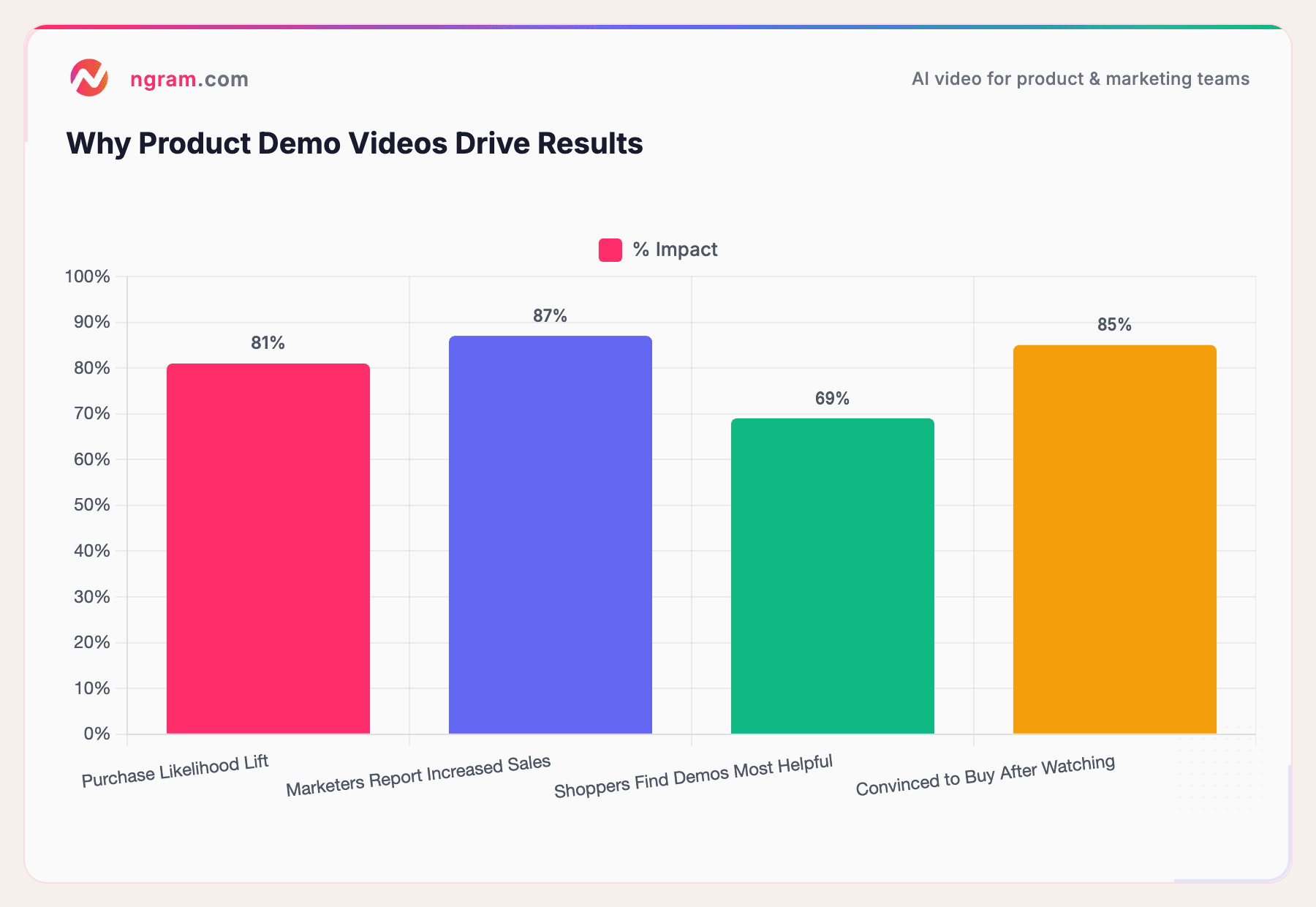
Sources: DemandSage, Wyzowl
The takeaway: product demo videos aren't just nice to have. They directly influence purchase decisions, shorten sales cycles, and build trust with prospects who increasingly prefer self-serve research over sales calls.
What You Need Before You Start
Creating a product demo video online doesn't require a studio, a camera, or editing experience. But you do need a few things ready:
- A clear goal - What should the viewer do after watching? Sign up? Book a demo? Understand a feature? One video, one goal.
- Your target audience - A demo for enterprise buyers looks different from one aimed at individual users. Know who you're talking to.
- Your raw materials - Whatever you already have: screenshots, screen recordings, product URLs, feature documentation, slide decks, or even just a written description of what the product does.
- Your brand assets - Logo, brand colors, fonts. If you've set up a brand kit, these will be applied automatically to keep every video consistent.
That's it. No camera, no script-writing expertise, no video editing skills required.
How to Create a Product Demo Video Online: Step by Step
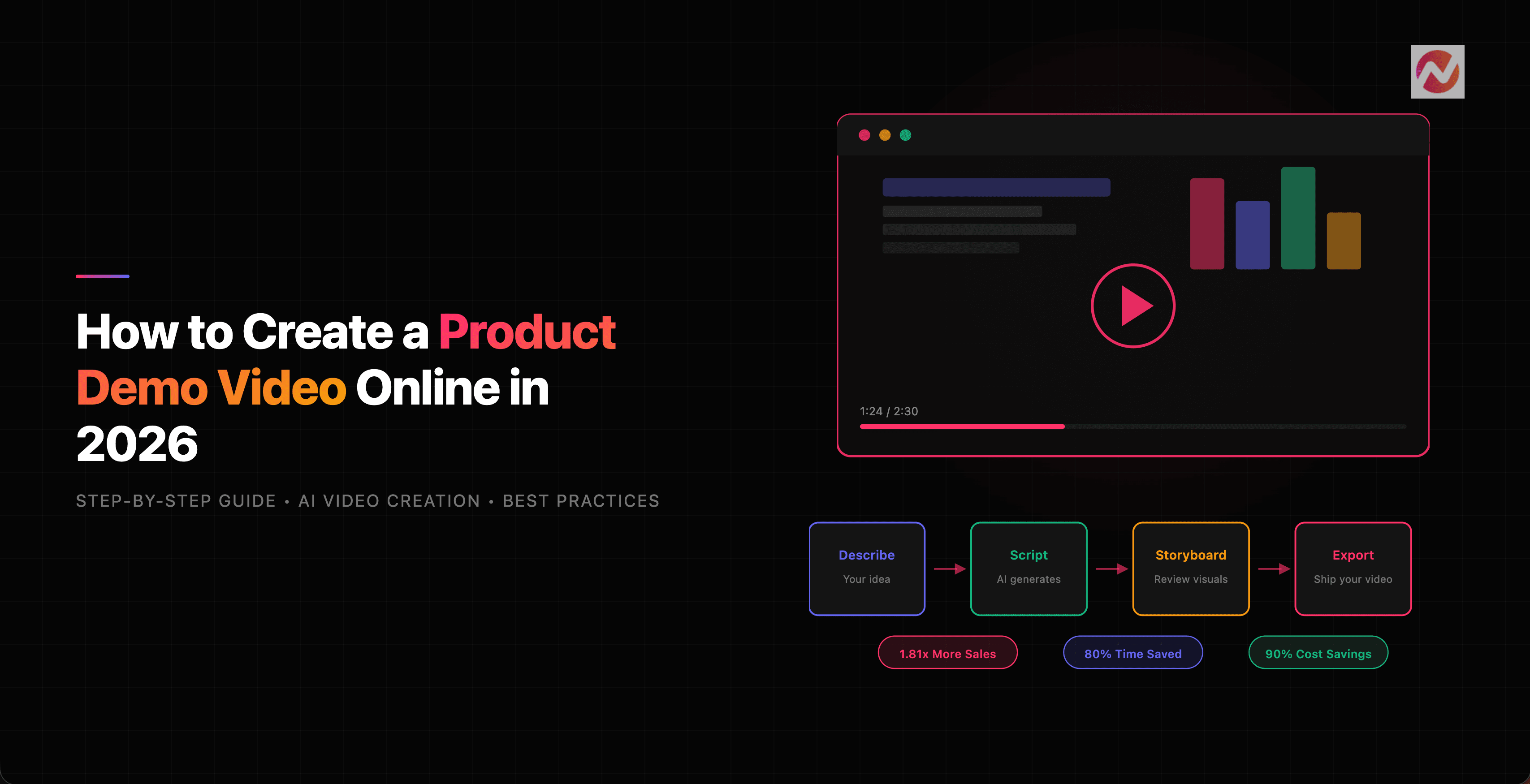
Here's the process for creating a professional product demo video from scratch, using ngram's AI-powered platform. Each step builds on the previous one, and the whole workflow takes minutes rather than days.
Step 1: Define Your Goal and Audience
Start with the two most important questions: Who is this for? and What should they do next?
According to Vidico, problem-solution demos that focus on specific pain points rather than feature tours convert 37% better. So don't try to show everything. Pick 1 to 3 features that address a specific pain point for a specific audience.
For example:
- For product marketers: A feature launch video showing how the new analytics dashboard solves reporting headaches
- For sales teams: A walkthrough showing how the integration saves 2 hours per week on data entry
- For customer success: An onboarding video showing the three most important first-day actions
Step 2: Gather Your Assets
Collect whatever you already have. ngram is designed to work with raw materials, not polished inputs. You can upload:
- Screen recordings (even rough, unedited ones)
- Screenshots and product images
- Documentation or feature descriptions
- URLs to your product pages
- Slide decks or PDFs
The key insight here: you don't need to prepare anything special. Your existing docs, screenshots, and rough recordings already contain the story. The AI extracts what it needs and organizes it into a coherent narrative.
If you have brand assets configured, ngram automatically applies your logo, colors, and fonts to keep the video consistent with everything else your team produces.
Step 3: Describe Your Video
Open ngram and describe what you want in plain language. This is where the conversational AI interface (called Agentic Mode) comes in. Instead of dragging clips onto a timeline, you tell the platform what the video should accomplish.
For a product demo, your prompt might look something like:
"Create a 2-minute product demo video for our project management tool, targeted at marketing teams. Focus on the campaign tracking feature and the automated reporting dashboard. Show how it saves time compared to manual spreadsheet tracking. Professional tone, keep it concise."
You can also specify:
- Duration and aspect ratio (16:9 for YouTube, 9:16 for social, 1:1 for feeds)
- Visual style and art direction
- Whether to use AI-generated visuals, your uploaded screenshots, or a mix
Step 4: Review and Edit Your Script
After you submit your prompt, ngram generates a structured script in the right-side panel. This isn't a wall of text. It's a scene-by-scene breakdown with narration, hooks, and a call to action.
This is the fastest place to iterate. Changing a sentence in the script takes seconds. Reshooting a scene in a finished video takes hours. Review the script for:
- Accuracy - Does it describe your product correctly?
- Flow - Does the story move logically from problem to solution to proof?
- Tone - Does it match your brand voice?
You can edit the script directly in the panel or tell the AI what to change in natural language ("Make the intro more concise" or "Add a mention of our API integration in scene 3"). The script generation engine adapts to your feedback in real time.
Step 5: Approve Your Storyboard
Once the script looks right, ngram generates a visual storyboard - a scene-by-scene preview of what the final video will look like. Each scene gets a keyframe image so you can see the structure before committing to full video generation.
This checkpoint matters. It's far cheaper (in time and credits) to catch problems here than after the video is rendered. Look for:
- Scene sequence - Does the visual flow match the narrative?
- Visual consistency - Do all scenes feel like they belong together?
- Missing context - Is there a concept that needs an additional scene?
Approve the storyboard when you're satisfied with the direction.
Step 6: Generate Your Video
This is the final stage of AI video creation. Once you approve the storyboard, ngram generates everything automatically, including brand-styled captions burned into every scene:
- AI voiceover narration that reads your script in your chosen voice
- Background music matched to the tone and pacing of your video
- Animated video clips for every scene, bringing the storyboard keyframes to life
The platform handles the heavy lifting: pacing, transitions, text animations, and scene timing are all set automatically based on the script and storyboard you approved.
Step 7: Fine-Tune in the Editor
Your generated video is a strong first draft, not a locked file. ngram gives you two ways to refine it:
AI-assisted editing: Continue the conversation. Say "Make the intro 3 seconds shorter" or "Swap the music for something more upbeat" and the AI handles it.
Manual editing: Open the full video editor for precise control. The timeline gives you granular access to timing, sequencing, and individual scene adjustments. If you need to trim dead air, adjust audio levels, or swap a scene, this is where you do it.
Most users find that 2 to 3 rounds of refinement get them to a video they're happy with. The conversation-based editing makes iteration feel natural rather than tedious.
Step 8: Export in the Right Format
Once your video looks and sounds right, export it. ngram gives you two places to download: directly from Agentic Mode or from the editor.
Before exporting, double-check:
- Aspect ratio matches your distribution channel (16:9 for websites and YouTube, 9:16 for Instagram Reels and TikTok, 1:1 for LinkedIn feeds)
- Captions are included (critical for accessibility and social media, where most videos are watched on mute)
- Length falls within the optimal range for your platform
Speaking of length...
How Long Should a Product Demo Video Be?
The honest answer: it depends on where you're publishing it and what you're demonstrating. But the data gives us clear guidance.
According to Spiel Creative, 71% of marketers say 30 seconds to 2 minutes is the optimal demo length. For SaaS products specifically, 2 to 3 minutes gives you enough time to show the problem, the solution, and a clear call to action.
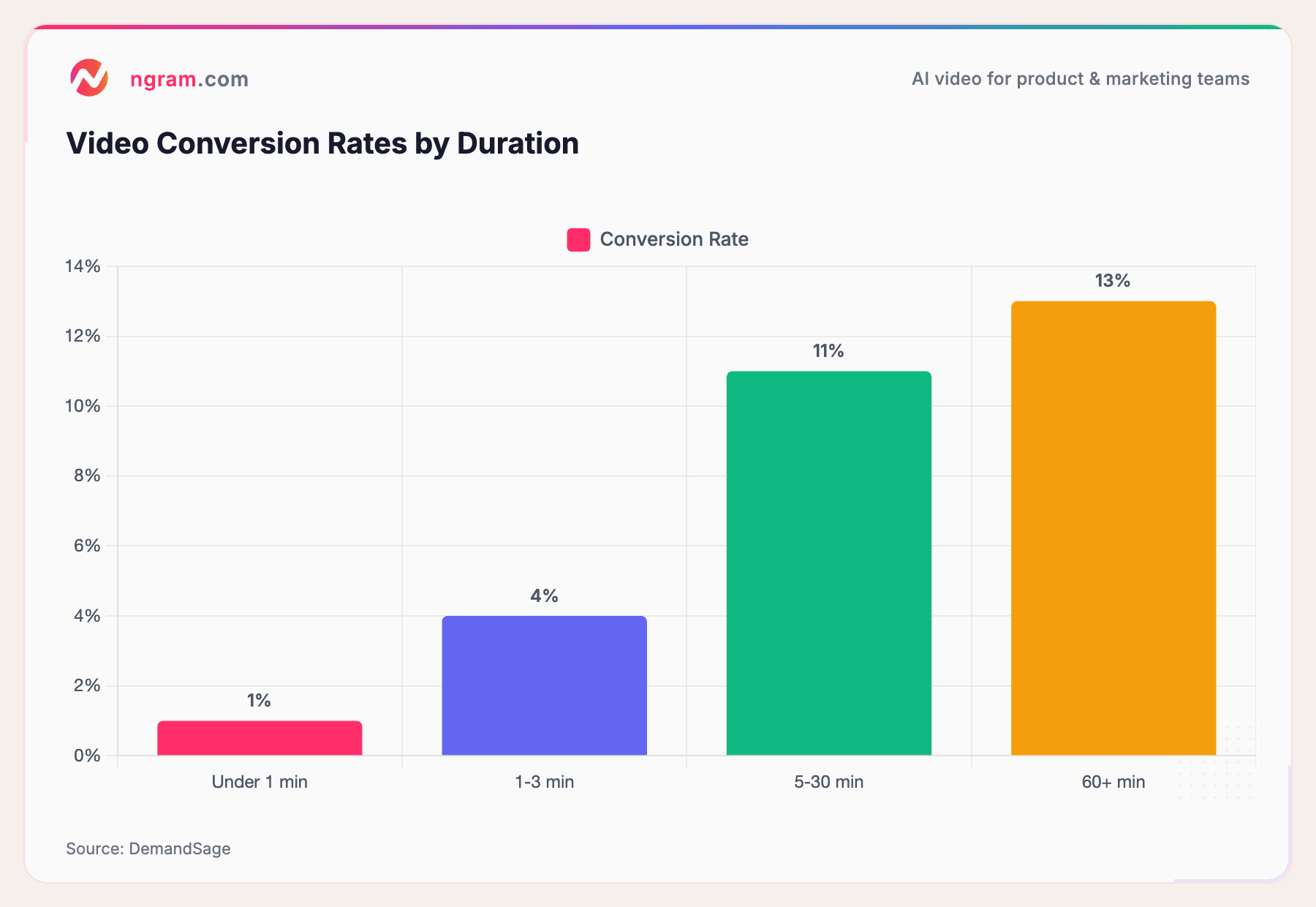
But here's something counterintuitive about conversion rates and video length:
Source: DemandSage
Longer videos actually convert at higher rates - but only because the people watching them are already highly interested. Videos under 1 minute get more views but only a 1% conversion rate. Videos in the 5-30 minute range average 11%.
The practical takeaway: match length to intent. Use short (30-60 second) product demos for social media and top-of-funnel awareness. Use longer (2-5 minute) demos for product pages, sales follow-ups, and consideration-stage content where viewers have already shown interest.
Ready to create your first product demo video? ngram turns your raw assets into a polished demo in minutes, not days. Try it free
How Much Does a Product Demo Video Cost?
This is where AI video creation changes the equation entirely.
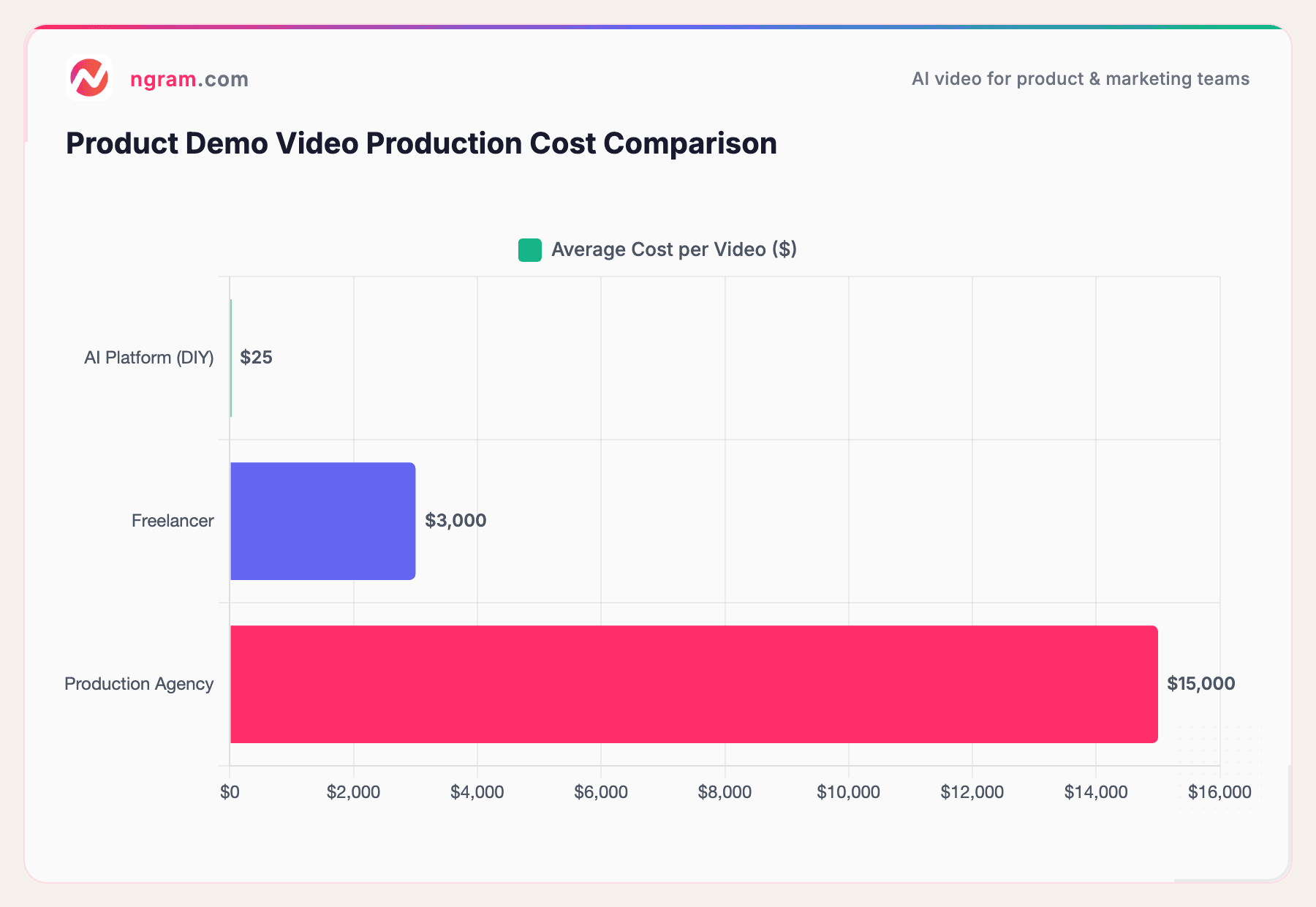
Traditional product demo video production costs between $1,500 and $7,000 per video when hiring a freelancer, and $15,000 or more through an agency (ContentBeta, Synthesia). That includes scripting, recording, editing, revisions, and final delivery - typically a 1 to 3 week timeline.
AI platforms like ngram flip this model. You can create a complete product demo video for a fraction of the cost, and iterate on it in real time without waiting for a freelancer's revision schedule.
Sources: ContentBeta, industry research
According to industry research, small businesses save 70-90% on video production costs using AI tools compared to traditional methods. Companies using AI can produce 5 to 10x more videos with the same budget.
The real savings go beyond dollars. AI tools reduce video production time by roughly 80% - hours instead of weeks. That means your product launch video ships on launch day, not two weeks later.
Video Marketing Confidence Is at an All-Time High
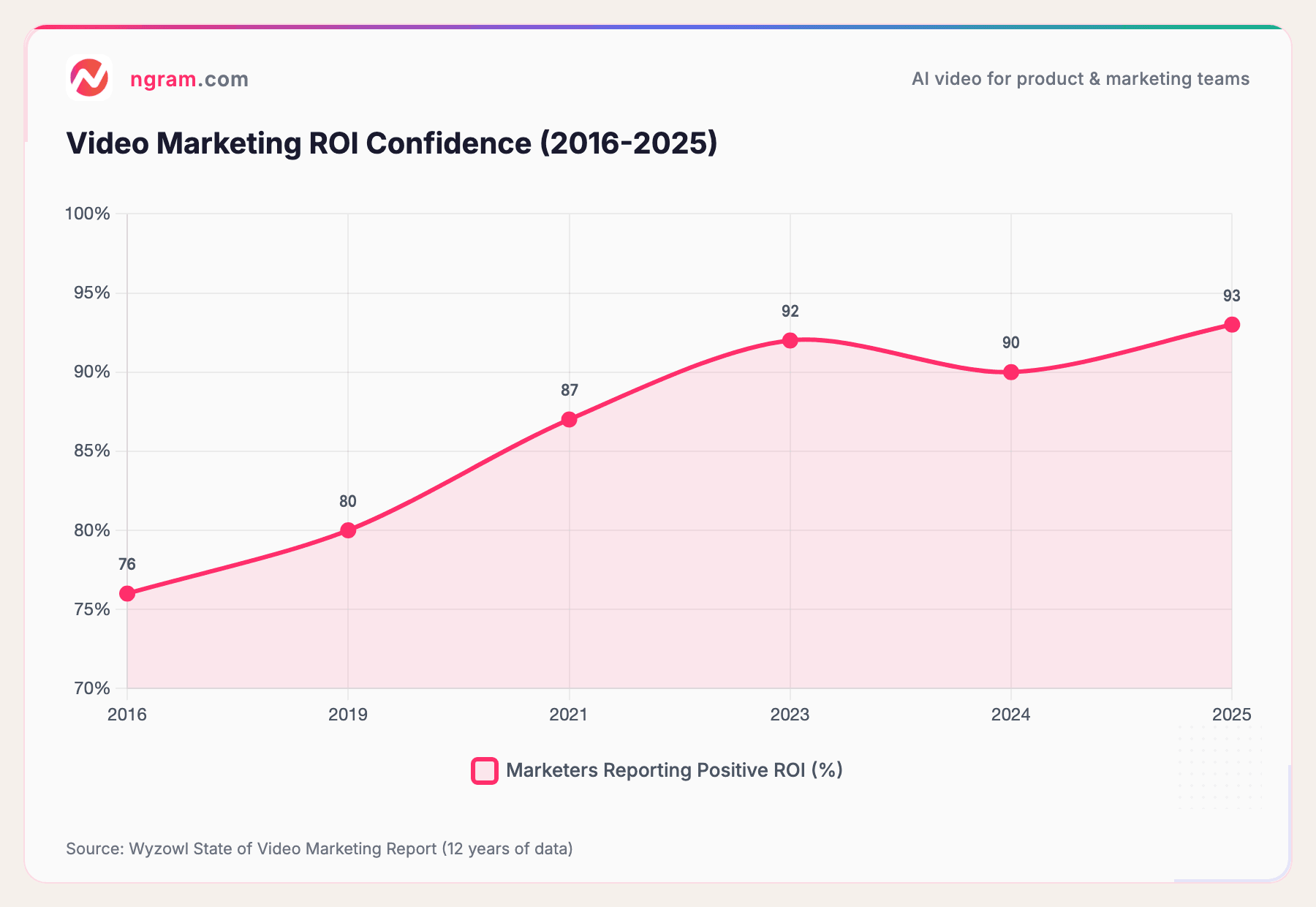
If you're not yet convinced that investing in product demo videos is worth it, consider the broader trend. Marketers who use video have been reporting increasingly strong ROI year over year:
Source: Wyzowl State of Video Marketing Report (12 years of data)
In 2025, 93% of marketers reported positive ROI from video marketing - the highest in Wyzowl's 12-year tracking history. Meanwhile, 99% said video increased user understanding of their product, and 87% said it directly increased sales.
The trend line is clear. Video marketing works, it keeps working better, and the tools to create it keep getting more accessible.
Best Practices for Product Demo Videos That Convert
Creating the video is one thing. Making it convert is another. Here are the practices that separate demos that drive action from demos that get skipped.
Lead With the Problem, Not the Product
Don't open with your logo or a feature list. Open with the pain point your audience feels. According to Vidico, problem-solution demos that start with a relatable frustration convert 37% better than feature tours.
Your first 3 to 5 seconds should answer one question: Why should I keep watching?
Keep It Focused
One video, one audience, one problem, one CTA. Don't try to cover your entire product in a single demo. LevitateMedia recommends focusing on 2 to 3 specific pain points rather than showcasing every feature.
Always Include Captions
Most social media video is watched on mute. If your demo doesn't have captions, you're invisible to a huge portion of your audience. ngram includes automatic captions in every video, so this is handled out of the box.
End With a Clear CTA
Don't let your video fade to black. Tell viewers exactly what to do next: start a free trial, book a demo, visit a landing page. Make the next step obvious and easy.
Build Modular, Not Monolithic
Instead of one 5-minute mega-demo, create five 1-minute modules. When a feature changes, you only re-record one minute instead of the entire video. This approach also lets you mix and match modules for different audiences and channels.
Use Real Scenarios
Including real-life scenarios of users interacting with your product increases understanding by 65% over abstract explanations (Vidico). Show someone solving an actual problem, not navigating menus in a vacuum.
Frequently Asked Questions
How do I create a product demo video for free?
Most AI video platforms offer free trials or free tiers with limited credits. ngram gives you enough credits to create your first video at no cost. You can go from a text description to a finished, exported video without spending anything upfront.
What should be included in a product demo video?
A strong product demo video covers four things: a relatable problem, a clear demonstration of how the product solves it, proof that it works (results, data, or a walkthrough), and a call to action telling the viewer what to do next. Keep it focused on 1 to 3 features rather than trying to cover everything.
Do I need screen recording software to make a demo video?
Not necessarily. While screen recordings work well for software walkthroughs, AI video platforms can generate product demos from screenshots, documentation, and text descriptions alone. If you do have screen recordings, you can upload them and the AI will clean them up with smart cuts, zoom effects, and captions.
How long should a SaaS product demo video be?
For social media and top-of-funnel content, aim for 30 to 60 seconds. For product pages and consideration-stage content, 2 to 3 minutes is the sweet spot. Longer demos (5+ minutes) work for in-depth tutorials or enterprise buyers who want comprehensive walkthroughs.
What makes a product demo video effective?
The most effective demos focus on problems rather than features, use real scenarios instead of abstract explanations, include captions for accessibility, and end with a clear next step. According to Wyzowl, 96% of people have watched an explainer video to learn about a product - so the format itself is proven. The quality of your execution determines whether viewers convert.
Can I create a product demo video without any video editing experience?
Yes. AI video platforms like ngram handle scripting, storyboarding, visual generation, voiceover, and editing through a conversational interface. You describe what you want in plain language and the platform builds it. You can refine the video by typing feedback rather than learning timeline editing.
Create Your First Product Demo Video Today
Product demo videos are the highest-ROI content format for SaaS and product-led businesses. The data backs it up: higher purchase intent, shorter sales cycles, and better product understanding.
The barrier used to be cost and complexity. That barrier is gone. With AI-powered video creation, you can go from a rough idea to a polished, on-brand product demo in minutes.
Create your first product demo video with ngram - bring what you have, tell it what you need, and ship a video that looks intentional.